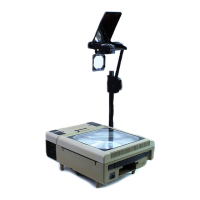
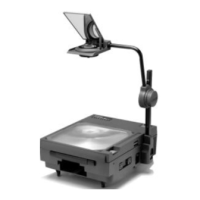
The Dukane Professional Overhead Projector is an audio-visual device designed for projecting transparencies and other presentation media onto a screen. It is available in several models, including 28A640, 28A641A, 28A653A, 28A663, 28A4000, 28A4003, 28A4500, and 28A5500.
Function Description:
The primary function of the overhead projector is to magnify and project images from transparencies placed on its stage. It achieves this through a lens head, mirror, and a powerful lamp. The projector is designed for professional use, offering features that enhance presentation quality and ease of use. Models 663, 4003, 4500, and 5500 feature a special optical design that combines a standard three-element (13") projection lens with a movable fourth element, converting it to a wide-angle (11") lens. This allows for maintaining image size for both transparency and smaller LCD panel aperture sizes. These models also include a lamp changing mechanism and a spare lamp indicator to remind users when to replace the primary lamp.
Important Technical Specifications:
- Dimensions:
- Folded: 5" H x 13" W x 17.5" D
- Opened: 32" H x 13" W x 17.5" D
- Aperture:
- 640, 641A, 663, 4000, 4003: 10" x 10" (254mm x 254mm)
- 4500, 5500: 11.2" x 11.2" (285mm x 285mm)
- Lens:
- 641A: Single Element, 293mm (11.5")
- 640, 653A, 4000: Three Element, 327mm (13.0")
- 663, 4003, 4500, 5500: Four Element, 280mm (11.0")
- Lamp:
- 641A, 653A, 663: 360W, ENX
- 640, 4000, 4003, 4500, 5500: 410W, FXL
- Elevation: Up to 30 Degrees
- Focus: Rack and Pinion
- Power:
- 641A, 653A, 663: 120V, 60Hz, 4.4A
- 640, 4000, 4003: 120V, 60Hz, 7.0A
- 4500, 5500: 120V, 60Hz, 9.8A
- Power Cord: 3-Wire Grounded, 10 Ft.
- Safety Interlock: Cuts Off Power When Unit Is Open
- Weight: 17 Lbs.
- High/Low Switch (Models 4000/4003/4500 only): High mode (4000 lumens), Low mode (3200 lumens).
- 120 V AC Outlet (Models 4000/4003/4500/5500): For use with LCD panel connection (two outlets on 4500/5500).
Usage Features:
The projector is designed for straightforward setup and operation.
- Setup:
- Place the unit on a projection table in a vertical position (handle up).
- Slide bottom door latches out and swing both doors around to magnet latches (doors are fixed open on model 640).
- Remove the power cord.
- Tip the unit over to rest on its legs.
- Turn the focus knob clockwise until it stops at the end of the mast.
- Rotate the mast up until it stops.
- Push in the mast locking knob and tighten.
- Rotate the lens assembly counterclockwise to the working position.
- Open the mirror and focus the image.
- To fold away, perform these actions in reverse order.
- Operation:
- Place the projector on a stable surface, ensuring the side vent is not blocked.
- Plug the power cord into a standard 120V AC outlet.
- Push the power button to turn the projector on.
- Place a transparency on the stage.
- If the fourth element lens is in place, an enlarged view of the transparency will be projected. For a standard size view, pull the fourth element lens towards the projector's mast and away from the lens head.
- Adjust the focus by turning the focusing knob.
- Alternate between wide-angle and standard lens by moving the fourth element lens towards or away from the lens head (adjust projector distance from the screen if needed).
- Models 640/653A/663 and 4000/4003/4500/5500 feature a lamp changing device for quick replacement of a failed lamp. Slide the lamp changing lever towards "SPARE 2". The spare lamp indicator will light up (on models 663, 4003, 4500, and 5500) to remind you to replace the primary lamp.
Maintenance Features:
Regular maintenance helps ensure the longevity and performance of the projector.
- Cleaning Fresnel, Cover Glass, and Mirror:
- Press the stage catch.
- Lift and swing the stage over.
- Remove the Fresnel (4 screws).
- Clean with a dry, lint-free cloth. Shipping brackets do not need to be replaced if the Fresnel is removed for cleaning.
- Lamp Replacement:
- CAUTION: Glass components may shatter. Cover glass parts with cloth and protect eyes. Handle carefully.
- Allow the lamp to cool before removing it.
- To remove a defective lamp, pull up and push back the lamp ejection lever.
- Before inserting a new lamp, move the ejection lever back to its original position.
- Avoid touching the new lamp with bare fingers, as oily skin can cause discoloration of the lamp capsule or reflector.
- Push the lamp down into the socket until firmly seated with the reflector lined up with the aperture.
- Lamp Safeguards:
- Never handle lamps with bare fingers.
- Periodically inspect lamps (when off) for signs of blistering or blackening.
- Ensure proper action of the cooling system.
- Turn off the projector immediately if the image becomes abnormally dim.
- Never operate a projector with the lamp housing open.
- Make sure the lamp is properly seated.
Safety Instructions:
- Read and understand all instructions before use.
- Close supervision is necessary when used by or near children. Do not leave unattended.
- Care must be taken as burns can occur from touching hot parts.
- Do not operate with a damaged cord or if dropped/damaged until examined by a qualified serviceman.
- Position the cord to avoid tripping, pulling, or contact with hot surfaces.
- If an extension cord is necessary, use one with a current rating at least equal to that of the projector.
- Always unplug from the electrical outlet before cleaning or servicing, and when not in use. Grasp the plug, not the cord, to disconnect.
- Let the projector cool completely before storing.
- To protect against electric shock, do not immerse in water or other liquids.
- Do not disassemble the projector; take it to a qualified serviceman for service/repair. Incorrect reassembly can cause electric shock.
- Use only accessory attachments recommended by the manufacturer to avoid fire, electric shock, or injury.
- Connect to a grounded outlet.
- Disconnect from the supply source before replacing the projection lamp.
Warranty and Servicing:
- Lamp Warranty: Projection lamps are warranted by the lamp manufacturer, not Dukane. Contact the lamp manufacturer for warranty replacement (e.g., General Electric Company, 1501 South 19th Street, Mattoon, IL 61938).
- Shipping Information: If returning a unit, use original packing material or pack securely to ensure safe shipment.
- Service: Service and parts are available from Dukane or an approved service station. Contact Dukane Service Department at 1-800-676-2487 for the nearest service station. Service manuals are available at nominal cost.
- No Charge Warranty Repair: Unit must be taken or sent to Dukane or an approved service station with a warranty card and sales receipt. The manufacturer is not liable for expenses incurred due to failure to present the warranty card, pickup/delivery charges, service calls, or if service is supplied by non-Dukane approved stations.
- Three-Year Limited Warranty: This Dukane audio-visual product is warranted to the original purchaser for three (3) years from the original purchase date, in normal use and service, against defects in material and workmanship. Dukane Corporation expressly disclaims all other warranties, expressed or implied, including all warranties of merchantability and fitness for a particular purpose. During the warranty period, Dukane Corporation will repair or replace (at the manufacturer's option) any defective parts (except for lamps) without charge for parts or labor when the product is returned, prepaid and insured, with proof-of-purchase date. This remedy is exclusive and void if the product has been damaged by accident, unreasonable use, neglect, improper service, or other causes not arising from defects in material or workmanship. Dukane Corporation disclaims all liability for incidental or consequential damages. No person, firm, or representative is authorized to assume any obligation or make any warranty on behalf of Dukane Corporation other than as stated. This limited warranty is valid for U.S.A. and Canada; for other locations, local warranties apply.
Electrical Safety Grounding Instructions:
This Class I product uses a three-wire power cord that grounds the product for protection. Do not defeat or remove the grounding pin. If an extension cord is used, it must also be a three-wire type with an ampere rating equal to or greater than the product's rating. The plug must be connected to a properly grounded three-terminal power receptacle. Connection to any other type of receptacle should be done only by a qualified electrician in accordance with local and/or national electrical codes.

 Need help?

 To Next Page
 General