EasyManua.ls Logo

Dukane 28A640 - 6 Care in Use; Maintenance; Lamp Replacement

Dukane 28A640
12 pages
Print Icon
To Next Page IconTo Next Page
To Previous Page IconTo Previous Page
Loading...
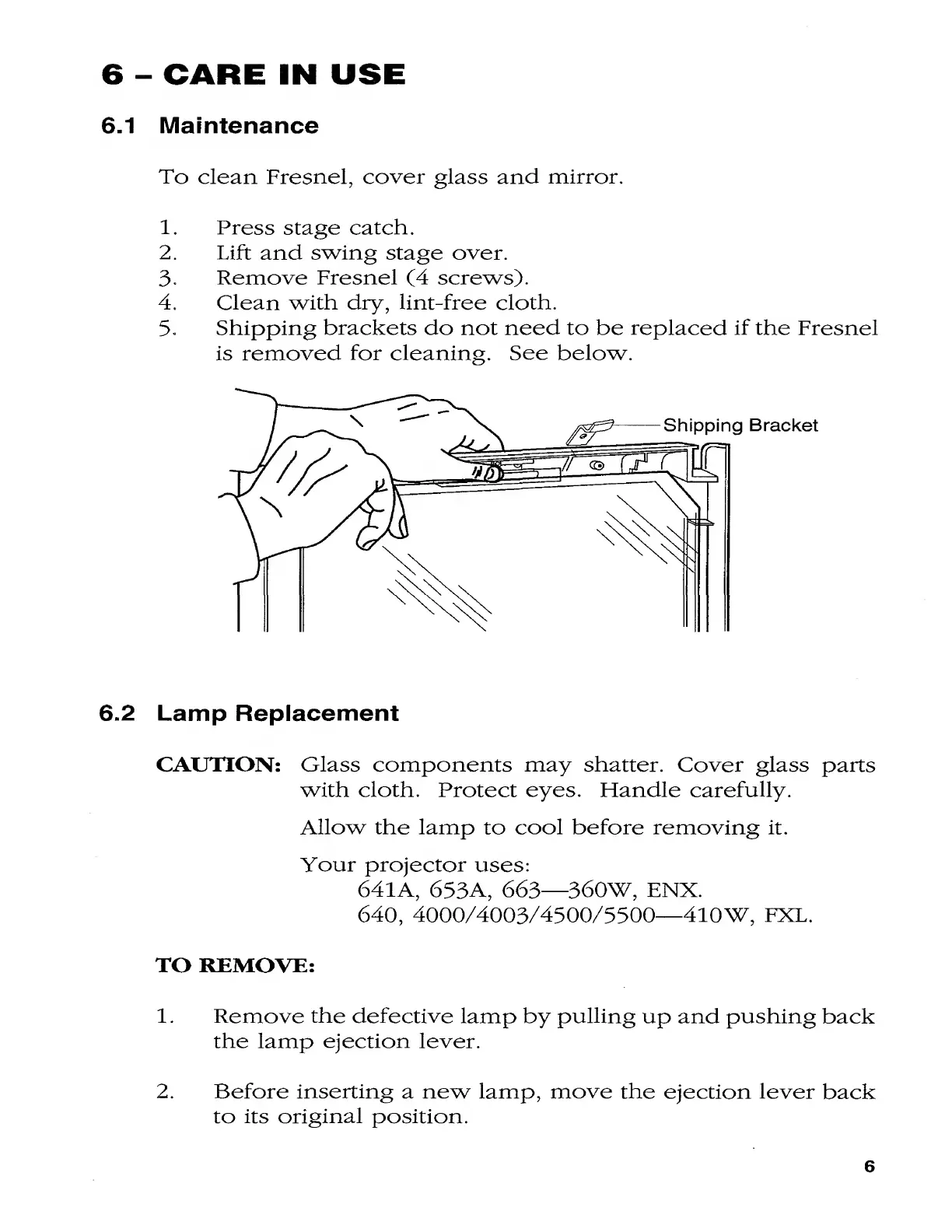
6.1
Maintenance
To
clean
Fresnel,
cover
glass
and
mirror.
1.
Press
stage
catch.
2.
Lift
and
swing
stage
over.
3-
Remove
Fresnel
(4
screws).
4.
Clean
with
dry,
lint-free
cloth.
5.
Shipping
brackets
do
not
need
to
be
replaced
if
the
Fresnel
is
removed
for
cleaning.
See
below.
6.2
Lamp
Replacement
CAUTION:
Glass
components
may
shatter.
Cover
glass
parts
with
cloth.
Protect
eyes.
Handle
carefully.
Allow
the
lamp
to
cool
before
removing
it.
Your
projector
uses:
641A,
653A,
663—360W,
ENX.
640,
4000/4003/4300/5500—410W,
FXL.
TO
REMOVE:
1.
Remove
the
defective
lamp
by
pulling
up
and
pushing
back
the
lamp
ejection
lever.
2.
Before
inserting
a
new
lamp,
move
the
ejection
lever
back
to
its
original
position.
6

Related product manuals