We’d like to thank you for making the Seymour Duncan Silver Lake Dynamic Reverb a part of
your tone quest. In your hands is a powerful creative tool that combines classic reverb sounds
with unique dynamic control for an inspiring musical experience.
HOW IT WORKS
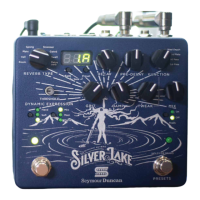
REVERB TYPE SELECTOR – 8-way switch to select between reverb types. Room – Models the sound
of smaller spaces. Hall – Models the ambience of a concert hall. Plate – Models the sound of metal plate
reverb. Spring – Based on a vintage Spring Reverb Tank. Shimmer – Adds an octave up to the reverb. Grit
will increase the amount of octave signal in this mode. Gated – Stops the reverb trail when you stop playing.
Swell – The reverb will swell in volume as the input signal decays. Delay/verb – Adds a delay line to the
reverb. Pre-Delay controls the delay time in this mode.
PRESET DISPLAY – Indicates the currently loaded preset.
BANK BUTTON – Press to cycle through the 32 preset banks.
PRESET BUTTON – Press to cycle through the 4 presets (A/B/C/D) in the currently selected bank.
**SAVE FUNCTION** Press both Bank and Preset buttons together to enter SAVE mode. Display will blink.
Use Bank and Preset buttons to choose a save location then press both buttons together again to save the
current UI state to the selected preset location.
DECAY KNOB – Sets the time it takes for the reverb to decay. Turning the DECAY knob clockwise will
give you larger room size and much longer reverb time.
1
2
3
4
5


 To Next Page