13
EXPERT UI: CONTROL TAB
The Control Tab allows operating the various types of devices and shows the reported values in case of sensors or
meters. In case the control options offered here are not sufficient please refer to the Expert Command Tab as part of
the Configuration menu for a full set of functions supported by the device.
EXPERT UI: CONTROL TAB: SWITCH
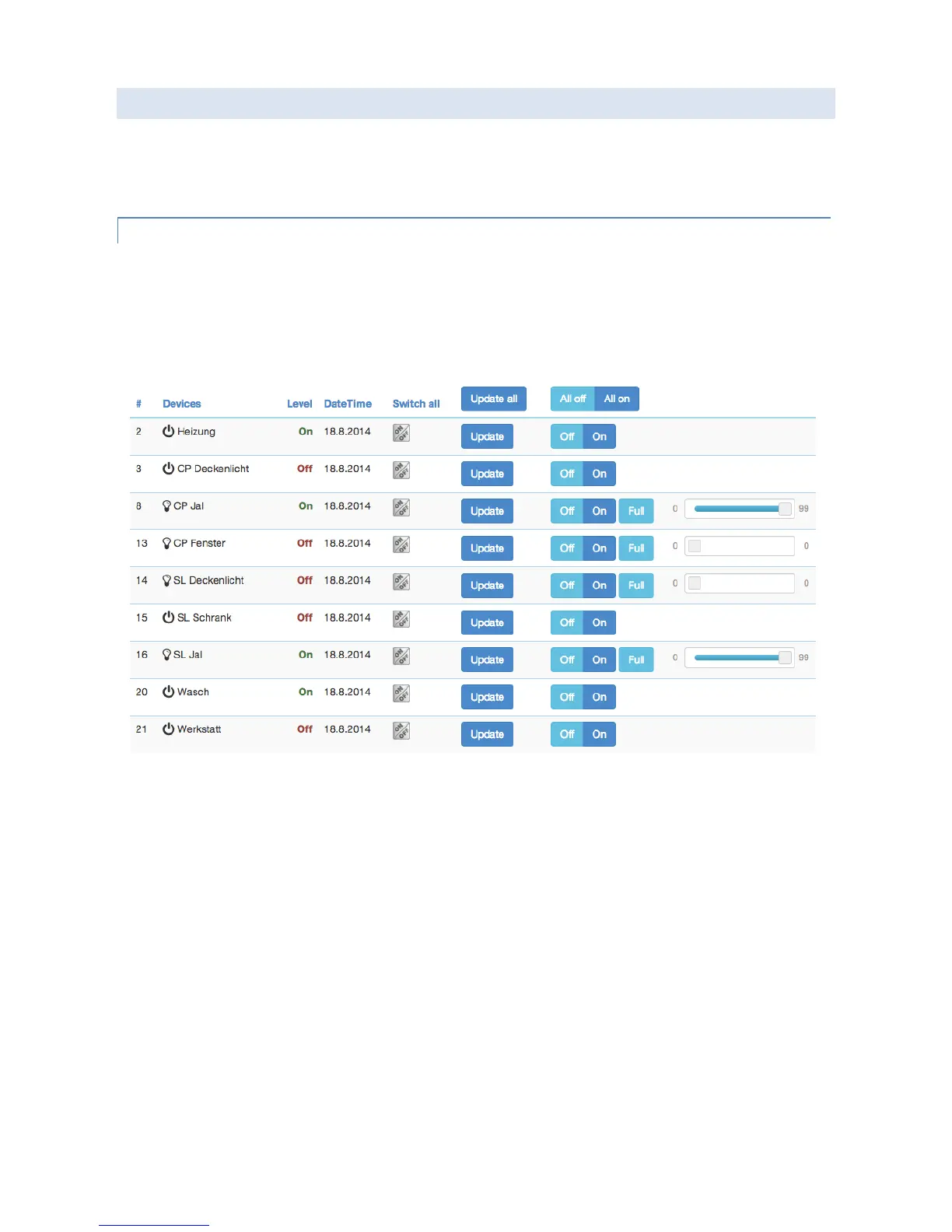
The Switch screen lists all devices of the network supporting switching, dimmer or motor control capabilities. The
device name and Id and the current status of the switch is given and the time of the last status update. The “Update”
button forces an immediate update of the switch (if mains powered device). A ‘Switch All’ Icon shows whether or not
the specific device will react on a Switch All ON or Switch All Off command. A green triangle indicates that the device
will react to the command shown.
All actuators can be switched on or off. Dimmer and motors controls can be operated using a slider. For dimmer there
is a button “On” and “Full”. “Full” turns the dimmer always to 100 % diming value while “On” will turn to the last
dimming state before the dimmer was turned off. Clicking on the table heads reorders the table view of the data.


 To Next Page