16
EXPERT UI: DEVICE TAB
The Device Tab gives access to screens with more detailed information about the devices in the network and their
actual status.
EXPERT UI: DEVICE TAB: STATUS
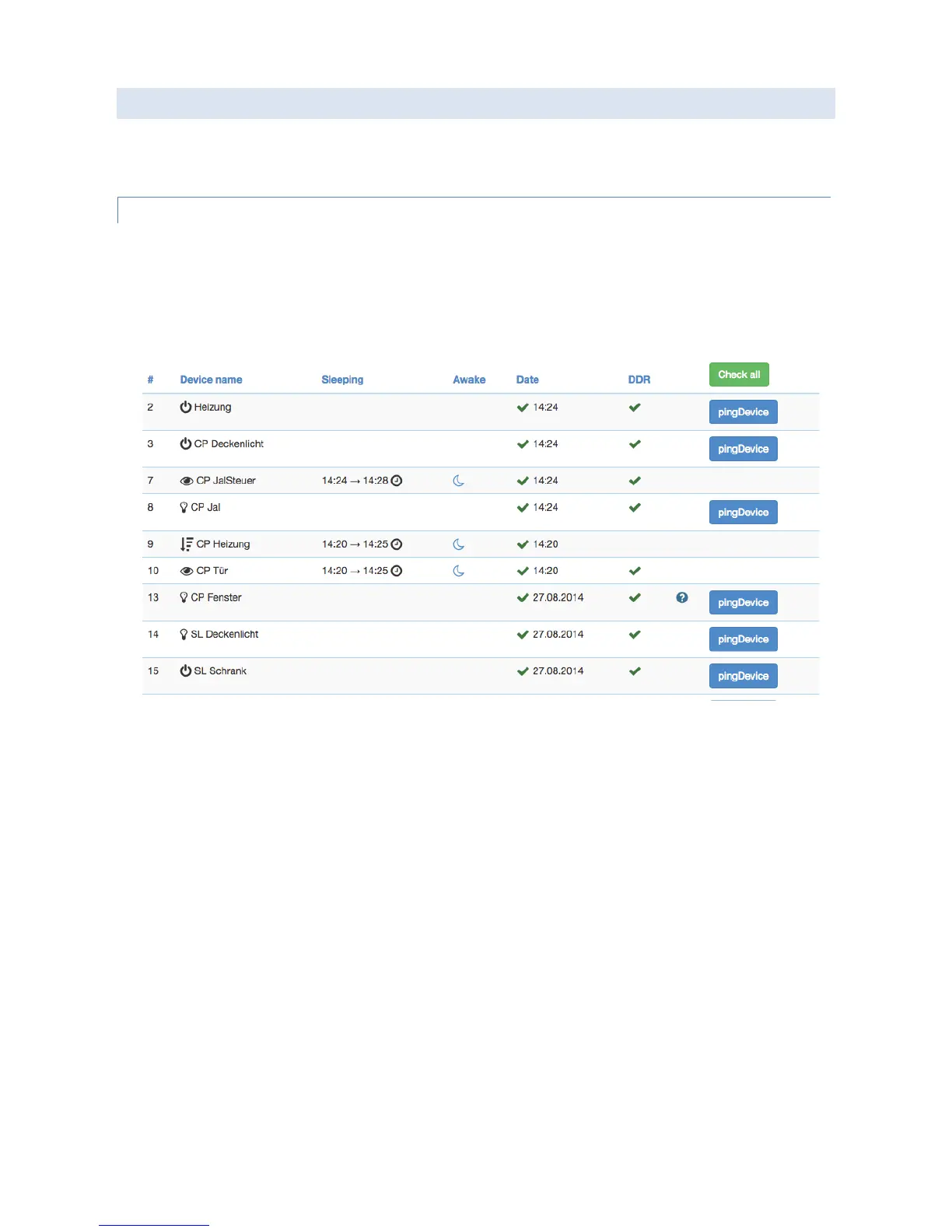
The Status screen shows the actual network status of all devices. All devices are listed by their node id and name. The
date/time indicates the time of the last successful communications between the controller and this device (either
confirmed sending or reception). The green checkmark indicates that the device is alive. A red sign indicates that the
controller assumes the device not being active anymore. Mains powered devices can be checked for their network
availability by hitting the “Check connectivity” button.
In case the device interview and configuration was not performed properly a little question mark icon will indicate
this. Clicking on the question mark will open a window displaying the details of the interview process. The correct
loading of a Device Description File is indicated as well. For battery-operated device the time of the last wakeup, the
time of the next wakeup and the current wakeup status is shown. Clicking on the table heads reorders the table view
of the data. Clicking on the table heads reorders the table view of the data.


 To Next Page