22
Note: For mains powered devices and FLIRS device the button “Apply configuration to device” will activate the
changes within few seconds. For battery operated devices the commands are stored to the next wakeup. Its possible
and recommended to wakeup the device manually to speed up the change of configuration values.
EXPERT UI: CONFIGURATION TAB: ASSOCIATION
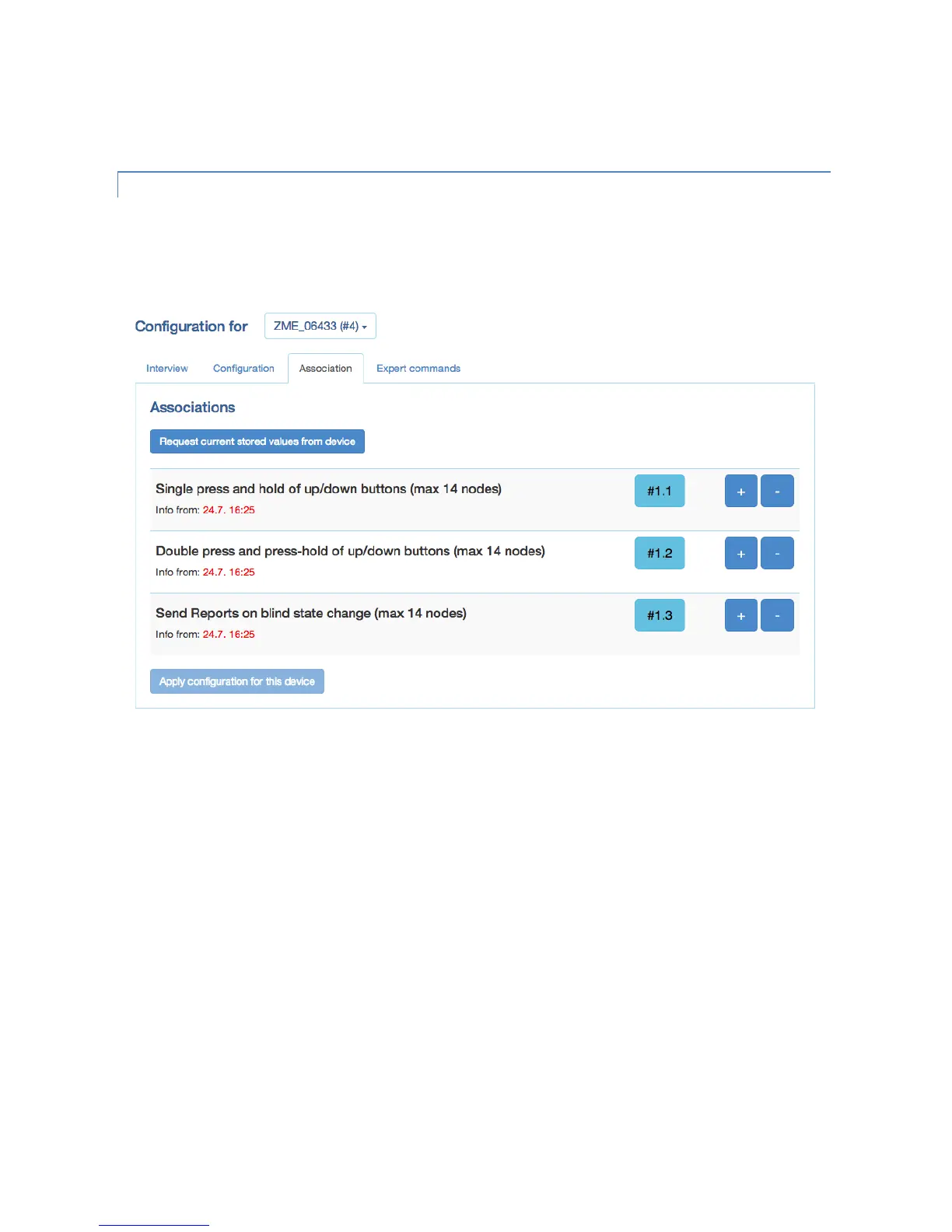
The Association screen allows configuration of Z-Wave associations. Z-Wave associations allow switching a Z-Wave
device B (target) as a result of an event in Z-Wave device A (source). Z-Wave device A offers lists of devices to switches
for each event supported. The list of these events - also called association groups - and the devices that are associated
with it are shown in the Association screen.
In case the information is provided either by the device or by the device record stored in the software the meaning of
the events is written. Otherwise only event group is shown unnamed. In this case refer to the devices manual for more
information about the association group meaning. The stored devices can be called from the actual device using a
button. The buttons ’+/-’ used to add and remove device from the group. A dialog is opened and a device can be
picked. In case this device has multiple instances an instance drop down list will appear allowing to choose the right
instance of the target device. The node ID and - if applicable – the instance id are shown in the target device list. Move
the mouse over the ID to show the complete given name of this device.


 To Next Page