26
EXPERT UI: NETWORK TAB: ROUTING
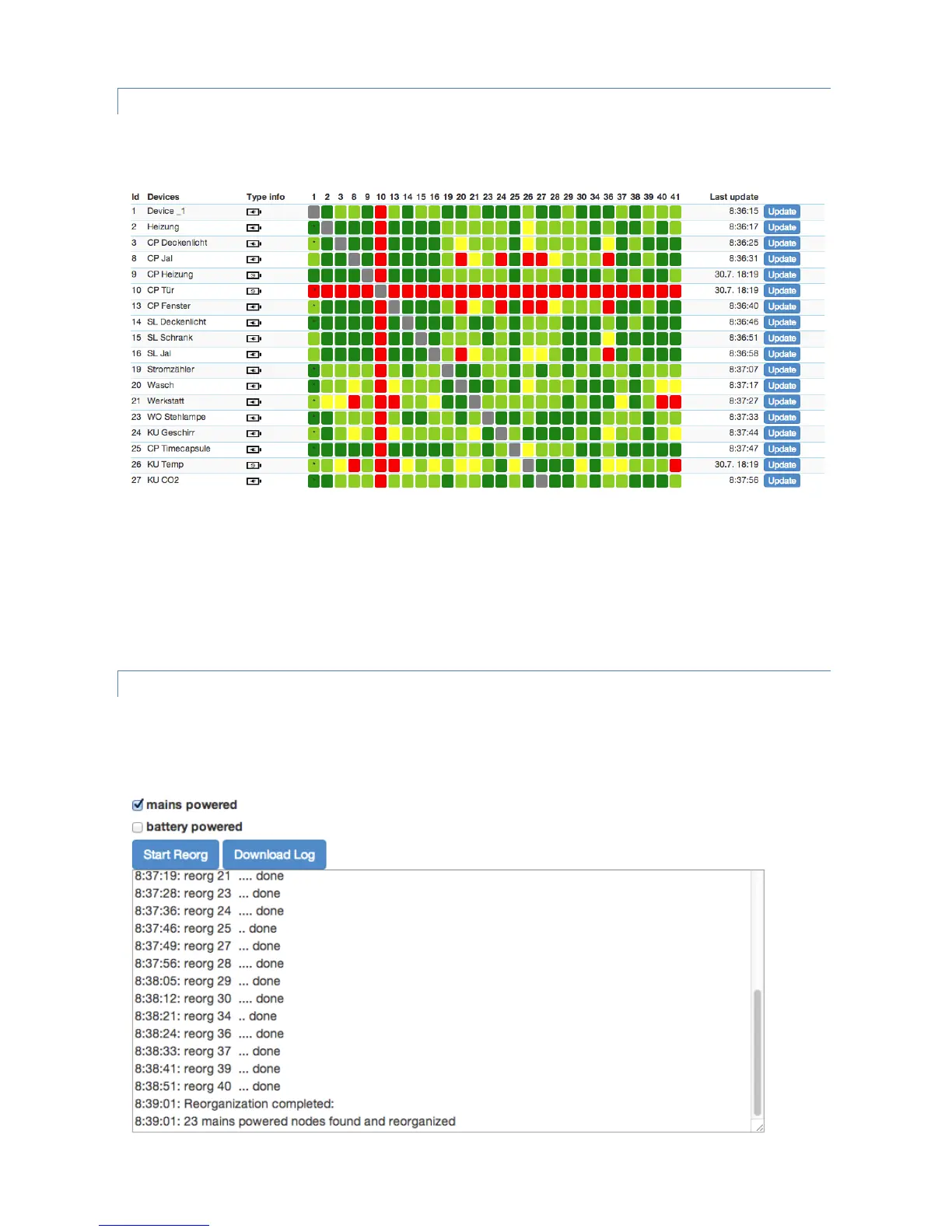
The routing screen shows the neighborhood relationship of devices. The id, the name and the type of the node are
listed.
Dark green indicates that the two devices are in direct wireless neighborhoods and don’t need any other device to
forward their signals. A Light green connection needs one router between. Yellow color indicates that the
communication route is just ok. This can be achieved by longer but multiple routes. A red color between two nodes
indicated an insufficient communication link. A little black dot in the colored field indicates that the current
configuration of the network requires these two nodes to communicate with each other due to an association
relationship. The ‘Update’ button calls the device to scan its neighborhood and report back the result to update its
own line of the routing table.
EXPERT UI: NETWORK TAB: REORGANIZATION
The reorganization screen controls an algorithm that reorganizes the network relationships and fixes problems. With
checkboxes different stages of the algorithm can be selected. The result of the reorganization is shown in a log and
can be downloaded.


 To Next Page