6
HOME AUTOMATION UI: Z-WAVE DEVICES
To add a new Z-Wave device (include it into your Z-Wave network), choose “Devices” item in the “Settings” menu.
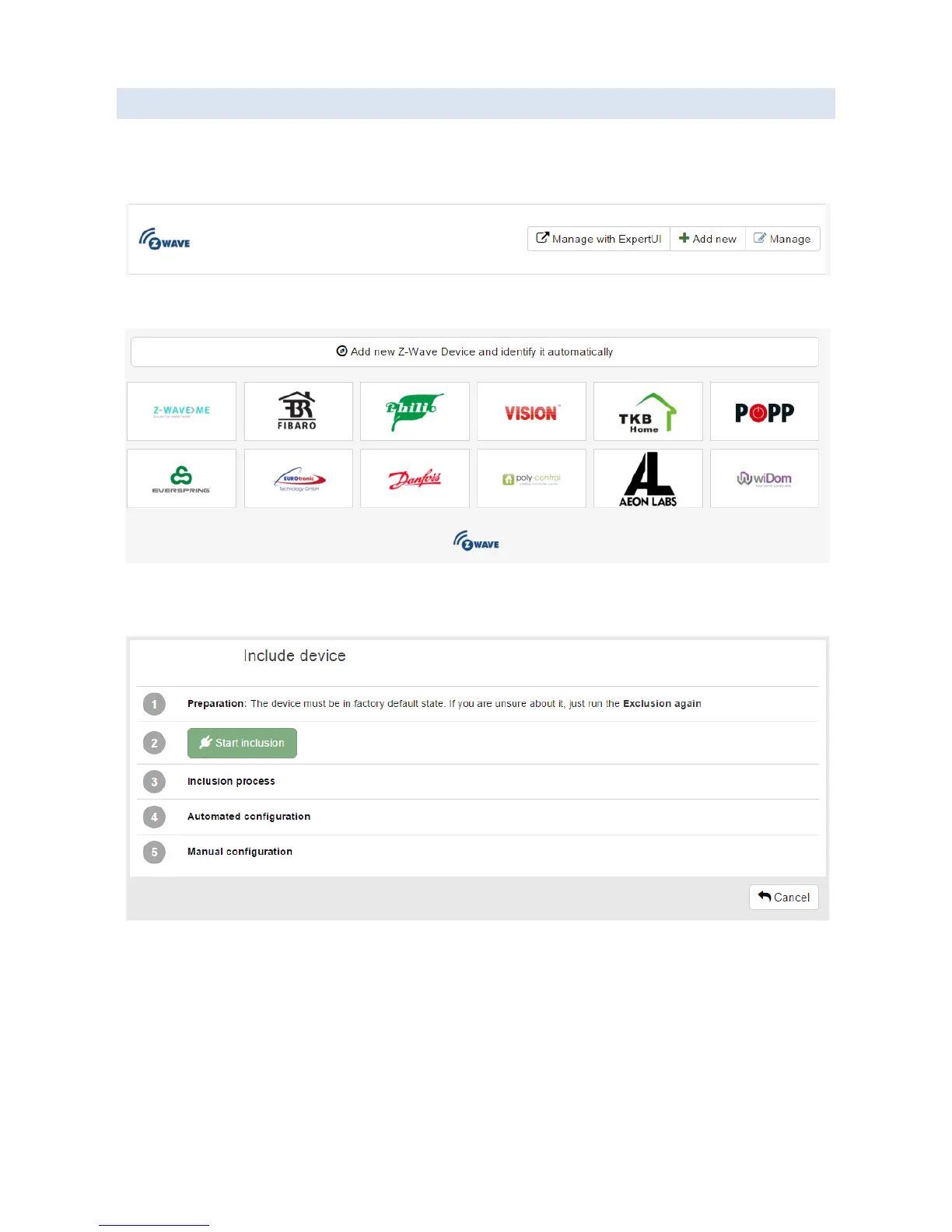
You will see the “Devices” screen:
Click "Add new" button in the "Z-Wave" section. You will see the following screen:
Click “Add new Z-Wave device and identify it automatically” button, or choose a brand/manufacturer of the Z-Wave
device from the list. You will see the “Include device” screen.
If the Z-Wave device is not in factory default state and was previously included into another Z-Wave network, first
perform the exclusion of the device from the old network:
Click “Exclusion again” link.
You will see “Ready to exclude” message.
Perform the “Exclude” action on the Z-Wave device (usually quickly press the button on the Z-Wave device 3
times; see the user manual of the Z-Wave device for device-specific information).
If the operation succeeds, you will see “Device excluded” message.


 To Next Page