IB-CD965(CDM32J-60F8)-WM-E-010504
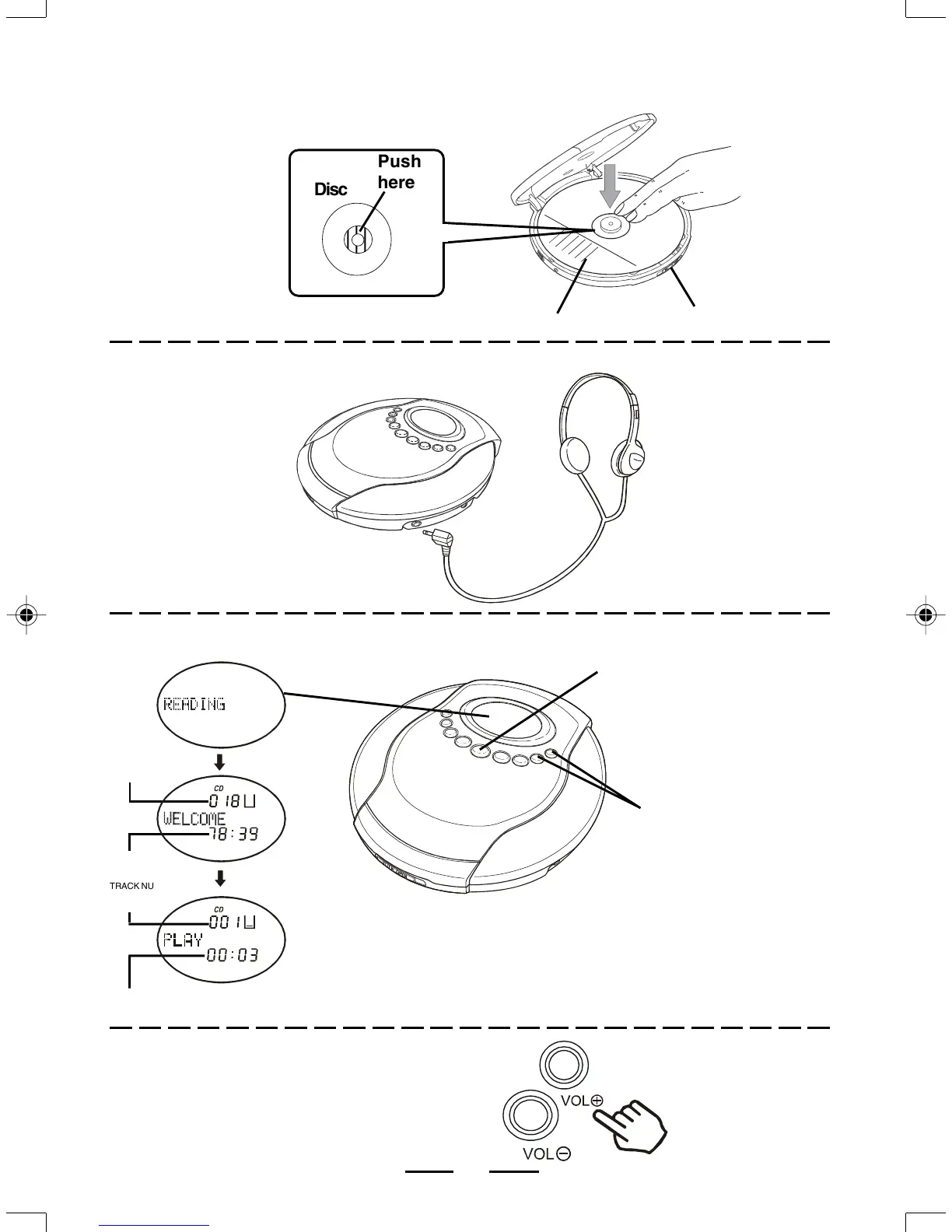
CD PLAYING
4 Adjust the Volume.
1 Load the Disc.
2 Connect the Headphones.
LABEL SIDE UP SLIDE RIGHT TO OPEN
TO PHONES
STEREO
HEADPHONES
PLAY/PAUSE
BUTTON
VOLUME
CONTROLS
INCREASE
DECREASE
Push
here
Disc
TRACK NUMBER
CURRENTLY
PLAYING
ELAPSED PLAYING TIME
OF THE CURRENT TRACK
4
NOTE: The ESP PLUS
TM
function will turn on automatically when
the PLAY/PAUSE button is pressed.
NOTE: To turn off the ESP PLUS
TM
function, press and hold the
10+ / ALBUM button for 2 or 3 seconds.
TOTAL TRACKS
ON THE DISC
TOTAL PLAYING
TIME
3 Press the PLAY/PAUSE Button.
IB-CD965(CDM32J-60F8)-WM-E-010504.p65 1/13/2004, 12:21 PM5



 To Next Page