IB-CT995(NL)-WM-E-011004
STOP/EJECT
RECORDING ON A TAPE
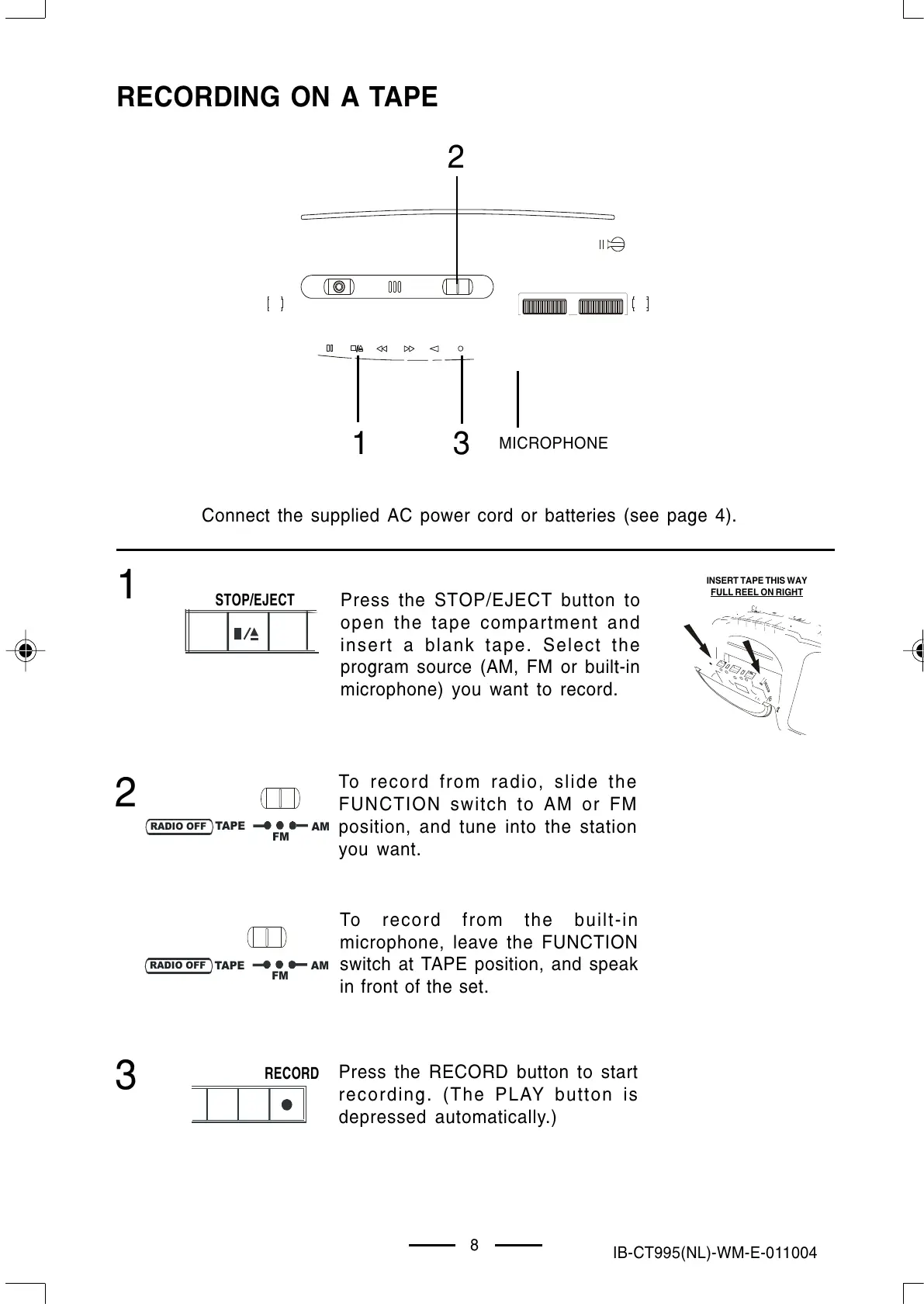
Connect the supplied AC power cord or batteries (see page 4).
1
3
1
2
To record from radio, slide the
FUNCTION switch to AM or FM
position, and tune into the station
you want.
To record from the built-in
microphone, leave the FUNCTION
switch at TAPE position, and speak
in front of the set.
3
8
Press the RECORD button to start
recording. (The PLAY button is
depressed automatically.)
2
RECORD
MICROPHONE
Press the STOP/EJECT button to
open the tape compartment and
insert a blank tape. Select the
program source (AM, FM or built-in
microphone) you want to record.
INSERT TAPE THIS WAY
FULL REEL ON RIGHT
AM
FM
TAPE
RADIO OFF
AM
FM
TAPE
RADIO OFF
IB-CT995(NL)-WM-E-011004.p65 1/9/03, 4:38 PM9


 To Next Page