Need help?
Do you have a question about the Duracell POWER 500 and is the answer not in the manual?
Key safety rules for operating the power station to prevent hazards.
Risks associated with electric shock and how to avoid them.
Risks associated with explosion and how to avoid them.
Lists the items included in the product package: power station, adapter, cables, and guide.
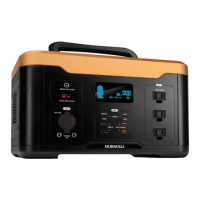
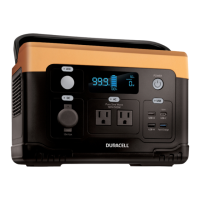
Diagram illustrating the main components, ports, and labels of the Power 500 unit.
Explains the various indicators and icons displayed on the LCD screen for status monitoring.
Details on how to charge the unit using AC adapter, car charger, and solar panel, with estimated times.
How to turn on/off, connect devices, use ports, and understand auto-shutoff features.
Proper storage environment and long-term battery maintenance recommendations for longevity.
Addresses common problems like charging failures, overheating, overload, and error messages with solutions.
Answers common questions about battery, device compatibility, run time, storage, and usage.
Guidelines for recycling the unit and its battery components according to local regulations.
Details the 24-month limited warranty and limitations of Duracell's liability.
States compliance with FCC rules for digital devices and potential radio frequency interference.
Comprehensive list of product specifications including battery, ports, charge times, dimensions, and fault conditions.
The Duracell Power 500 is a portable power station designed to provide reliable power for a wide range of electronic devices and small home appliances. It utilizes high-performance lithium-ion cells to store energy, making it a versatile solution for outdoor adventures, emergency backup, or simply powering devices on the go.
The primary function of the Duracell Power 500 is to convert stored DC battery power into various output forms, including AC, DC, and USB, to charge or power compatible devices. It acts as a portable energy source, allowing users to operate electronics without access to a traditional wall outlet. The unit is capable of delivering up to 500W of continuous AC power, with a peak output of 1000W, making it suitable for a variety of devices.
The Duracell Power 500 is designed for ease of use with a clear LCD info screen and intuitive controls.
To turn the unit on, a short press of the main POWER button is required. The POWER button will glow, the LCD screen will illuminate, and the battery level indicator will display the current state of charge. To conserve power, the unit features an auto-shutoff feature, automatically turning off after 5 minutes if no ports are activated.
After turning on the POWER button, users can connect their devices to the desired port or outlet. To activate a specific port (DC, USB, or AC), a short press of the button located above that port is necessary. Once activated, the corresponding button will glow, indicating that the port is ready for use.
The AC outlets are designed to power devices rated less than 500 Watts. If this limit is exceeded, the unit will automatically shut off, and an "Overload" icon will appear on the screen, accompanied by three beeps. To conserve battery life, the AC port output will automatically turn off after 2 hours if no load is detected.
The USB ports and the car charger port (CLA) will automatically turn off after 8 hours if no load is detected, further contributing to battery life conservation.
The unit includes an LED light for illumination. Pressing the button above the LED light will turn it on. Subsequent clicks will cycle through different modes: Low, High, SOS, and Off.
The LCD screen provides crucial information about the unit's status:
The unit can be charged using several methods:
The Power 500 can be charged and used simultaneously, although this will extend the overall recharge time.
The manual provides a troubleshooting section to address common issues such as the unit not charging, not powering devices, overheating, or displaying error messages. It offers solutions like checking connections, ensuring ports are activated, verifying operating temperature, and disconnecting overloaded devices.
Proper storage and maintenance are crucial for prolonging the life and performance of the Duracell Power 500.
The unit should be stored in a cool, dry, and well-ventilated environment, away from any sources of water, heat, or flammable gases. The recommended storage temperature is between 42-85°F (6-29°C). Before storing for an extended period, ensure the unit is turned off.
For long-term storage, it is recommended to recharge the unit every 3-6 months to maintain the battery level above 80%. This practice helps protect the battery life and ensures the unit is ready for use when needed. To further prolong the unit's life, always keep the state of charge above 30%.
The Duracell Power 500 has no serviceable parts, and users should not attempt to disassemble, repair, or modify the unit, as this can lead to fire, explosion, injury, and unpredictable risks. Power cables should always be removed by holding their connectors, not by pulling on the cable itself, to prevent fraying and short circuits.
Adherence to safety guidelines is paramount. The unit should not be exposed to rain, snow, or direct sunlight. It should only be used with recommended Duracell accessories and chargers. Avoid exposing the unit to fire or excessive temperatures above 140°F (60°C), as this can cause an explosion. Do not use the unit near flammable gases or fumes, or with damaged wires or plugs. The unit should always be used in a ventilated environment, and ventilation should not be restricted during use.
By following these usage and maintenance guidelines, users can ensure the safe and efficient operation of their Duracell Power 500 for an extended period.
 Battery
| battery chemistry | Li-Ion NMC |
|---|---|
| maximum capacity | 515Wh (23.2Ah@22.2V) |
| cell lifecycles | 1000 Cycles to 80% capacity (cell) |
 Ports & Interfaces
| usb-a port output | 5V @ 2.4A per port |
|---|---|
| usb-a fast charge port output | 5V@3A, 9V@ 2A, 12V@1.5A 18W Max |
| usb-c output | 100W Max |
 Charge Time
| wall charger charge time | 6-7 Hours |
|---|---|
| solar panels charge time | More than 7 Hours (Depending on the weather condition) |
| car charger charge time | 7-8 Hours |
Operating Environment| charging temperature | 39.2°F -104°F (4°C -40°C) |
|---|---|
| storage temperature | 42°F -85°F (6°C -29°C) |
| protection systems | Over and Under Temperature Protection, Short Circuit Protection, Overload Protection, Battery Over Charge and Over Discharge Protection, DC Input Overvoltage, Undervoltage and Reverse Polarity Protection |
 Weight and Dimensions
| dimensions | 11.6 x 7.4 x 8.1in (295 x 188 x 208mm) |
|---|---|
| weight | 13.4lbs (6.1Kg) |
| discharging temperature | 14°F -104°F (-10°C -40°C) |

 To Next Page