EasyManua.ls Logo

Duracell Powerpack 300 - User Manual

Duracell Powerpack 300
48 pages
Print Icon
To Next Page IconTo Next Page
Loading...
Owner’s Guide

Table of Contents

Questions and Answers

  • K
    Kimberly Barker DVMAug 17, 2025
    Why Duracell Powerpack 300 battery status LED is red after charging?
    • M
      Melissa DanielAug 17, 2025
      If the Battery Status LED on your Duracell Portable Generator is red and hasn't changed to green after 24 hours of charging, the voltage at the AC wall outlet might be less than 120 VAC. In this case, continue charging the unit for another 12 hours; it will be ready to use even if the Battery Status light remains red.
  • B
    Bonnie DuranAug 19, 2025
    What to do if Duracell Portable Generator battery status LED is red when battery level LEDs show full?
    • W
      willisdavidAug 20, 2025
      If the Battery Status LED is red, and the Battery Level LEDs indicate a full charge when the Battery Level button is pressed on your Duracell Powerpack, it may be because the Battery Level lights are only accurate when the unit has been disconnected from all appliances and charging sources for 15 minutes. Unplug the charging sources and any appliances and let the unit rest for 15 minutes to obtain an accurate reading.
  • S
    Steven MontoyaAug 22, 2025
    What to do if Duracell Powerpack 300 Portable Generator jump-start clamps measure zero volts?
    • Z
      Zachary MillerAug 22, 2025
      If the jump-start clamps on your Duracell Portable Generator measure zero volts, it could be because the jump-start power switch is off, or the battery needs to be recharged. Turn the jump-start power switch on and recharge the battery.
  • K
    kathywrightAug 25, 2025
    Why AC appliance will not operate with Duracell Portable Generator?
    • S
      Susan AndersonAug 26, 2025
      The AC appliance might not operate with the Duracell Portable Generator for several reasons. It could be rated more than 300W, causing a safety overload, or it might have a high starting surge. Alternatively, the battery may have discharged to 10.5V, or the Duracell Powerpack may have overheated due to poor ventilation or warm conditions. To resolve this, use an AC appliance with a power rating less than 300W, or one that doesn't exceed the surge capability of the Duracell Powerpack. You may also need to turn off the AC power and recharge the powerpack, or allow it to cool down in a better-ventilated, cooler environment.
  • B
    Brandy SmithAug 27, 2025
    What to do if Duracell Powerpack 300 Portable Generator shows overload shutdown?
    • G
      Gabriela DixonAug 27, 2025
      If your Duracell Portable Generator shows an overload shutdown, it means the appliance's power requirements exceed the powerpack's capability. Unplug the appliance and confirm that its power requirement is 300W or less before attempting to restart it.
  • R
    rachel89Aug 30, 2025
    What to do if Duracell Powerpack 300 Portable Generator run time is less than expected?
    • E
      Edward VargasAug 30, 2025
      If the run time of your Duracell Portable Generator is less than expected, it could be due to several reasons. The battery may not be fully charged, the AC appliance might be consuming more power than anticipated, or the environmental temperature is outside the 0°C to 40°C (32°F to 104°F) range. To fix this, recharge the unit using the AC charger until the Battery Status LED turns green. Check the power or wattage rating of the AC appliance and ensure it's within the specified limits. Also, operate the generator within the correct temperature range.
  • M
    Michael NixonSep 2, 2025
    Why Duracell Portable Generator battery status LED is OFF when AC charger is connected?
    • A
      ambermccoySep 2, 2025
      If the Battery Status LED is off when the AC charger is connected to your Duracell Portable Generator, it could be due to either no AC power at the wall outlet or a faulty AC charger. First, ensure that the wall outlet has power. If the outlet is working, the AC charger may need to be replaced.
  • A
    April MendozaSep 5, 2025
    What to do if measured AC output voltage is too low on Duracell Portable Generator?
    • D
      dayanitaSep 5, 2025
      If the measured AC output voltage of your Duracell Portable Generator is too low, it may be because you're using an average-reading AC voltmeter, or the battery is almost fully discharged. The modified sine wave output requires a true RMS reading meter for accurate measurement. Press the Battery Level button to check the battery status and recharge the unit as needed. Note that the Battery Level LEDs are only accurate after the unit has been disconnected from all appliances and charging sources for 15 minutes.
  • J
    Joseph CunninghamSep 7, 2025
    Why Duracell Powerpack 300 Portable Generator engine won't start?
    • D
      Donald SmithSep 7, 2025
      If the engine being jump-started won't start with your Duracell Portable Generator, it could be due to a few reasons: the powerpack battery might not be fully charged, the engine condition could be poor, or the engine's starting capacity exceeds the jump-start capability of the powerpack. Recharge the powerpack battery. If that doesn't work, have the engine serviced. Alternatively, consider using a higher power Duracell Powerpack.
  • P
    paulmooreSep 10, 2025
    Why Duracell Portable Generator compressor runs, but won’t inflate?
    • A
      Alexander ClarkSep 12, 2025
      If the compressor on your Duracell Portable Generator runs but won't inflate, it could be because the valve connector isn't securely placed on the valve stem or the item being inflated has a leak. Ensure the valve connector is securely placed on the valve stem before closing the thumb latch. Also, verify that the item being inflated doesn’t have a leak, and check the compressor hose for any breaks or leaks.

Summary

1 • Introduction

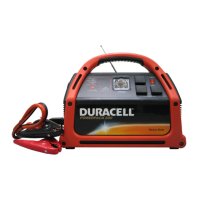
About the Duracell Powerpack 300

Provides an overview of the Duracell® Powerpack 300, detailing its capabilities and intended uses for various power requirements.

Comprehensive Protection

Details built-in safety features such as automatic overload, overheating, and low battery protection for safe operation and damage prevention.

2 • Features

Materials List

Lists all items included in the Duracell® Powerpack package to ensure customers have complete contents.

Front Panel Detail

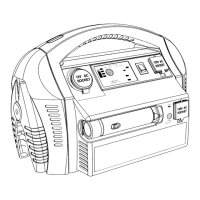
Identifies and describes all components and indicators on the front panel of the Duracell® Powerpack 300 for user comprehension.

Left Side View

Illustrates and labels features and ports located on the left side of the Duracell® Powerpack 300.

Accessories

Details accessories provided with the Duracell® Powerpack, such as charging cables and nozzle adaptors.

3 • Operation

Operating Conditions and Guidelines

Outlines essential operating conditions and guidelines, including wattage limitations and incompatible product types for safe use.

Choosing a Location

Recommends safe and suitable locations for Duracell® Powerpack operation, considering environmental factors and safety.

First Time Operation

Guides users through initial setup and first-time operation of the Duracell® Powerpack 300, emphasizing the importance of battery charging.

Using the Built-in Light

Describes how to use the integrated LED emergency light feature of the Duracell® Powerpack for illumination in emergencies.

Using the USB Port

Details USB port usage for charging compatible devices, specifying current output and device compatibility.

Operating AC Appliances

Guides safe operation of AC appliances using the Duracell® Powerpack, including power ratings and estimated run times.

Trouble Appliances

Identifies specific appliances incompatible with the Duracell® Powerpack due to unique power requirements, which may cause damage.

Operating an AC Appliance

Provides step-by-step instructions for connecting and operating AC appliances with the Duracell® Powerpack, detailing shutdown conditions.

Operating 12 V DC Appliances

Explains connecting and operating 12 V DC appliances, detailing compatibility and potential equipment damage from DC outlet usage.

Jump-Starting a Vehicles Engine

Details the process of using the Duracell® Powerpack to jump-start a vehicle's engine, including crucial safety warnings and procedures.

Using the Air Compressor

Explains using the built-in air compressor, covering operation limits, cooling procedures, and essential safety precautions.

Over-temperature Safety Protection

Describes the air compressor's automatic over-temperature safety feature and necessary user actions when it engages.

Inflating Tires

Provides guidance and pressure specifications for inflating various tire types using the Duracell® Powerpack's air compressor.

Inflating Small Sports Equipment

Details using the air compressor for small sports equipment, including cautions for incompatible or large-capacity inflatables.

Connecting to an External Battery

Explains extending operating times by connecting the Duracell® Powerpack to a larger external battery, including necessary safety warnings.

4 • Maintenance

Battery Maintenance

Provides essential guidelines for maintaining internal battery health and capacity through proper charging and regular care.

Recharging with the AC Charger

Explains the procedure for recharging the Duracell® Powerpack using the supplied AC charger, including crucial safety cautions.

Recharging with the DC Charging Cable

Details recharging the Duracell® Powerpack using the DC charging cable from a vehicle, including relevant safety warnings.

Recharging with a Generator

Explains recharging the Duracell® Powerpack using a generator's regulated 12 V DC output or lighter socket.

Recharging From a Solar Panel

Describes recharging the Duracell® Powerpack using a solar panel via the AC charger input socket, including wiring guidance.

5 • Troubleshooting

Common Problems

Addresses common issues such as audio buzz and television interference, offering practical solutions for resolution.

Troubleshooting Reference

Provides a detailed reference for diagnosing and resolving various problems, including appliance non-operation, low voltage, and connection issues.

A • Specifications

Electrical Specifications

Lists detailed electrical specifications for the 12 V DC and AC power sections, covering output power, voltage, frequency, and waveform.

Physical Specifications

Details physical dimensions, weight of the Duracell® Powerpack 300, and specifications for included accessories.

B • Warranty and Return Information

Quality Guarantee

Outlines the 1-year limited warranty for the Duracell® Powerpack 300 against defects in materials and workmanship.

Contacting Customer Support

Provides information and tips for contacting customer support for technical assistance and inquiries regarding the Duracell® Powerpack.

Warranty and Return Policy

Explains the one-year limited warranty, disclaimer of warranty, and limitation of liability for the Duracell® Powerpack.

Duracell Powerpack 300 Specifications

General IconGeneral
AC Outlets2
DC Outlets1
USB-A Ports2
12V Car Port1
Battery TypeLithium-ion
Warranty1 year
Output Power300W
Input ChargingAC Wall Outlet, Solar Panel

Related product manuals