10
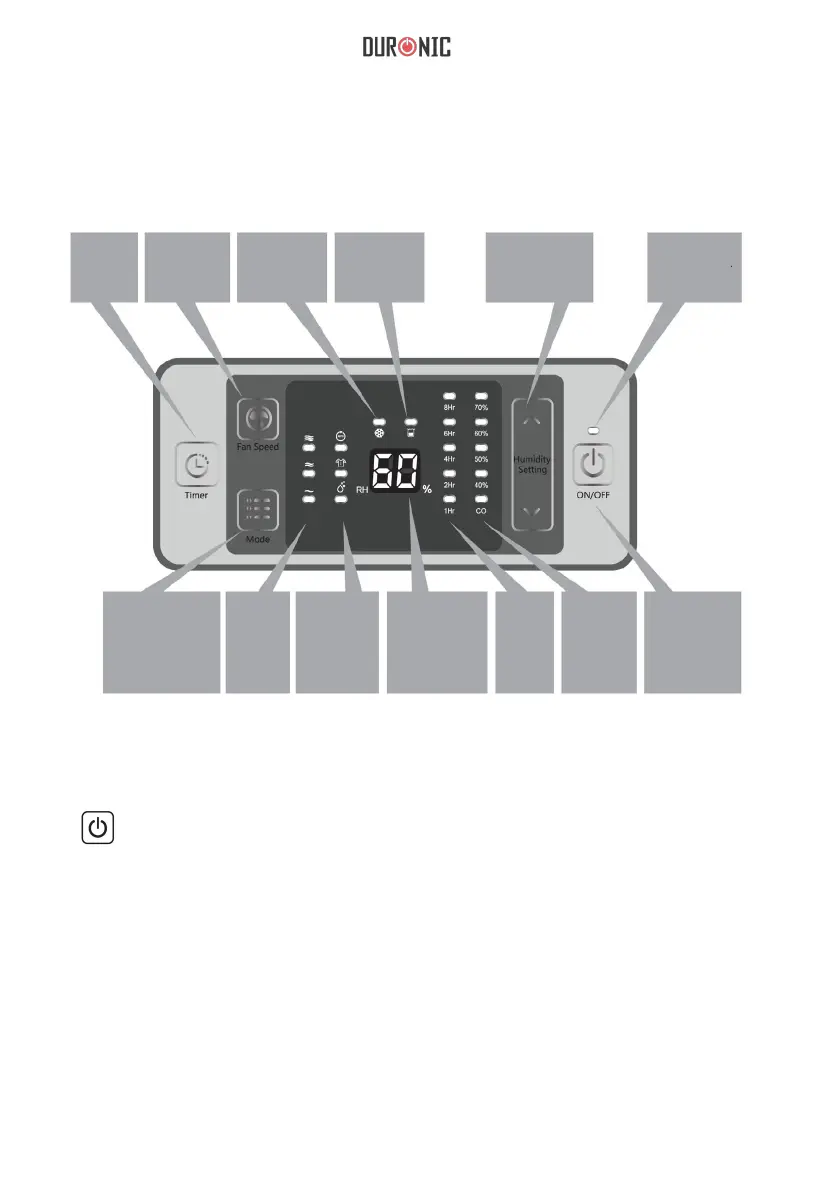
Control & Display Panel
Timer
Fan
speed
Defrost
indicator
Full tank
indicator
Humidity
selection
Power
indicator
Working mode
Fan
speed
indicator
Working
mode
selection
Humidity
reading
Timer
indicator
Humidity
setting
indicator
On/Off
1.
ON/OFF: Press once to turn the unit ON or OFF.
2.
“^” Up
“v” Down
Under manual operation mode, used to set the target humidity and adjustment
time, the humidity could be set between 40%-70% in 10% per step or “CO”.
When the humidity is set to “CO”, the machine will work continuously. The
timer can be set to 1h-2h-4h-6h-8h and can be used to shut down after timer.


 To Next Page