16
Water drainage for cooling mode
This air conditioner is equipped with auto water
evaporation so the water compartment would not
typically ll in cooling mode unless there is high
humidity. Water drainage will generally only be
required at the end of the season for these modes.
Note: When the water level reaches a
predetermined level, the “full tank” indicator light
located on the control panel of the unit goes on.
If error code “E2” appears on the control panel in
COOL mode, the unit will have to be drained.
Intermittent draining
Unplug the unit from the power source.
Carefully move the unit to a drain area over
your basement oor or drip tray (not included)
and remove the bottom drain cap.
Let the water drain away and close the drain
cap. Restart the unit until the error codes “E2”
or “E4” disappears on the control panel.
Note: Be sure to close the bottom drain plug
before using the unit.
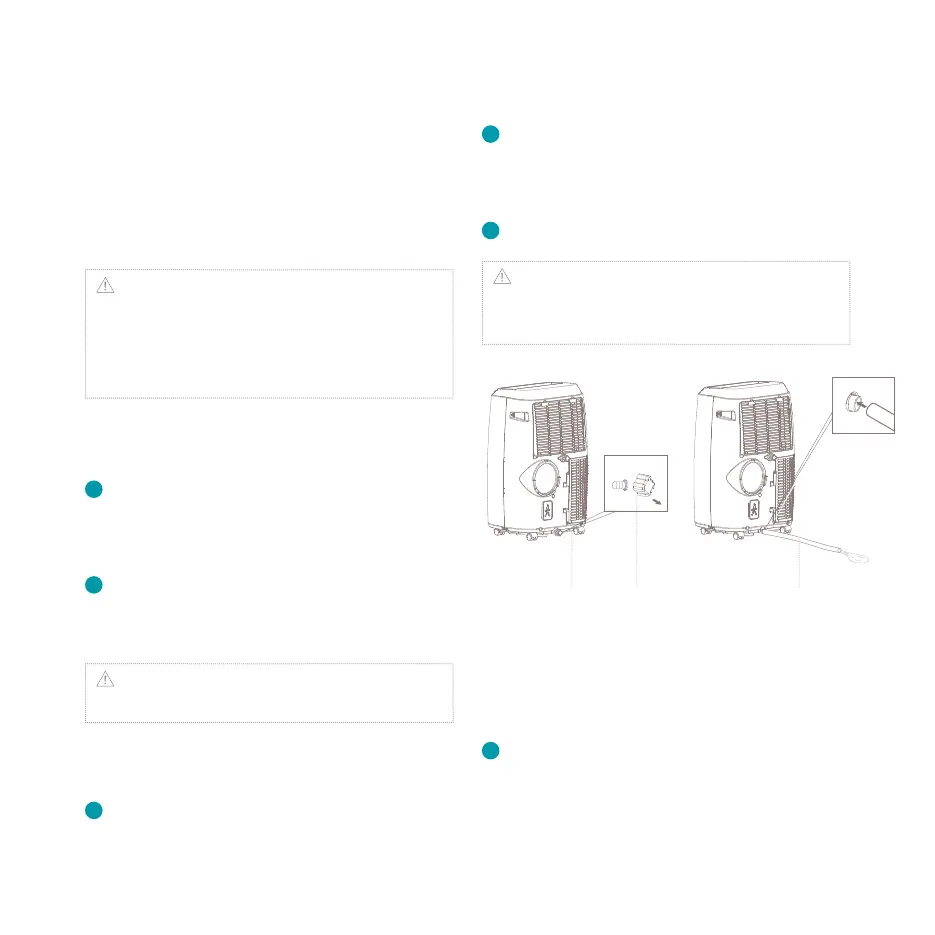
Continuous draining for cooling
and heating mode
Unplug the unit from the power source.
Remove the bottom drain cap. While doing this,
1
2
operation some residual water may spill so use
a drip tray (not supplied) to collect the water.
Connect the drain hose as shown in the
diagram. The water can be continuously
drained through the hose into a oor drain or
drip tray.
Turn on the unit.
Note: After the unit has stopped, it cannot be
restarted for 3 minutes. Operation will automatically
resume after 3 minutes.
Continuous draining for
dehumidication mode
Unplug the unit from the power source.
Remove the drain cap located in the back
center of the unit. While doing this operation
some residual water may spill so use a drip tray
1
2
3
1
Drain outlet Drain cap Drain hose


 To Next Page
 Loading...