76
• If there is interference with TV, radio or other
electrical devices, please move the device.
• When moving the device please move it with the
base of the device held securely
• The device does not have an automatic humidity
adjustment feature. Wet oors and condensation
can form easily in rooms with lower temperatures
or high levels of humidity.
• Adjust the level of humidity with the mist button,
with adequate consideration of the space the
device is located in, and by either raising the
room temperature or turning o the device.
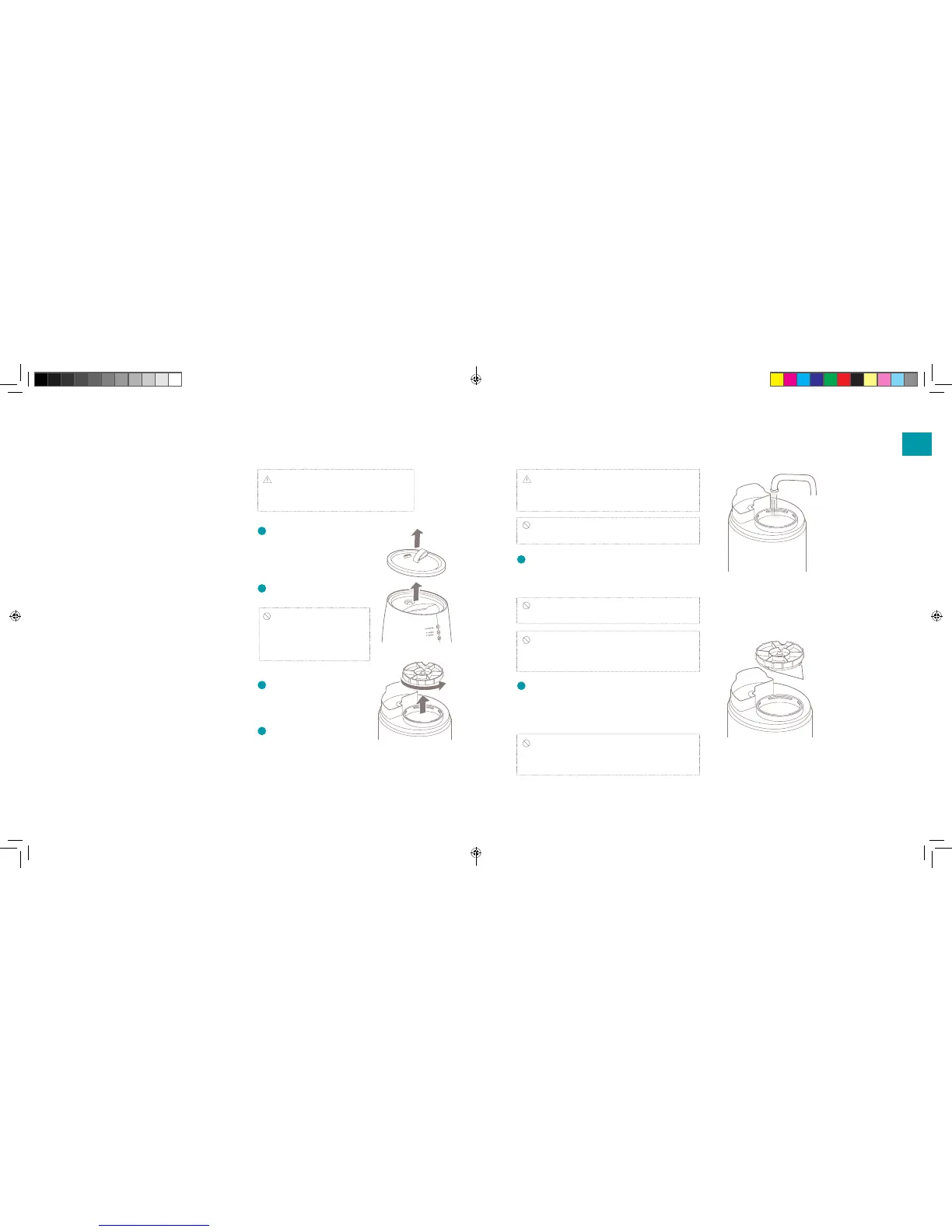
1
Remove the top surface
cover. Hold and lift the
label on the top cover when
removing the top cover.
2
Take out the water tank
Caution: Do not tilt the
device when raising the water
tank. This may lead to spillage
of water remaining in the device.
3
Turn the water tank cap
counter-clockwise and
remove from water tank.
4
Pour water in the water
tank.
Note: we advise to use distilled or mineral water
as water source. When using tap water, there is a
risk of bacteria growth and increased scale.
Caution: Do not use hot water. It may deform
the shape of a water tank.
5
The paws of the water tank cap are attached to
t into the feed-water inlet cuts. Firmly turn it
clockwise until it stops.
Caution: Please carefully check that the water
tank cap has not been inserted diagonally.
Caution: Please check whether the
rubber seals on the water tank cap are properly
attached.
6
Place back the water tank cap on the device
after carefully checking whether the water tank
is properly in place and attach the top surface
cover.
Caution: Be sure to place back the top cover
after relling the tank. The mist will not be eciently
distributed without its top cover.
Note: Please check that the power is o
before removing the water tank from the
device.
Filling the water tank
EN
DUU15045_Handleiding-TAG-Universeel.indd 6-7 14-04-17 15:46


 To Next Page