98
Connecting the product
1
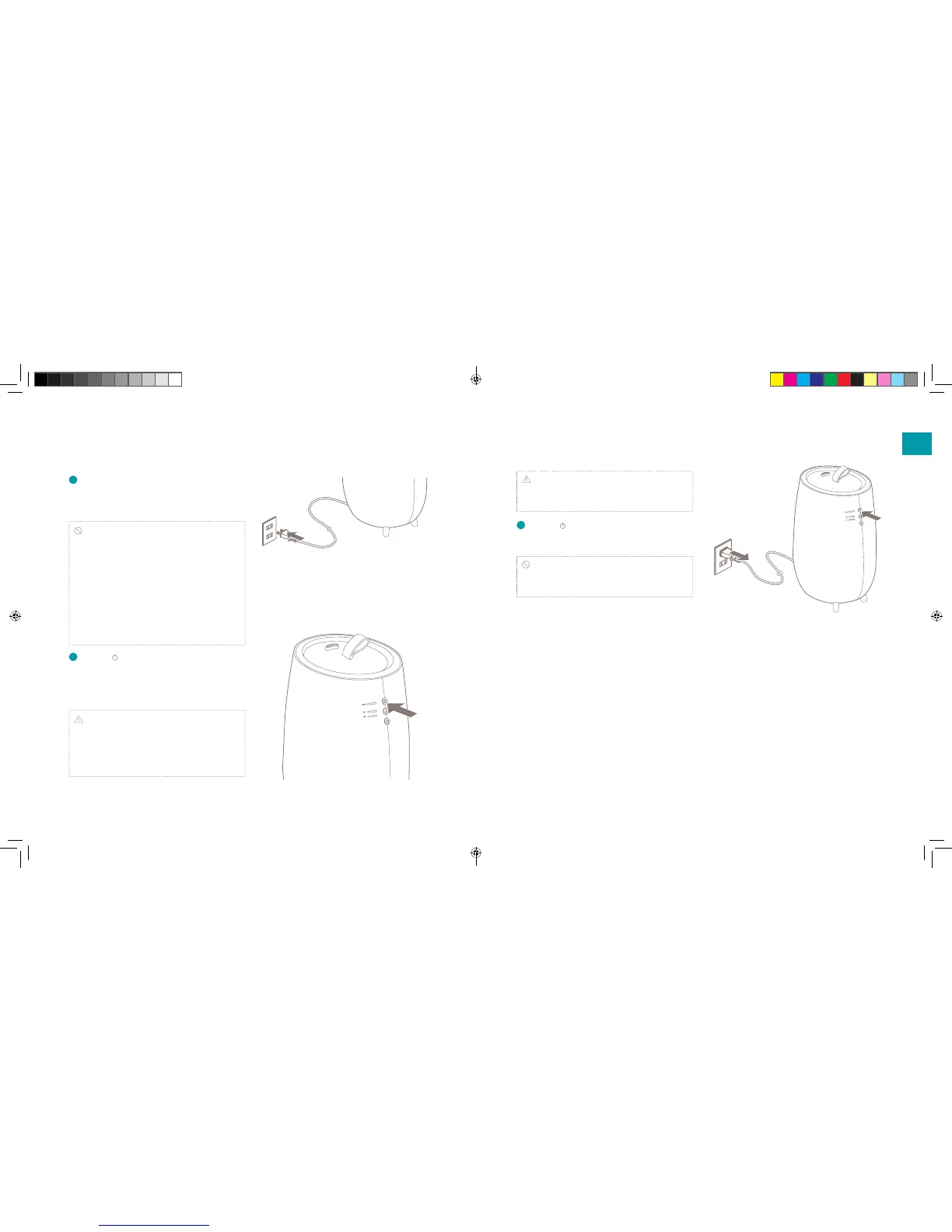
Put the power plug into a wall outlet. The
power/water supply indicator will light red when
you connect the power plug into a wall outlet.
Caution:
• Do not plug in the device or pull plug out of the
power supply with wet hands or use the product.
• Thoroughly dry your hands before you use the
device, in particular after pouring water in the
water tank.
• Avoid connecting the device using other plugs,
multi-outlet and extension cords.
• Do not use when the power cord is bundled
together.
2
Push the power button. The power/water
supply indicator will light blue and it will begin
to humidify with MIN (minimum) mist output.
The bottom light will lid up.
Note: There is insucient water in the tank if
the light on the power/water supply indicator turns
from blue tot red immediately after powering on in
the device. Please remove the water tank and ll it
with water (see chapter 2).
Note: The power/water supply display will ash
red when there is not enough water in the water
tank while in use.
3
Push the power button to turn o the device
and pull out the plug after use.
Caution: When removing the power plug, be
sure to hold it by the plug. Pulling the cord to
remove the plug may cause the cable to break.
EN
DUU15045_Handleiding-TAG-Universeel.indd 8-9 14-04-17 15:46


 To Next Page