5
AMPS SELECTION at DV Mark EVO 1 software
clean
• TRIPLE 6 CH1 (DV Mark Triple 6)
• DARKFACE ‘65 (65 Blackface FENDER
®
TWIN REVERB
®
)
• SLODRIVE US (SOLDANO X88R
®
CH1)
• ECSTASY CH1 (BOGNER XTC
®
CH1) clean
• MARAGOLD (DV Mark Greg Howe signature)
• TOP 30 (Vox AC30)
crunch
• TRIPLE 6 CH2 (DV Mark Triple 6)
• ROCK ‘75 UK (MARSHALL
®
JCM800
®
)
• SLODRIVE US (SOLDANO X88R
®
CH2)
• ECSTASY CH2 (BOGNER XTC
®
CH2)
• JCMARK (MARSHALL
®
JCM800
®
)
lead
• RECTO US (Mesa Boogie
®
DUALRECTIFIER
®
)
• SLODRIVE US (SOLDANO X88R
®
CH3)
• ECSTASY CH3 (BOGNER XTC
®
CH3)
• PROGRESSIVE (MARK V hi-gain inspired)
• MARAGOLD CH3 (DV Mark Greg Howe signature)
REVERB SELECTION at DV Mark EVO 1 software
• NONE (no reverb)/ SPRING REVERB / REVERB
Parameters: TIME / COLOR / DIFFUSION
CAB SELECTION at DV Mark EVO 1 software
• NONE (no CAB emulator)
• 4x12” VINTAGE 30
®
(Celestion
®
Vintage 30
®
)
• 2x12 CELESTION
®
(Vox
®
AC 30
®
)
• 1x12 JENSEN
®
(Fender
®
De Luxe
®
)
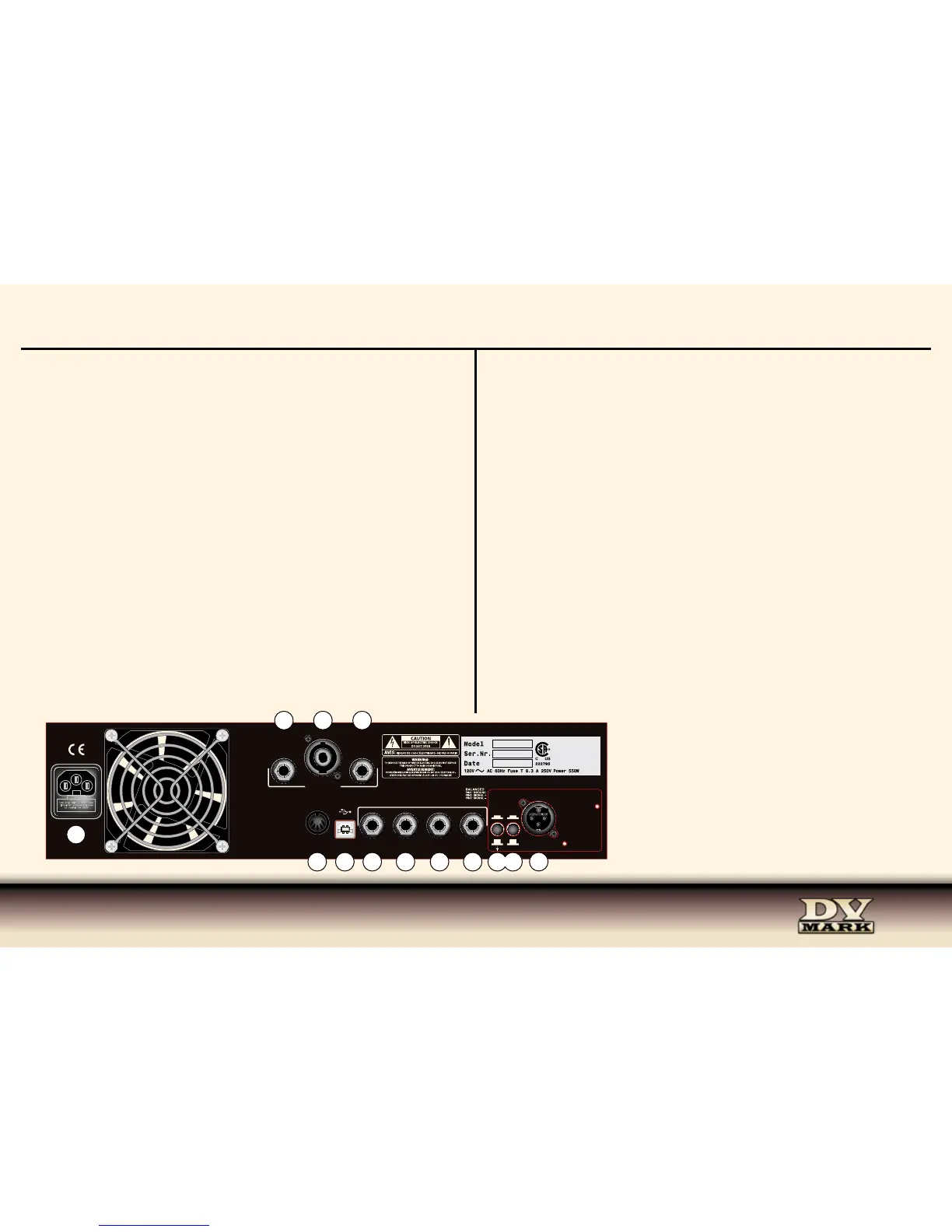
32/34) SEND/ RETURN 1 If you use effect pedals or rack gear, you can route them through
the CH1 using SEND 1 (32) and RETURN 1 (34), connecting the SEND to the input of the effect
and the RETURN to the effect’s output using instrument cables.
33/35) SEND/ RETURN 2 If you use effect pedals or rack gear, you can route them through
the CH2 using SEND 2 (33) and RETURN 2 (35), connecting the SEND to the input of the effect
and the RETURN to the effect’s output using instrument cables.
36) ) +4 / -10dB Output Level select switch (+4/-10dB) related to the LINE OUT XLR level.
37) GROUND LIFT Occasionally when you’re playing live and using the LINE OUT, the
soundman will detect a hum from your amp’s signal. This is almost always due to a grounding
problem related to your power source; you will likely eliminate this hum simply by flipping the
GROUND LIFT switch.
38) LINE OUT This output sends the preamp signal to the mixing console, to recording
device, DI, etc. The Line Out signal is post reverb and effects connected to the send/return.
CAB/Speaker Emulator is assignable at the XLR Line Out using the DV Mark EVO 1 software.
REAR PANEL
26) AC POWER SOCKET Make sure the unit is grounded; all three terminals of the AC power plug must be connected to avoid any
injury to the user or damage to the unit.
The DV Mark EVO 1 is manufactured to be used in the country where it has been sold, and it’s factory preset to that country’s voltage.
So make sure you’re sending the correct voltage to your amp before you connect it to AC power.
27/28/29) SPEAKER OUT Connect your cabinet/s to the speaker out/s (minimum load 4 ohm, the speaker outputs are in parallel).
The speaker JACK outs (27-29) accepts ¼” Jack speaker cables, the SPEAKON (28) accepts SPEAKON speaker cable (either 2 poles
or 4 poles connector -standard wiring +1/-1).
Do not use instrument cables.
The DV Mark EVO 1 delivers 250W of power into a 4 ohm cabinet (or two 8 ohm cabinets) or 150W into an 8 ohm cabinet.
30) MIDI IN Connecting the EVO PEDAL to this MIDI input you’ve access to switch CH1/CH2, turn ON/OFF FX1 and FX2, TURN ON/
OFF the BOOST and the MUTE/TUNER functions.
• The MIDI RX CHANNEL is setted on #0
The switch between channel are setted as for the PROGRAM CHANGE:
• PC#1=Ch1 / PC#2=Ch2
REVERB 1, REVERB 2, BOOST, MUTE/TUNER ON/OFF are setted as for the CONTROL CHANGE:
• REVERB 1 ON = (CC #1,1) / REVERB 1 OFF = (CC #1,0)
• REVERB 2 ON = (CC #2,1) / REVERB 1 OFF = (CC #2,0)
• BOOST ON = (CC #3,1) / BOOST 1 OFF = (CC #3,0)
• TUNER ON = (CC #28,1) / TUNER OFF = (CC #28,0)
31) USB - This USB port allows to connect your DV Mark EVO 1 to a computer thanks to an USB A/B (printer) cable to set your
preferred AMPs on CH1 and CH2, parameters of REVERB 1/REVERB 2 and virtual CAB/Speaker Emulator (assignable at the XLR Line
Out) using the DV Mark EVO 1 software, and then storing your favorite settings on the amp.


 To Next Page
 Loading...