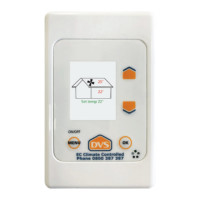
Supply air temperature
at the fan unit.
Optional features, if
in operation, appear
here.
Displayed on the home screen.
House temperature at
the keypad.
Fan symbol, spinning if
fan is running.
Set temperature.
Filter change indication
(if it is due) appears
here.
Menu / On / O
Turning the system ON or OFF:
Press the arrows to adjust. This is the
temperature the system will try to achieve.
*Refer to Useful Tips on the back for more information.
Set temperature:
Press and hold MENU to turn the system on or o.
Standard features:
Heat Retention. This automatically adjusts the fan speed
(Air supply rate) down from condensation control speed, in
cold conditions. (Typically, only used in the cooler parts of the
country).
Heat Recovery. This automatically adjusts the fan speed (Air
supply rate) up from condensation control speed when there is
heat to recover from the ceiling, and the house is not yet at, or
above the set temperature. (Measured at the keypad).
Note: Heat recovery and heat retention settings automatically
adjust fans speeds once they are set. They can also be
adjusted at any time.
Fan Boost.
When in fan boost, the system will operate at maximum speed
(max air supply rate) for a set amount of time, and then it will
revert back to condensation control speed.
Utilities.
Setting the time, backlight o/on, system timer, resetting the
lter timer, temperature graphs, and diagnostics.
Standard features
continued:
Optional features :
DVS® EC Climate Controlled User Guide Phone 0800 387 387 | www.dvs.co.nz
ON/OFF
These include:
Air warmer,
Air Transfer and
Summer Vent
To access the optional features (if tted).
Press the MENU button. (This changes the screen to the rst
menu) Then move the highlight by using the arrows
to select the desired option and press OK to select that
option.
Mode: The way you want the optional feature to be activated.
(Follow the prompts at the bottom of each screen to help you
set these.)
Fan Speed: The fan speed the optional feature will run at
when it is on.
Fan Burst: (heat transfer and summer vent only): Purges the
system of cooler or warmer air.
Remember: Where you leave the highlight is the mode in
which the feature will switch on. If a feature is currently
active, it will show on the home screen in red.
To access the standard features.
Press the MENU button. (This changes the screen to
the rst menu). Then move the highlight by using
to select the desired function and press OK to enter
that function. Press the MENU Button at any time to
return to the previous screen.
Fan Settings.
Fan Speed. This allows you to adjust the condensation
control fan speed (Air supply rate) by +/- 50%.
Note: This is the pre-set fan speed for your home.
Your system will operate at this fan speed if heat
retention and heat recovery are not active.



 To Previous Page
 Loading...