DVS® EC
Climate Controlled System
Enjoy a healthier, more comfortable home
User Guide
0800 387 387 www.dvs.co.nz
Useful Tips.
Set Temperature.
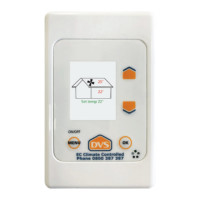
(Press the arrows to access.)
This is the temperature in the home, (measured at
the key pad) which the system is trying to achieve.
The system will turn o if the roof temperature is
higher than the house temperature and the house
has reached the set temperature.
The system will continue to operate if the roof
temperature is lower than the house temperature,
even if the set temperature is reached.
For Example:
In Summer: If you select a set temperature of
18 degrees Celsius, the house will reach this
temperature quickly, the system will turn o.
When the roof temperature falls, the system will
begin to operate again.
In Winter: If you have selected a set temperature
of 22 degrees Celsius, the house may not reach
this temperature. The system will continue to
operate depending on weather conditions and
how warm your home is.
Note: The system will continue to operate even
if the roof space is cooler than the house. The
system will reduce the air supply rate if you have
heat retention activated.
System Performance.
Your DVS® will help provide a healthier, drier living
environment. The house should feel fresher and
drier. You will see evidence of this in a reduction of
condensation and dampness through the home.
Adjust the system if you need to.
Each system is calibrated (set) to the size of your
home. However, if you are still experiencing some
moisture issues, increase the fan speed (Air supply
rate). If the system is working well, you may be
able to select a lower air supply rate.
If you are getting regular performance issues e.g.
wet windows, turn the system o and call 0800
387 387 so that we can assist with this issue.
Note: Maintaining comfortable living temperatures
in the home is a key to achieving maximum DVS®
performance. Use heating in the home if it is
needed.
Filter(s).
For best results the lter(s) needs to be changed
annually. Over time the lter(s) can become
blocked resulting in poor performance of the
system. A message will show on the controller
when your lter(s) are due to be changed.
To ensure system eciency and cover under
the DVS® Five Year Warranty, the lter(s)
should be replaced annually with a genuine
DVS® lter.
Call us on 0800 387 387 or
visit www.DVS.co.nz to purchase lters.
Five Year Warranty
DVS® Manufactured and branded products
carry a 5 year on site parts and labour warranty.
The warranty is dated (begins) on the day of
installation and/or supply of the goods.
Non DVS® manufactured and branded products
are not manufactured by the company. Non DVS®
manufactured and branded products therefore,
carry the warranty provided by the specic
product manufacturer.
The warranty covers manufacturing faults in the
product (equipment) and product failure caused
by incorrect installation.
For further assistance please call DVS® on 0800 387 387 or visit www.dvs.co.nz
DVS® System Installed on:
Installed by:
Invoice Number:
F6 Carbon MERV12
Filter(s) type and number:
F7 MERV13

 Need help?
 General

 To Next Page