HDMI™ out port
HDMI™ (High-Definition Multimedia Interface™) out port digitally transfers
both video and audio data without reducing the quality. HDMI™-compatible
external display devices including televisions can be connected via the
HDMI™ out port.
As the port operation of all external monitors have not been confirmed,
some display devices might not function properly.
To connect an HDMI™-compatible display device, do the following:
To connect a device to the HDMI™ out port, you must purchase a suitable
HDMI™ cable.
1. Plug one end of the HDMI™ cable into the HDMI™ in port of the
HDMI™ display device.
2. Turn the HDMI™ display device's power on.
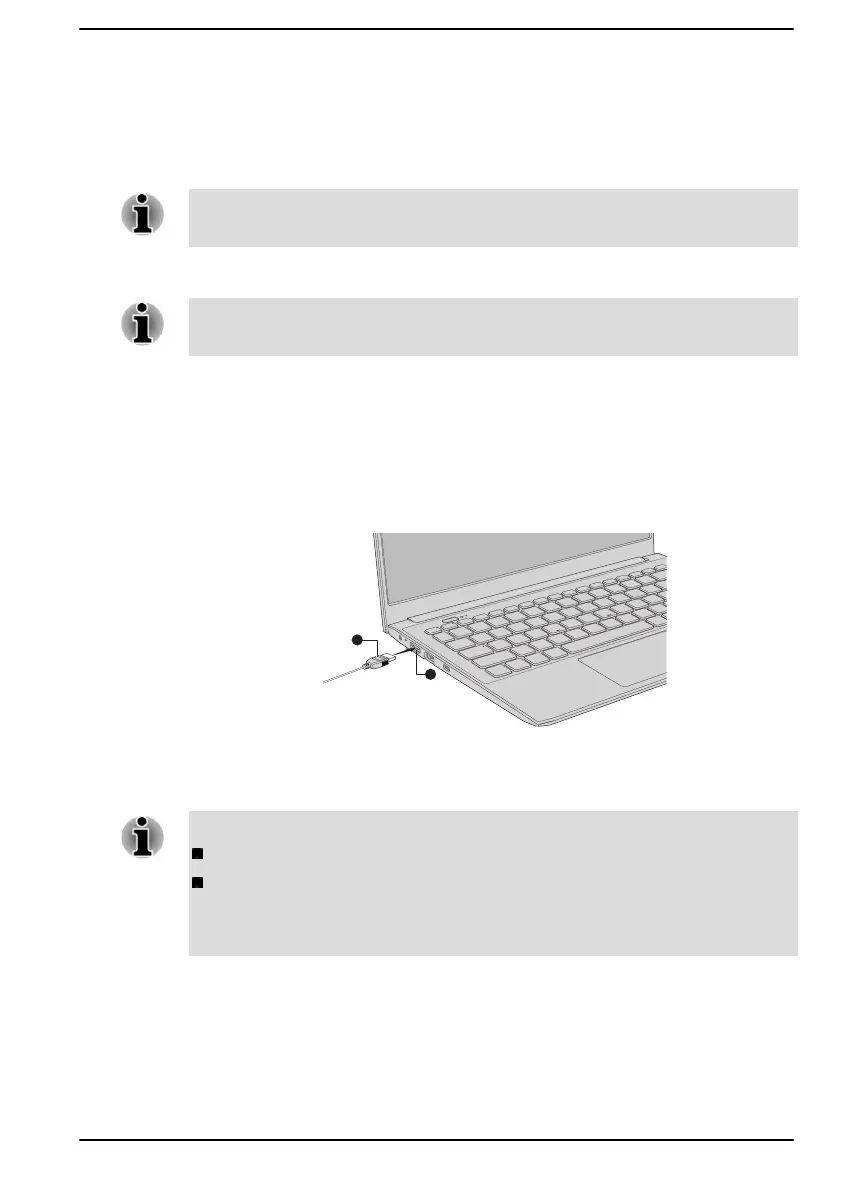
3. Plug the other end of the HDMI™ cable into the HDMI™ out port on
your computer.
Figure 4-5 Connecting the HDMI™ out port
1. HDMI™ out port 2. HDMI™ cable
Product appearance depends on the model you purchased.
Do not plug/unplug an HDMI™ device under the following conditions:
The system is starting up.
The system is shutting down.
When you unplug the HDMI™ cable and replug it, wait at least 5 seconds
before you replug the HDMI™ cable again.
Settings for display video on HDMI™
To view video on the HDMI™ display device, be sure to configure the
settings, otherwise you might find that nothing is displayed.
User's Manual
4-13


 To Next Page
 Loading...