- 5 –
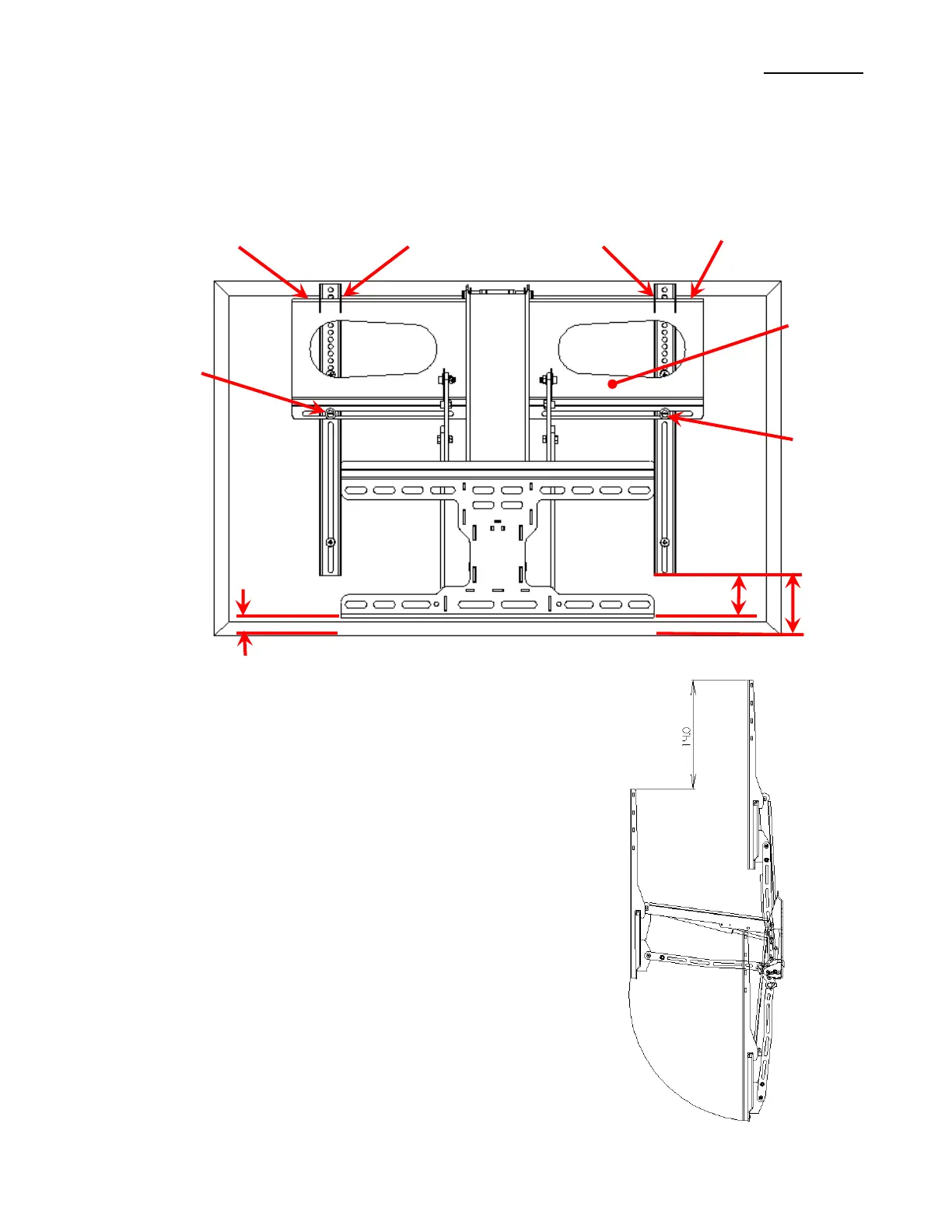
o Put the Level on the top edge of the Hook Plate where the Attach Arms Hook onto, see Figure 4 and 6, this
edge should be level to help ensure a level TV.
o 2 mounting holes are needed in the top slots of the mount and 2 in the bottom slots.
o 2 mounting holes need to be on each side of the of the center of the mount and the center of gravity of the television
12. Once you know your location pre-drill the 4 mounting holes 2.5in deep using the 1/4in drill bit.
13. Use the 4 3/8in lag bolts with washers to attach the mount to the wall. Tighten with a 9/16in box or socket wrench until the
mount is firmly pressed against the wall. A friend makes this much easier. Do NOT over tighten.
Secure
Arm Here
Secure
Arm Here
Hook Attach Arms
Over Hook Plate Edge
3.0”
Arm To
TV
Mount To TV, or
Arm To TV – 3.0”
Hook Plate
Level off of Hook
Plate Edge
Level off of Hook
Plate Edge
Figure 4 Mount Test Fitting
Positions Mount Will Stay At
The Down and Out Mount has a range of positions the mount
will hold the TV at. The general range is shown in Figure 5.
The mount can always stay in the top position.
From the top position down 14 inches the mount can be set to
stay but the angle may not be vertical and the TV will not have a
wide range of positions to stay at. The Mount really isn’t
designed to hold the TV in this range.
From 14 inches to all of the way down the mount can be set to
stay in a wide range of positions. Depending on the weight of
your TV the range will vary. For lighter TVs the mount may stay
in the entire bottom range. For Heavier TVs the mount may only
have a range of about 8 inches.
Figure 5 Positions Mount Will Stay At


 To Next Page
 Loading...
