8. Monitor Output (A & B)
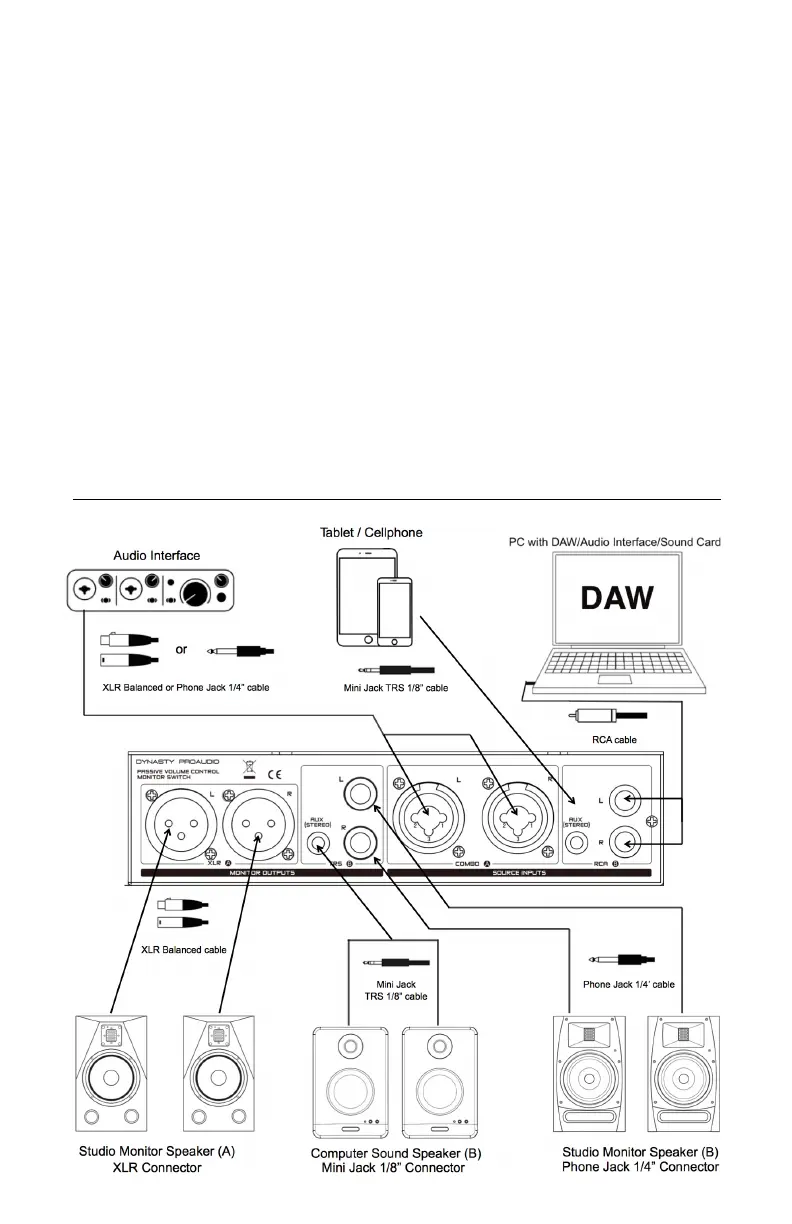
The PMC-2 stereo outputs are also located on the rear panel and feature a pair (Left and Right) of XLR
balanced and Phone Jack 1/4” unbalanced analog output connectors, those monitor outputs are fed by the
“control room bus.”
This is the signal path fed from the source input currently selected with the source select button, the level of
each stereo output may be trimmed using the top panel volume rotary control to balance the level between
monitor speakers.
XLR (A): Use the XLR balanced cable to connect the inputs of powered studio monitors, or to a power
amplifier driving passive speakers.
TRS (B): Use the Phone Jack 1/4" or the Mini Jack TRS cable to connect PMC-2 to your studio monitors, or to
a power amplifier driving passive speakers.
The PMC-2
can be used with either balanced or unbalanced signals. Because the main stereo signal path
through the PMC-2 is passive, like a ‘straight-wire’, you should not mix balanced and unbalanced connections.
Doing so will ultimately ‘un-balance’ the signal through the PMC-2. If this is done, you may encounter
crosstalk or bleed. For proper performance, always maintain either a balanced or unbalanced signal
flow through the PMC-2 by using appropriate cables for your equipment. Most mixers, workstations and
near- eld monitors can work either balanced or unbalanced so this should not pose a problem when used with
the proper interface cables. The diagram below shows various types of balanced and unbalanced audio
cables.


 To Next Page
 Loading...