EasyManua.ls Logo

Dynasty ProAudio PMC-2 - User Manual

Dynasty ProAudio PMC-2
4 pages
Print Icon
To Next Page IconTo Next Page
Loading...
PMC-2
Passive Studio Monitor Volume
Controller Owners Manual
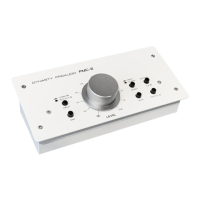
The Dynasty ProAudio PMC-2 is a 2 x 2 premium passive stereo monitor and
volume controller for professional computer-based studio applications and home
use. It is designed for a precise volume control of analog audio signals and is
inserted between analog signal sources and active speakers or amplifiers, also
can be connected between a PC sound card or audio interface and monitor
speakers, simply delivers an attenuated signal for pure transparent, without
compromising your audio which is one of the man benefits of passive volume
attenuation. It is ideal for quick and easy level control by using your fingngertips
with a large rotary control knob. The PMC-2 is completely passive and does not
require power supply, you can keep your software masters at unity and attenuate
the audio to your active monitor speakers precisely with the PMC-2 while main-
taining maximum audio resolution. The unit features balanced combo XLR /
Phone Jack, RCA Audio Line and Mini Jack TRS 3.5mm inputs, DIM & Mute/Mo-
no switches, XLR Balanced/Phone Jack/Mini Jack output, and a large rotary
volume control.
Question and Answer IconNeed help?

Do you have a question about the Dynasty ProAudio PMC-2 and is the answer not in the manual?

Summary

Dynasty ProAudio PMC-2 Overview

Product Description

A 2x2 premium passive stereo monitor and volume controller for professional and home studio applications.

PMC-2 Controls and Features

Volume Attenuation Control

Precise level adjustment from 0 to -50dB using the rotary control knob.

Mute Operation

Engages the mute function, disabling audio output for silence.

Stereo; Mono Switch

Switches between stereo or mono signal output for mix phase checks.

DIM Switch

Reduces signal to monitor outputs by 20 dB for conversations.

Source Input Select Switch

Selects between input source A (Combo Jack) and input source B (RCA/AUX).

Monitor Output Select Switch

Selects active monitor outputs between A (XLR) and B (TRS/AUX).

Source Input Connectors

Features combo XLR/Phone Jack, RCA, and Mini Jack inputs for audio sources.

Monitor Output Connectors

Provides balanced XLR and unbalanced Phone Jack outputs for monitors or amplifiers.

PMC-2 Setup and Troubleshooting

PMC-2 Setup Guide

Instructions on connecting the PMC-2 to audio sources and monitors.

Troubleshooting Common Issues

Addresses common problems like no sound, bad sound, and noise/hum/buzz.

Technical Support Information

Contact details for Dynasty ProAudio support for technical questions.

Dynasty ProAudio PMC-2 Specifications

General IconGeneral
BrandDynasty ProAudio
ModelPMC-2
CategoryController
LanguageEnglish