3. Connecting the Subwoofer
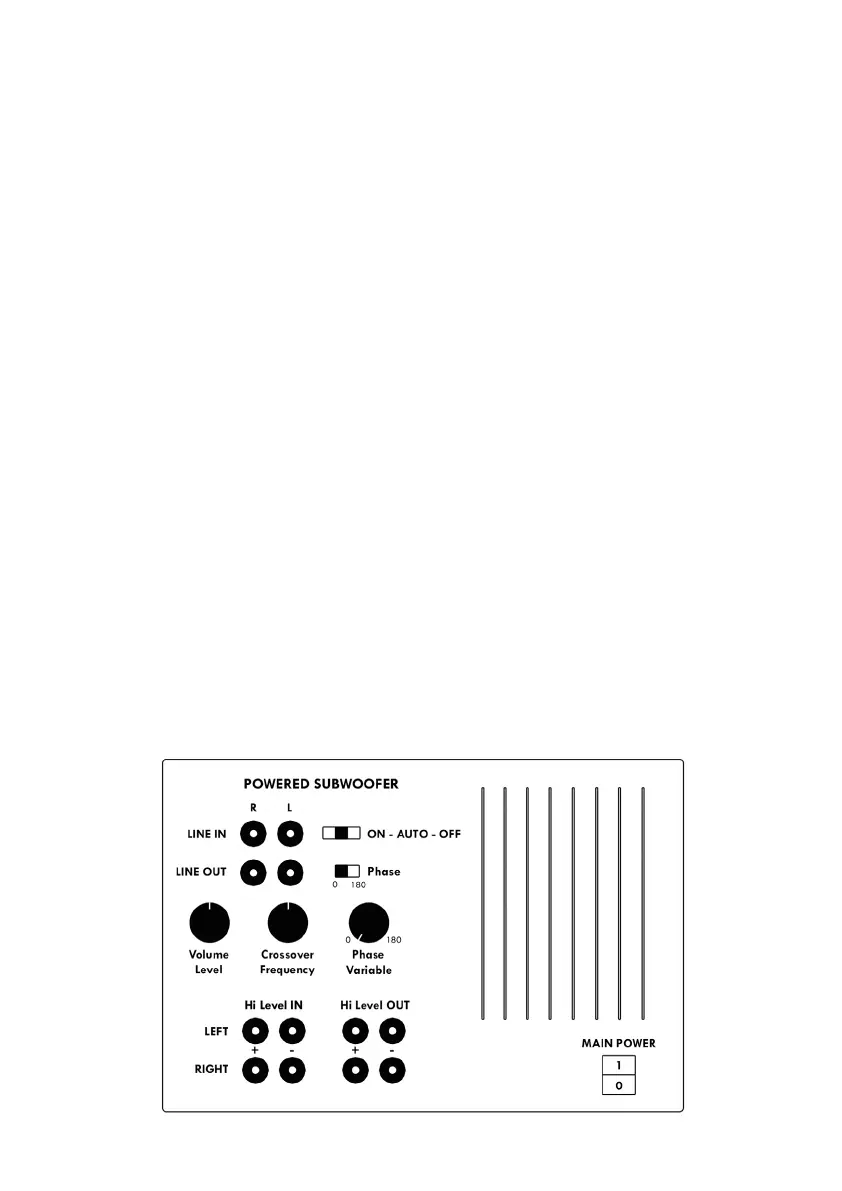
There are several ways to connect the subwoofer to the amplier, here are three
options. The level of the bass is controlled by the volume control on the subwoofer.
Thereafter the volume can be regulated on the amplier as usual.
3.1 Option 1 (Thunder, Challenger, Magic and Charisma series)
If your amplier has a subwoofer output, connect the subwoofer to this with a shiel-
ded RCA cable. If you have an LFE input use it, otherwise, choose Mono or Line IN R.
To increase the bass more, you can connect a Y cable that share the RCA cable to
the two connectors that you connect to Line IN R and Line IN L. Remember to turn
the subwoofer output on your amplier.
3.2 Option 2 (Thunder, Challenger, Magic and Charisma series)
If the amplier has separate preamp outputs on the left and right channels, connect
these to the subwoofer Line IN R and Line IN L. Use a shielded dual RCA.
3.3 Option 3 (Challenger and Magic series)
If your amplier does not have subwoofer output, you can connect your subwoofer
with a conventional speaker cable through the Hi-Level-IN. The subwoofer is then
parallel connected with the front speakers to the amplier speaker outputs. On the
subwoofer connect the left and right cable Left Hi Level IN and Right Hi Level IN.
Attention! Make sure to connect + to + and – to –.
4. Settings on your subwoofer
You can change all knobs and switches while the amplier is on.
4


 To Next Page
 Loading...