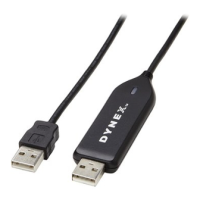
The Dynex DX-UBDB9 is a USB 1.1 Serial Adapter designed to bridge communication between a USB port and a standard serial port. This adapter allows you to connect a serial (RS-232) device with a DB9P male connector to a PC, router, or hub port.
Function Description:
The primary function of the DX-UBDB9 is to provide a reliable connection between modern computers, which often lack native serial ports, and legacy serial devices. It effectively converts a USB port into a serial port, enabling data exchange between the two different interface types. This is particularly useful for connecting devices such as modems, point-of-sale terminals, industrial control equipment, and other peripherals that rely on RS-232 serial communication to computers with USB ports. The adapter is compliant with the USB 1.1 specification, ensuring compatibility with a wide range of USB-enabled systems. It also supports Plug & Play functionality, which simplifies the installation process for users. Furthermore, the device includes debug UART for debug and code development, making it a versatile tool for developers working with serial communication.
Important Technical Specifications:
- Data Transfer Rate: The adapter supports a data transfer rate of up to 115 kbps. This speed is suitable for most standard serial communication applications, including data logging, device configuration, and command-line interfaces.
- USB Standard: Compliant with USB 1.1 specification. While not the latest USB standard, USB 1.1 is sufficient for the data rates required by most serial devices and ensures broad compatibility with older and newer systems.
- Serial Interface: Operates as a bridge between a USB port and a standard RS-232 port. The RS-232 standard is widely used for serial communication, and the adapter's support for this standard ensures compatibility with a vast array of serial devices.
- System Requirements:
- IBM compatible Pentium-233 MHz processor or faster.
- 64 MB RAM or more.
- Available USB port.
- OS support for all versions of Windows®, Mac OS X, and Linux. This broad operating system compatibility makes the adapter highly versatile for different user environments.
Usage Features:
The Dynex DX-UBDB9 is designed for straightforward use, with features that facilitate easy installation and operation across various operating systems.
- Plug & Play Compatibility: The adapter supports Plug & Play, meaning that in many cases, the operating system will automatically detect the device and install the necessary drivers upon connection. This significantly reduces the complexity of setup for users.
- Driver Installation:
- Windows 7/8 via Windows Update: For Windows 7 and 8, the driver can often be installed automatically via Windows Update. Users simply plug the adapter into a USB port, and Windows checks for and downloads the appropriate driver.
- All Windows Versions (Manual Installation): If Windows Update does not automatically install the driver, or for other Windows versions, users can manually download the driver from the Dynex products website (www.dynexproducts.com). After navigating to the Support & Service section and entering the model number (DX-UBDB9), users can find the driver under "Drivers, Firmware and Software." The installation process involves running an executable file (PL2303_Prolific_DriverInstaller_vX.X.X.exe) and following the on-screen instructions of the InstallShield Wizard. This typically involves clicking "Next" to proceed through the installation steps and "Finish" to complete the process, often requiring a computer restart.
- Linux: No specific drivers are required for the Linux Operating System, making it particularly easy to use for Linux users.
- Mac OS X: For Mac OS X, drivers can be downloaded from the Dynex products website. The process involves navigating to the Support & Service section, entering the model number, and downloading the appropriate driver file (e.g., md_PL2303_MacOSX10_6_dmg_vX.X.X). After downloading, users open the disk image file and run the installer (Install Prolific USB to Serial Cable driver v1.4.0 for Mac OS X). The installation wizard guides the user through steps such as selecting the destination, confirming installation type, and clicking "Install." A system restart is typically required after installation.
- Connectivity: The adapter connects to an available USB port on the PC and provides an RS-232 end for connecting to the serial device. This simple two-point connection ensures ease of setup.
- Device Manager Verification: After installation, users can verify that the adapter is correctly installed by checking the Device Manager (on Windows) or USB Hardware Inside System Profiler (on Mac). On Windows, it should appear as "Prolific USB-to-Serial Comm Port (COMx)," where "x" is the assigned COM port number. On Mac, it should be listed as "USB-Serial Controller" or "USB-Serial Controller D," or "IEEE-1284 Controller" under the USB Device Tree.
Maintenance Features:
The Dynex DX-UBDB9 is designed to be a low-maintenance device, with most "maintenance" revolving around proper handling and driver management.
- Safety Instructions:
- Keep User Guide for Future Reference: Retaining the user guide is crucial for troubleshooting and understanding device features.
- Keep Equipment Away from Humidity: Exposure to moisture can damage the device, so it should be kept in a dry environment.
- Lay Equipment on a Reliable Flat Surface: This prevents accidental falls and physical damage.
- Professional Servicing for Malfunctions: If the equipment shows signs of moisture exposure, damage, or is not working well, it should be checked by a service technician. Users are advised not to attempt repairs themselves if the equipment is not working correctly or shows signs of breakage.
- Driver Updates: While the initial driver installation is typically sufficient, checking the Dynex website periodically for updated drivers can ensure optimal performance and compatibility with newer operating system versions. This proactive approach helps maintain the device's functionality over time.
- Troubleshooting: The manual provides guidance on verifying driver installation, which is a key step in troubleshooting connectivity issues. If the device is not recognized or functioning correctly, checking the Device Manager (Windows) or System Profiler (Mac) can help identify if the driver is installed correctly or if there are conflicts.
- Warranty: The product comes with a one-year limited warranty, covering defects in material or workmanship. This provides assurance for users regarding product quality and offers options for repair or replacement if defects occur within the warranty period. To obtain warranty service, users typically need to provide proof of purchase and contact Dynex customer service. The warranty does not cover damages from misuse, accidents, cosmetic damage, or modifications.
In summary, the Dynex DX-UBDB9 USB 1.1 Serial Adapter is a practical and essential tool for bridging the gap between modern USB-only computers and a wide array of legacy serial devices. Its broad operating system support, straightforward installation process, and adherence to standard communication protocols make it a reliable choice for both general users and developers. Proper handling and adherence to safety guidelines ensure its longevity and consistent performance.

 Need help?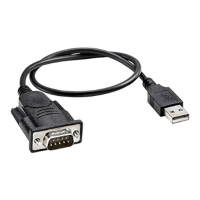

 To Next Page
 General