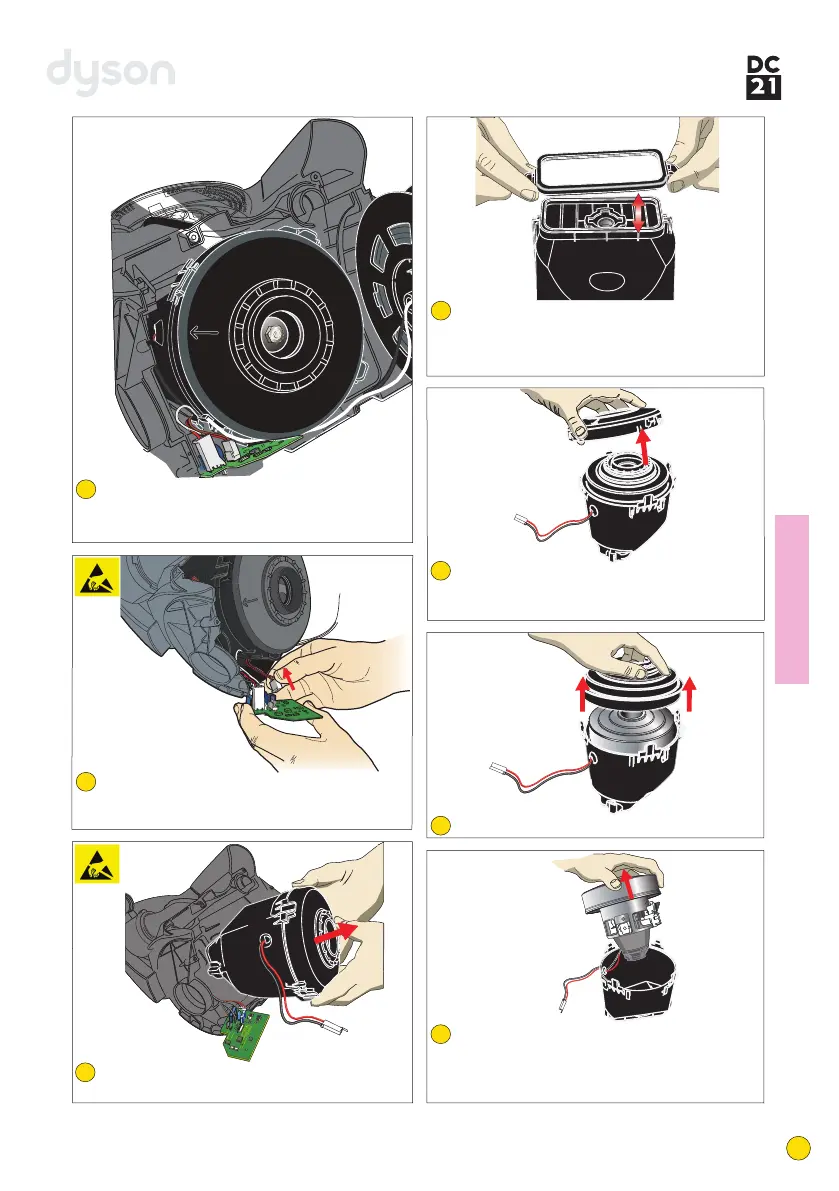
Release the cable rewind from the lower motor
cover (LMC) assembly. Unclip the fly leads
from around the side of the motor bucket.
Slide the PCB assembly carefully out of the
LMC assembly. Carefully unclip all connectors
from the PCB assembly.
Firmly release the four retaining clips on the
side of the motor bucket. Lift off the motor
bucket top.
Peel the fan case seal off the base of the motor.
Lift the motor, motor plate and mount out of
the motor bucket. Unclip the wiring harness
from the motor. Release the wiring harness
from the motor bucket if necessary.
The motor bucket mount can be replaced if
necessary as shown. When fitting ensure the
mount is correctly located within the channel
on the motor bucket.
Fitting notes
12
15
16
17
18
Release the motor bucket from the LMC
assembly.
14
13
8
service manual



 To Next Page