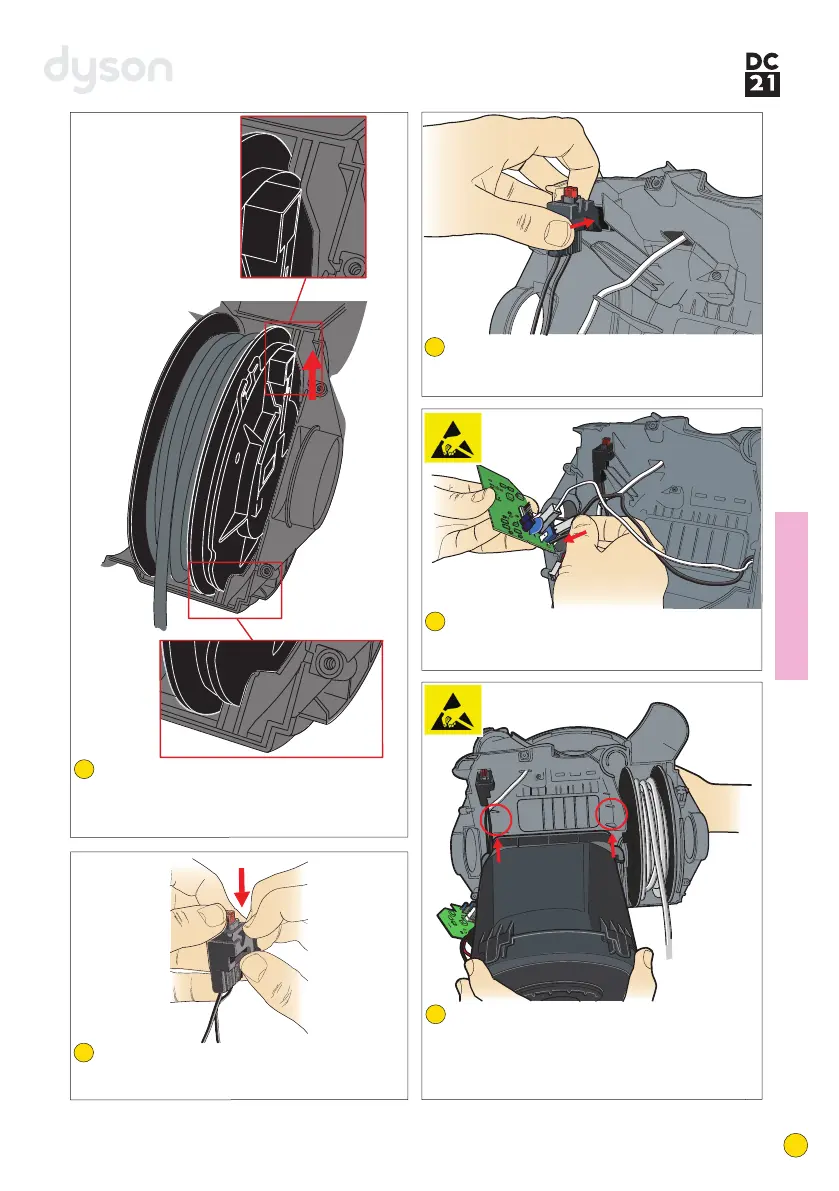
Carefully attach the wires from the cable
rewind assembly and cyclone inlet assembly
onto the PCB assembly.
Locate the black wires from the PCB assembly
through the switch holder and attach to the
switch. Clip the switch into the holder.
Locate the cable rewind assembly into the
LMC assembly. Ensure it sits within the LMC
as shown. When fitted correctly the brake
actuator will point directly upwards.
Fitting notes
33
35
32
Position the switch holder into the LMC
assembly. When positioned correctly the switch
button will point directly upwards.
34
Lower the motor bucket into the LMC assembly.
The lugs on the motor bucket mount locate
into the ribs within the LMC assembly. Locate
the cable rewind wires within the retaining clips
around the side of the motor bucket.
36
12
service manual



 To Next Page