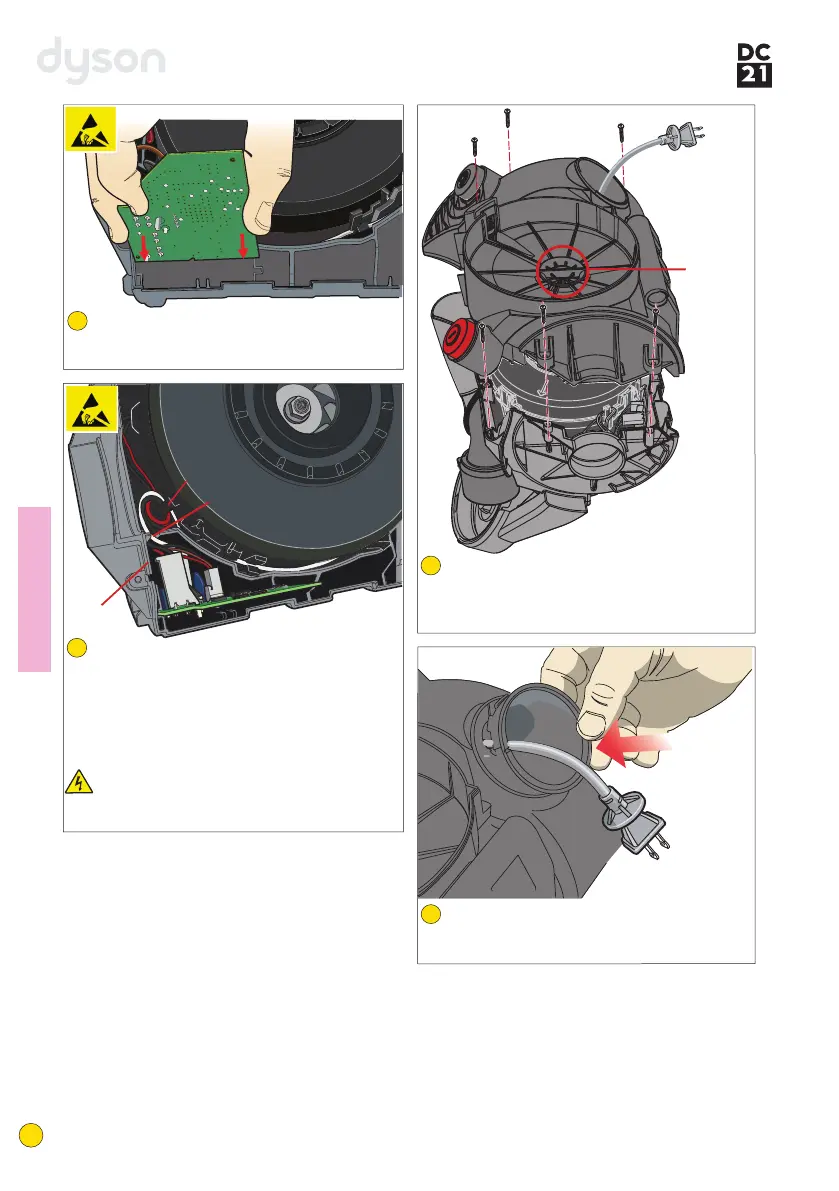
Locate the plug through the UMC. Position
the LMC vertically. Locate the UMC onto it
ensuring that the UMC grille is seated centrally
around the fancase seal. Refit the 6 screws.
Open the cable collar and fit over the
powercord. Locate the collar into the LMC.
Firmly clipinto place.
Fitting not
es
39
40
Carefully attach the wiring harness to the PCB
assembly. Locate the PCB assembly into the
channels in the LMC assembly.
37
Neatly dress all wires within the channel
provided. Hook the wiring harness around
the last retaining clip on the side of the motor
bucket.
Note: locating the cable rewind wires in the
channel last, retains the other wires within the
channel.
Important: ensure all wires are clear of the
side wall. Failure to ensure this could result
in trapped wires when fitting the UMC.
38
Side wall
Channel
Retaining
clip
13
service manual
U
M
C
grille



 To Next Page