EasyManua.ls Logo

Dyson zone - User Manual

Dyson zone
17 pages
Print Icon
To Next Page IconTo Next Page
Loading...
User manual
XXXX JN.00000 PN.000000-00-00
00.00.00 VERSION NO.01
Contents
In the box
Download the MyDysonapp
Getting started
Assembling your headphones
Pairing your headphones
Charging your headphones
Airflow control
Using audio
Active noise cancelling
Audio joystick
LEDs
In-flight adaptor
Changing your filters
Cleaning your Dyson Zone™
headphones with air purification
Reassembling your headphones
Question and Answer IconNeed help?

Do you have a question about the Dyson zone and is the answer not in the manual?

Summary

Dyson Zone: Unboxing and Included Accessories

Included Accessories List

Lists and describes the various accessories provided with the Dyson Zone™ headphones.

Dyson Zone: MyDyson App Setup

Dyson Zone: Getting Started Guide

Audio Joystick Operation

Introduction to the audio joystick for music, volume, and voice assistant control.

Airflow and ANC Modes Overview

Learn about Auto-activity mode and Transparency mode for environmental control.

Charging with USB-C Cable

Instructions on how to connect the USB-C cable to charge the headphones.

Dyson Zone: Assembling Your Headphones

Filter Insertion and Cover Replacement

Guide to inserting filters into the ear cups and securely replacing the covers.

Adjusting Headband Fit

How to adjust the headband for a comfortable and secure fit.

Dyson Zone: Attaching and Adjusting the Visor

Magnetic Visor Attachment

Steps to attach the visor to the ear cups using magnetic connectors.

Optimizing Visor Position

Adjusting the visor for comfort and automatic airflow activation.

Dyson Zone: Pairing Your Headphones

Connecting to MyDyson App

Procedure for connecting your headphones to the MyDyson™ app.

Bluetooth Audio Pairing

Steps to pair headphones via Bluetooth® for audio playback.

Dyson Zone: Charging Your Headphones

Battery Life and Initial Use

Information on battery life and recommendations for initial use.

LED Charging Indicators Explained

Explanation of LED signals for charging status and battery levels.

Dyson Zone: Airflow Control

Automatic and Manual Airflow

How the headphones automatically adjust airflow or how to set it manually.

Understanding Airflow Modes

Details on Auto, Rest, Light, and Moderate airflow modes and their battery impact.

Dyson Zone: Using Audio Playback

Audio Control with Joystick

How to use the joystick for play/pause, skip, volume, and voice assistant.

Dyson Zone: Active Noise Cancelling (ANC)

ANC Modes: Isolation, Transparency, Conversation

Describes Isolation, Transparency, and Conversation modes for managing ambient sound and noise.

Dyson Zone: Audio Joystick Detailed Functions

Comprehensive Joystick Operations

Comprehensive guide to all joystick functions for audio, calls, and voice assistant.

Dyson Zone: Understanding LED Indicators

LED Status and Alerts Explained

Decoding LED indicators for power, battery, Bluetooth, filters, and system alerts.

Dyson Zone: In-flight Adaptor Usage

Connecting to Aircraft Audio Systems

Instructions for connecting the adaptor to airplane audio ports.

In-flight Adaptor Safety Warnings

Crucial safety information regarding the in-flight adaptor's use.

Dyson Zone: Changing Your Filters

Filter Life and Replacement

Information on filter lifespan, alerts, and the procedure for replacing filters.

Filter Removal and Insertion Guide

Step-by-step instructions for removing old filters and inserting new ones.

Dyson Zone: Cleaning Your Headphones

Quick Cleaning Guide

How to perform a quick clean of ear cups, cushions, and the visor.

Dyson Zone: Reassembling Your Headphones

Visor Reassembly Guide

Guide to reassembling the visor components after cleaning.

Reattaching the Visor to Headphones

Final steps to attach the reassembled visor back to the headphones.

Summary

Dyson Zone: Unboxing and Included Accessories

Included Accessories List

Lists and describes the various accessories provided with the Dyson Zone™ headphones.

Dyson Zone: MyDyson App Setup

Dyson Zone: Getting Started Guide

Audio Joystick Operation

Introduction to the audio joystick for music, volume, and voice assistant control.

Airflow and ANC Modes Overview

Learn about Auto-activity mode and Transparency mode for environmental control.

Charging with USB-C Cable

Instructions on how to connect the USB-C cable to charge the headphones.

Dyson Zone: Assembling Your Headphones

Filter Insertion and Cover Replacement

Guide to inserting filters into the ear cups and securely replacing the covers.

Adjusting Headband Fit

How to adjust the headband for a comfortable and secure fit.

Dyson Zone: Attaching and Adjusting the Visor

Magnetic Visor Attachment

Steps to attach the visor to the ear cups using magnetic connectors.

Optimizing Visor Position

Adjusting the visor for comfort and automatic airflow activation.

Dyson Zone: Pairing Your Headphones

Connecting to MyDyson App

Procedure for connecting your headphones to the MyDyson™ app.

Bluetooth Audio Pairing

Steps to pair headphones via Bluetooth® for audio playback.

Dyson Zone: Charging Your Headphones

Battery Life and Initial Use

Information on battery life and recommendations for initial use.

LED Charging Indicators Explained

Explanation of LED signals for charging status and battery levels.

Dyson Zone: Airflow Control

Automatic and Manual Airflow

How the headphones automatically adjust airflow or how to set it manually.

Understanding Airflow Modes

Details on Auto, Rest, Light, and Moderate airflow modes and their battery impact.

Dyson Zone: Using Audio Playback

Audio Control with Joystick

How to use the joystick for play/pause, skip, volume, and voice assistant.

Dyson Zone: Active Noise Cancelling (ANC)

ANC Modes: Isolation, Transparency, Conversation

Describes Isolation, Transparency, and Conversation modes for managing ambient sound and noise.

Dyson Zone: Audio Joystick Detailed Functions

Comprehensive Joystick Operations

Comprehensive guide to all joystick functions for audio, calls, and voice assistant.

Dyson Zone: Understanding LED Indicators

LED Status and Alerts Explained

Decoding LED indicators for power, battery, Bluetooth, filters, and system alerts.

Dyson Zone: In-flight Adaptor Usage

Connecting to Aircraft Audio Systems

Instructions for connecting the adaptor to airplane audio ports.

In-flight Adaptor Safety Warnings

Crucial safety information regarding the in-flight adaptor's use.

Dyson Zone: Changing Your Filters

Filter Life and Replacement

Information on filter lifespan, alerts, and the procedure for replacing filters.

Filter Removal and Insertion Guide

Step-by-step instructions for removing old filters and inserting new ones.

Dyson Zone: Cleaning Your Headphones

Quick Cleaning Guide

How to perform a quick clean of ear cups, cushions, and the visor.

Dyson Zone: Reassembling Your Headphones

Visor Reassembly Guide

Guide to reassembling the visor components after cleaning.

Reattaching the Visor to Headphones

Final steps to attach the reassembled visor back to the headphones.

Overview

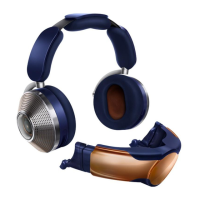
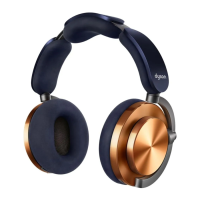
The Dyson Zone™ is a pair of headphones with integrated air purification, designed to provide both high-quality audio and purified airflow. This innovative device combines active noise cancellation (ANC) with a contactless visor that delivers purified air to the user's nose and mouth. The headphones are controlled via an audio joystick on the right ear cup and an airflow button on the left ear cup, and can also be managed through the MyDyson™ app.

Function Description

The primary function of the Dyson Zone™ is to offer an immersive audio experience while simultaneously providing purified air. The headphones feature Active Noise Cancelling (ANC) to reduce surrounding and background noise, allowing users to focus on their audio or enjoy a quieter environment. The integrated air purification system uses electrostatic carbon filters to capture pollutants, delivering clean air through a contactless visor. The device is designed to adapt to the user's activity level, automatically adjusting airflow, or allowing manual control through various modes.

Usage Features

Audio Control:

The audio joystick, located on the back of the right ear cup, provides comprehensive control over audio playback and volume.

  • Play/Pause: Press the middle of the joystick once.
  • Skip/Seek: Tap the joystick left or right to skip tracks. Press and hold left or right to fast forward or rewind.
  • Volume Adjustment: Push the joystick up or down to adjust the volume. A slow press adjusts volume gradually, while holding it increases volume quickly until released.
  • Voice Assistant: Press and hold the middle of the joystick to activate the voice assistant on your mobile device.
  • Call Management: Press the joystick to accept or end a call, and press and hold to decline a call.

Airflow Control:

The Dyson Zone™ offers several airflow modes, which can be selected via the airflow button on the left ear cup or through the MyDyson™ app.

  • Auto Mode: The headphones detect your activity level and automatically adjust airflow.
  • Rest Mode: Provides the lowest airflow setting, extending battery life.
  • Light Mode: Offers increased airflow.
  • Moderate Mode: Delivers the highest available airflow setting.
  • Off: Turns off the air purification system.

Noise Cancellation Modes:

The headphones offer different noise cancellation and transparency modes to suit various environments.

  • Isolation Mode: This is the default setting, providing the maximum level of ANC to reduce surrounding and background noise.
  • Transparency Mode: Double-tap either ear cup to switch to this mode, which amplifies surrounding sounds, allowing you to hear your environment more clearly.
  • Conversation Mode: Flipping the visor down automatically pauses airflow, audio, and noise cancelling. Voices are amplified, enabling conversations while wearing the headphones.

Connectivity:

  • Bluetooth®: Connects wirelessly to your mobile device for audio playback. Pairing is initiated by pressing and holding the airflow button until the LED pulses blue.
  • MyDyson™ App: An essential part of the experience, the app allows you to control the headphones, access live reporting on air quality and noise, and check battery and filter life.
  • USB-C Charger: Used for charging the headphones.
  • In-flight Adaptor: Connects to 2-pin audio outlets on planes for entertainment systems. Note that audio controls on the headphones will not function when using this adaptor, and it only charges the device when the USB-C cable is also connected.

Assembly and Fit:

  • Filter Insertion: Filters are inserted by twisting off the ear cup covers anti-clockwise, securing the filters into the ear cups, and then twisting the covers clockwise to secure them.
  • Headphone Adjustment: The headband can be adjusted by sliding both sides to achieve a comfortable fit.
  • Visor Attachment: The contactless visor attaches to each ear cup using magnetic connectors. It should be positioned below the mouth and then pushed up to cover the nose and mouth. The airflow starts automatically once the visor is adjusted to a comfortable position, close to but not touching the face.
  • Slide Adjustor: Adapts to different face shapes and sizes for the visor.

LED Indicators:

LEDs provide visual feedback on the device's status.

  • Power On/Off: White LED flashes momentarily.
  • Battery Status: Green LED for over 20% charge, solid amber for under 20% charge, flashing amber for insufficient charge for purification.
  • Charging Status: Pulsing amber while charging, solid green then fading off when fully charged.
  • Bluetooth®: Continuous blue pulse in discoverable mode, solid blue when successfully connected.
  • Filter Status: Pink LED pulse indicates filters need changing.
  • Alerts: Red LED flash for Dyson support, white LED pulsed flashing for update installation.

Maintenance Features

Filter Replacement:

  • Filter Life Monitoring: The MyDyson™ app and headphones will alert you when filter life is low. Filter life depends on usage time and activity level.
  • Non-washable Filters: Filters are not washable and must be replaced when alerted by the app.
  • Replacement Process: Twist off ear cup covers anti-clockwise, carefully lift out and dispose of old filters, insert new filters, and twist covers clockwise to secure. Remember to reset filter life in the MyDyson™ app after replacement.

Cleaning:

Regular cleaning is crucial for maintaining maximum performance.

  • Ear Covers: Wipe dust or debris from perforations with a soft, damp, lint-free cloth.
  • Ear Cushions: Wipe dust or debris with a soft, damp, lint-free cloth.
  • Visor: Wipe dust or debris with a soft, damp, lint-free cloth.
  • Visor Deep Cleaning:
    • Removal: Push the visor down and gently pull it away from the ear cups.
    • Disassembly: Slide out the side extensions and unclip them from the visor. Pinch the outer edges of the mesh until it pops out.
    • Washing: Wash the visor and mesh with warm water and dish soap. Use the Dyson visor cleaning brush to reach all areas. Rinse all parts thoroughly.
    • Drying: Leave the visor to dry in a well-ventilated, warm place. Ensure all parts are completely dry before reassembling.
  • Reassembly: Clip in the inner mesh, slide in side extensions until they click into position, and reattach the visor to your headphones.

Allow sufficient time for your headphones to dry completely before using them again after cleaning.

Dyson zone Specifications

General IconGeneral
Headset typeBinaural
Product typeHeadset
Product colorBlue
Wearing styleHead-band
Recommended usageCalls/Music
Driver unit40 mm
Magnet typeNeodymium
Ear couplingCircumaural
Headphone frequency6 - 21000 Hz
Noise canceling typeActive
Headphone sensitivity94 dB
Microphone typeBuilt-in
Number of microphones11
USB connectorUSB Type-C
Bluetooth version5.0
Bluetooth profilesA2DP, AVRCP, HFP
Connectivity technologyWired & Wireless
Battery typeBuilt-in battery
Battery capacity2600 mAh
Battery recharge time3 h
Continuous audio playback time50 h
Battery life3000 min
Weight and Dimensions IconWeight and Dimensions
Weight670 g