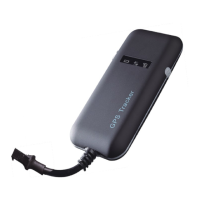
The GT06 is a high-precision vehicle GPS tracker that leverages both 4G/GSM communication technology and GPS high-precision satellite positioning technology. This device enables remote positioning and monitoring of any target via SMS, a dedicated application, and the Internet. It incorporates advanced GPS and AGPS dual positioning technology, featuring a built-in satellite receiving antenna that provides positioning accuracy of less than 10 meters, making it suitable for vehicle positioning and tracking applications. Through continuous technological innovation, the GT06 offers high accuracy, high sensitivity, low power consumption, and a compact size. Its exceptional tracking sensitivity significantly expands its positioning coverage.
Key Features (GT06 and GT06N models):
- Universal Compatibility: Supports 2G/4G networks.
- Wide Voltage Input: Operates within an ultra-wide voltage input range of DC 10V to 40V.
- Continuous Positioning & Reporting: Provides continuous GPS positioning and regular GPRS reporting, with a default reporting interval of 1 report every 10 seconds.
- Location Query: Supports querying location information via SMS and a dedicated platform.
- Intelligent Anti-theft: Features a built-in vibration sensor for intelligent vehicle anti-theft capabilities.
- ACC Ignition Detection: Detects ACC ignition signals and displays vehicle status.
- Remote Vehicle Control: Allows remote control of the vehicle via a Relay.
- SOS Button Connectivity: An SOS switch button can be connected for emergency calls for help.
- Backup Battery & Alarm: Equipped with a 180 MAH lithium battery to enable illegal thread cutting alarms.
- Voice Monitor: Includes a voice monitoring function.
- Door Alarm: Provides a door alarm feature.
Product Specifications:
- Positioning Accuracy: Achieves an accuracy of 10 meters.
- Additional Functions: Offers a comprehensive suite of alarms and controls, including Door alarm, ACC detection, Low power alarm, Wire-Cut alarm, Remote oil control, SOS Alarm, Overspeed alarm, Vibration alarm, and Geo-Fence capabilities.
- Application Area: Ideal for a wide range of vehicles, including Leased Vehicles, Credit Vehicles, Passenger Vehicles, Taxis, Freight Vehicles, Cars, and Motorcycles.
- Power Supply: Designed to be powered by a car battery.
- Work Voltage Range: 10V to 40V.
- Work Current: 12V/30mA to 80mA.
- Sleep Current: 12V/5mA to 15mA.
- Battery Capacity: 3.7V/180mAH lithium battery.
- Work Temperature Range: -30°C to +80°C.
- Storage Temperature Range: -40°C to +85°C.
- Operating Humidity Range: 5% to 95%.
- Communication Module Brand: Simcom/A7670SA.
- Network System: 2G/4G.
- Communication Band:
- LTE FDD: B1/B2/B3/B4/B5/B7/B8/B28/B66
- LTE TDD: B34/B38/B39/B40/B41
- GSM: 850/900/1800/1900MHZ
- SIM Card: Supports BIG SIM CARD.
- Communication Antenna: Built-in design.
- Positioning Type: GPS/AGPS/LBS.
- Cold Start Time: <30S (Open Sky).
- Warm Start Time: <10S (Open Sky).
- Hot Start Time: <2S (Open Sky).
- GPS Sensitivity: -165dBm.
- Acquisition Sensitivity: -148dBm.
- Position Accuracy: 10M.
Indicator Definitions:
The device features three LED indicators to communicate its status:
- GPS LED Indicator (Blue LED):
- Flashing: Searching GPS signal.
- Continuously bright: GPS fixed.
- Continuously dark: No GPS fix or initializing.
- Continuously bright to dark: Device is in sleeping mode.
- Communication LED Indicator (Green LED):
- Flashing: Searching communication signal.
- Continuously bright: Communication signal OK.
- Continuously dark: No communication signal or initializing.
- Continuously bright to dark: Device is in sleeping mode.
- Power Status Indicator (Red LED):
- Flashing: No external power.
- Continuously bright: External power OK.
- Continuously dark: No battery and no external power.
- Continuously bright to dark: Device is in sleeping mode.
Equipment Wiring Requirements:
The device requires a DC 10V-40V power supply. The red wire is the positive pole, and the black wire is the negative pole. The negative pole of the power supply should be connected to ground or metal surfaces, avoiding connection with other ground lines. After connecting the power supply wires, the power supply plug should be connected to the device.
SMS Command Description:
All commands are SMS-based, case-insensitive, and require a space between parameters. Key SMS commands include:
- APN Setting: Configures the Access Point Name for data transmission.
APN123456 APN internet (Example: apn123456 internet)APN123456 APN APNNAME APNPASSWORD claro claro (Example: apn123456 java.claro.com.br claro claro)- Successful Setting:
set apn ok!
- Server Setting: Configures the IP address and port of the server.
adminip123456 ip port (Example: adminip123456 45.112.205.99 7018)adminip123456 domain port (Example: adminip123456 www.19gps.net 7018)- Successful Setting:
set ip port ok!
- Heartbeat Packet Upload Time Setting: Sets the interval for sending heartbeat packets (90-600 seconds, default 300 seconds).
TCP123456 300 (Example: TCP123456 300)- Successful Setting:
TCP ok!
- Moving Upload Time Setting: Sets the upload interval when the device is moving (default 10 seconds, 30 means 30 seconds).
fix123456 30 (Example: fix123456 30)- Successful Setting:
fix 30S ok!
- Static Upload Time Setting: Controls GPS data upload when static (default GPS closed, only heartbeat packets).
sup123456 5 (Example: sup123456 5 for 5 minutes upload interval)- To cancel:
nosup123456
- Successful Setting:
1)sup ok! 2)nosup ok!
- Sleeping Setting: Puts the tracker into sleeping mode after 5 minutes of being static.
sleepin123456 (Example: sleepin123456)- Successful Setting:
sleepin ok
- Inflection Points Supplementary Setting: Automatically adds GPS data points when the turning angle exceeds a set degree (default 22 degrees, scope 18-28 degrees).
angle123456 20 (Example: angle123456 20)- To cancel:
noangle123456
- Successful Setting:
1)angle ok! 2)noangle ok!
- Relay Action Command (Oil Cut/Resume): Remotely controls the vehicle's oil pump power. Requires GPS fixed and speed < 20km/h for oil cut.
- Oil Cut:
cut123456 (Example: cut123456)
- Resume Oil:
resume123456 (Example: resume123456)
- Successful Setting:
1)Stop engine Succeed! 2)Resume engine Succeed!
- Sound Monitor And Tracking mode:
- Sound Monitor:
monitor123456 (Tracker auto answers calls)
- Tracking Mode:
tracker123456 (Tracker returns Google link message after calling)
- Successful Setting:
1)monitor ok! 2)tracker ok!
- SMS Position Query: Returns a Google link message with GPS or LBS data.
smslink123456 (Example: smslink123456)- Successful Setting:
Google link with GPS data or LBS data.
- SMS Command Password: Changes the default password (123456) to a new 6-digit number.
password123456 888888 (Example: password123456 888888)- To revert to default:
begin888888 (if new password is 888888)
- To factory reset password:
superformat123456
- Successful Setting:
password ok!
- Admin Numbers Setting: Sets up to 5 admin numbers (country code needed).
Admin123456 008613800138000 (Example: Admin123456 008613800138000)- Successful Setting:
1) admin ok! 2) admin fail!admin number full
- Low Battery Alarm: Enables or disables low battery alarms (triggered when battery < 3.55V).
- Enable:
lowbattery123456 on (Example: lowbattery123456 on)
- Disable:
lowbattery123456 off (Example: lowbattery123456 off)
- Successful Setting:
1) lowbattery on ok! 2) lowbattery off ok!
- Wire-Cut Alarm: Enables or disables alarms for external power cuts.
- Enable:
extpower123456 on (Example: extpower123456 on)
- Disable:
extpower123456 off (Example: extpower123456 off)
- Successful Setting:
1) extpower on ok! 2) extpower off ok!
- Overspeed Alarm: Enables or disables overspeed alarms (e.g.,
speed123456 80 for 80km/h). Suggested value > 30.
- Enable:
speed123456 80 (Example: speed123456 80)
- Disable:
nospeed123456 (Example: nospeed123456)
- Successful Setting:
1) speed ok! 2) nospeed ok!
- Shock Alarm: Enables or disables shock alarms (effective for 5 minutes after activation).
- Enable:
shock123456 (Example: shock123456)
- Disable:
noshock123456 (Example: noshock123456)
- Successful Setting:
1) shock ok! 2) noshock ok!
- Time Zone: Sets the device's time zone.
time zone123456 8 (Example: time zone123456 8 for +8 time zone)time zone123456 -8 30 (Example: time zone123456 -8 30 for -8:30 time zone)- Successful Setting:
time zone ok!
- Defensive State (Arm/Disarm): Enables or disables defensive mode (all alarms enabled when armed, requires ACC off).
- Enable Arm:
arm123456 (Example: arm123456)
- Disable Arm:
disarm123456 (Example: disarm123456)
- Successful Setting:
1) arm ok! 2) disarm ok!
- Status Check: Returns communication signal strength, GPRS status, GPS status, external power voltage, ACC status, relay status, arm status, etc.
check123456 (Example: check123456)- Feedback:
Status report.
- Parameters Check: Returns software version, IMEI numbers, APN, Time zone, admin numbers, etc.
param123456 (Example: param123456)- Feedback:
Parameters report.
- IMEI Check: Returns IMEI numbers and SIM card ICCID.
imei123456 (Example: imei123456)- Feedback:
IMEI numbers and sim card ICCID.
- Mileage Check: Returns total and current mileage information.
mileage123456 (Example: mileage123456)- Feedback:
Total mileage and current mileage information.
- Restart: Restarts the tracker.
reboot123456 (Example: reboot123456)- Successful Setting:
after 20s will reboot ok!
- IMEI Change: Changes the IMEI number (all settings return to factory status).
SETIMEI123456 357857049999999 (Example: SETIMEI123456 357857049999999)- Successful Setting:
superformat ok!
- Factory Reset: Resets all settings to factory status.
superformat123456 (Example: superformat123456)- Successful Setting:
superformat ok!
- Platform: Access via
http://www.19gps.net. Login using the 15-digit IMEI number found on the tracker's label, with the default password 123456.
- APP: Search for "MYGNSS" in Google Play Store or Apple App Store. Select "19GPSGroup--> 19GPS" as the server. Login using the 15-digit IMEI number and the default password
123456.
- The IP and port are usually pre-set at the factory, and the tracker should automatically come online after APN setting. If the tracker is offline, obtain the APN from the SIM card's mobile operator and set it via SMS. If the IP and port are lost, they can be reset using the SMS command:
Adminip123456 www.19gps.net 7018.
Installation:
- Preparation: Before installation, verify the device type and ensure all accessories are included.
- Professional Installation: This high-tech electronic device should be installed by a professional.
- Power Off During Installation: Ensure no power is supplied to the device during installation.
- SIM Card Installation:
- The device requires a SIM card that supports 4G or GSM 2G networks, with GPRS enabled.
- Testing SIM Card: Test the SIM card in a normal 4G or GSM 2G mobile phone to confirm it can send/receive SMS and has GPRS enabled.
- Installing SIM Card: Remove the upper cover of the device, insert the SIM card as shown in the manual, then replace the cover and secure it with 4 bolts.
- Installation Location (Hidden): Install the device in a hidden location such as:
- Under the front windshield.
- In the front instrument panel.
- Under the back windshield.
- Avoid Signal Radiators: Do not place the tracker near high-power electrical devices that emit signals, such as reversing radars, anti-theft devices, or other vehicle communication equipment.
- Antenna Orientation: The device has internal antennas. Ensure the receiving side of the device faces up and is not covered by metal, as metal can reduce GPS signal reception.
- Covert vs. Non-Covert Installation:
- Covert Installation: Refer to an auto electrical contractor. Install as covertly as possible to prevent theft.
- Non-Covert Installation: Fix the device on the dashboard below the windshield, in the parcel shelf in the rear, in the front bumper (non-material face, ensuring it stays dry), or under the wiper version (non-metal, ensuring it stays dry).
- Windshield Coating Notice: If the windshield has a metal thermal-protective coating, it may affect device performance. In such cases, change the installation location after consulting a professional.
Troubleshooting:
- Device Offline:
- Check LED Status: Observe the three LED indicators.
- Signal Check: If not connected, the device may be out of signal. Drive to an open area.
- SIM Card Deposit: If the SIM card is out of deposit, recharge it.
- GPRS Function: If you can call the device but it's still offline, check with your operator for GPRS functionality.
- Power Check: If the device is powered off:
- Check if the red LED is flashing. If dark, check power connection and fuse.
- If the green GSM LED is not constantly flashing, check SIM card installation.
- If the blue GPS LED is not constantly bright, GPS signal reception is poor. Check the tracker's position (must be out of a room and face the sky).
- Network Problem: Check the offline area to determine if there's a network problem with the operators.
- GPS Unfixed: Drive to an open area and ensure no metal objects are on the device.
This comprehensive overview provides a detailed understanding of the GT06 High Precision Vehicle GPS Tracker, covering its functionality, technical specifications, usage, and maintenance aspects.

 Need help?

 To Next Page
 General