- 6 -
Operating elements
q
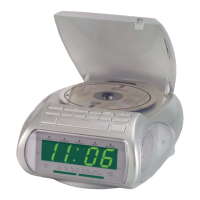
CD compartment
w
Button Skip/Fast Search
(
backwards/ forwards )-
MINUTE/HOUR
· Skip button and fast search
within a title
· Clock setting
(Minutes (Min.) and hours (Hr.))
e
Button OPEN
r
Button TIME: Time Adjustment
t
Button ALARM 2: Setting
y
Button ALARM 1: Setting
u
Power button (ON/OFF)
i
Display
o
LED display for FM (VHF) Stereo
a
LED display for CD function
REPEAT
s
LED display for CD function
Random Playback RANDOM
d
LED display for CD function
PROGRAM
f
ON/OFF LED power display
(glows when appliance is
switched on)
g
Button SNOOZE: Snooze mode
1%
Button SLEEP: Sleep timer
j
Button PROGRAM: Preprogramming
of CD titles
1&
CD-Display
l
Button MODE
1(
Button STOP: To switch off playback
2)
Button PLAY/PAUSE: To start the CD
playback or to briefly interrupt the
CD playback
2! Loudspeakers
2@
TUNING controller:
For selecting the radio station
2# Function selection switch: AM/FM
2$ Volume controller
2%
FM (VHF) Antenna
2^ FM STEREO/MONO
2& Function selection switch:
BUZZER - TUNER - CD
Startup
This CD clock radio is operated with
230 - 240 Volt alternating current (AC),
50 Hz. It is additionally equipped with
a back-up system for use in the event
of a power failure, for which a 9 V block
battery (not supplied) is required to be
inserted.
➩ Insert the plug of the power
cable into a suitable plug socket
(AC voltage).
➩ Place the 9 V block battery into
the battery compartment on the
underside of the appliance.
The use of alkaline batteries is
recommended. To ensure optimal
performance characteristics, the
battery should be exchanged every
6 months. Batteries are not charged
in the battery compartment!
Battery Back-up System in Case of
Power Failures
The battery ensures that the clock
continues to function in the event of
a power failure. To prolong the battery
life, how-ever, the time is not shown in
the display. If a battery has not been in-
serted, appears on the display. This
means that you have to carry out the
time and alarm settings again.
12:00


 To Next Page