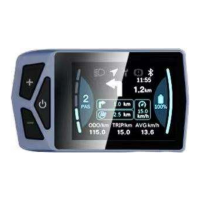
This document describes the EKD01-AKSM Smart Displayer instrument, also known as the B02NU-AKSM model. It serves as a comprehensive manual for its operation, settings, and maintenance.
Function Description
The EKD01-AKSM is a smart displayer instrument designed for electric bikes (e-bikes). Its primary function is to provide real-time information about the e-bike's status and allow users to adjust various settings. Key functions include:
- Information Display: Shows current speed, battery level, gear indicator, single trip mileage, total mileage, and average speed.
- Navigation Integration: When connected to the BIKEGO app, it displays navigation indicators, current turn tips and distances, next turn tips and distances, and mileage to destination. (Note: Live navigation requires payment).
- Control Interface: Features buttons for power on/off, gear level selection, headlight/backlight control, and boost mode activation.
- Settings Management: Allows users to customize display settings (units, auto-off time, brightness), view information (wheel size, speed limit, battery info, error codes), select language, choose display themes, set passwords, and manage Bluetooth connections.
- Self-Diagnosis: Provides maintenance tips and reports limited faults through error codes displayed on the screen.
Important Technical Specifications
General Parameters:
- Dimensions (LengthWidthHeight): 86.8 * 50.5 * 12.5 mm
- Screen Size: 2.4 inches
- Holder Diameter: 22.2 / 25.4 mm
- Screen Type: IPS
- Screen Color: RGB
- Image Resolution: 320 * 240 PX
- Connector Type: M5 Waterproof Connector
- Connector Length: 23 cm
- Voltage: 12V / 32V / 48V / 60V
- Working Temperature: -20 °C to +70 °C
- Waterproof Level: IP67
- Weight: 67g
- Communication Protocol: UART / CAN
- Bluetooth: 4.0 + BLE
- Type-C Interface: Supported
- Certification: RoHS / CE / FCC (Support Customization)
Specific Settings Ranges:
- Wheel Size: Default 26" (660mm), settable range 16" (410mm) - 29" (740mm).
- Speed Limit: Default 99 km/h (metric) or 61.88 MPH (imperial), settable range 0-99 km/h.
- Gear Levels: Default 0-5 (support customization), adjustable to 0-3 or 0-9 depending on the setting.
- Auto-Off Time: Settable from 1 minute to 10 minutes, or "OFF" to disable.
- Backlight Brightness: Settable to 30%, 50%, 75%, or 100%.
- Bluetooth RSSI Level: Level 5 is the maximum.
Usage Features
Button Definitions: The device has three buttons: Power key (O), Plus key (+), and Minus key (-).
General Operations:
- Power On/Off: Press and hold the Power key (O) for >2.5 seconds to turn on/off. The boot screen requires a password (default 0000) before entering the main screen.
- Gear Level Selection: After entering the main display, click "+" or "-" to increase or decrease the assist gear level, changing the motor output power. Gear 0 has no power output.
- Headlight/Backlight Switch:
- Turn on lights: When lights are off, long press "+" to light up the headlight indicator and dim the display brightness.
- Turn off lights: When lights are on, long press "+" to dim the headlight indicator and brighten the display.
- Boost Mode: In any gear, long press "-" to enter boost mode, setting the speed to 6km/h. The boost icon (A) will be dynamic. Releasing "-" exits boost mode, the icon disappears, and speed returns to zero. If no operation occurs within 5 seconds while static, it automatically jumps to gear 0.
Information Viewing and Setting:
- Menu Navigation: Click "O" to enter the settings menu. Use "+" or "-" to move the cursor and "O" to select.
- Unit Conversion: In "Display Settings" -> "Units", select "Metric" or "Imperial". Default units are imperial.
- Automatic Shutdown: In "Display Settings" -> "Auto Off", set the desired shutdown time (1-10 minutes) or disable it ("OFF"). Any operation within the auto-off time resets the timer.
- Mileage Reset: In "Display Settings" -> "ODO Reset", select "Yes" to clear all mileage. Mileage also resets automatically when it reaches the maximum (655km). On the main interface, pressing and holding "+" and "-" simultaneously resets TRIP and AVG to zero.
- Backlight Brightness: In "Display Settings" -> "Brightness", select 30%, 50%, 75%, or 100%.
- Bluetooth Distance Level: In "Display Settings" -> "BT Rssi Level", set the level (max 5).
- Wheel Size Information: View in "Information" -> "Wheel Size".
- Speed Limit Information: View in "Information" -> "Speed Limit".
- Display Information: View software and hardware version numbers in "Information" -> "Display Info".
- Error Code: View the last 10 error messages in "Information" -> "Error Code". "E-CODE 0" is the last error, "00" indicates no error.
- Battery Information: View battery details (temperature, voltage, current, capacity) in "Information" -> "Battery Info".
- Language Selection: In "Language", choose from 8 available languages (English, German, French, Italian, Spanish, Polish, Dutch, Czech).
- Theme Menu: In "Themes", select from 4 different display themes.
- Password Settings:
- Startup Password On/Off: In "Password" -> "Startup Password", enter the password to enable or disable the function.
- Reset Password: In "Password" -> "Reset Password", enter the old password, then a new password, and confirm it. A new password must be set to enable the password feature.
- Bluetooth Unlock Setting: In "Password" -> "Bluetooth Unlock", select "On" or "Off". If enabled and the mobile app is not connected, a QR code will appear for binding.
Bluetooth Connection:
- Binding Device: In the menu interface, enter "Bluetooth", then click "O" to display the QR code. Scan the QR code with the mobile APP (BIKEGO app) to bind the device. After binding, the device automatically jumps to the home screen, and the Bluetooth indicator lights up.
- Navigation via App: After connecting Bluetooth, click "GO" on the APP's main interface to select a destination. Real-time navigation on the display requires payment.
- App Information:
- Android SDK 9 and above: Domestic: https://www.pgyer.com/LST2, Abroad: https://apkpure.com/cn/bikego/com.huiye.ebike
- IOS SDK 12 and above: https://apps.apple.com/cn/app/bikego/id1615694432
- Navigation Package Options: Users get 200 map searches and 5 navigation projections upon first signup. Additional packages (1$, 5$, 10$) are available for more navigation times and search counts.
Maintenance Features
- Maintenance Tips: The display provides electronic system self-diagnosis and reports limited faults as error codes.
- Error Code Comparison Table: The manual includes a table listing error codes, their descriptions, and troubleshooting methods. Examples include:
- "04": Speed control has no homing -> Check handle is in place.
- "05": Speed regulation failure -> Check handlebar.
- "07": Overvoltage protection -> Check battery voltage.
- "08": Motor Hall signal line faulty -> Check motor module.
- "09": Motor phase line failure -> Check motor module.
- "11": Controller temperature sensor failure -> Check controller.
- "12": Current sensor failure -> Check controller.
- "13": Battery internal temperature failure -> Check battery.
- "14": Temperature failure in the motor -> Check motor.
- "21": Speed sensor failure -> Check where speed sensor is installed.
- "22": BMS communication failure -> Replace battery.
- "30": Communication failure -> Check controller connector.
- Factory Reset: In the menu interface, click "O" to enter "Reset Factory". Select "Confirm" and press "O" to restart the instrument and restore factory settings. Selecting "Cancel" returns to the previous menu.
Note: Due to product upgrades, the actual display content may differ slightly from the manual, but this will not affect normal use. Some features, like live navigation, require payment. Bluetooth RSSI level display may vary slightly between phone models.

 Need help?
 General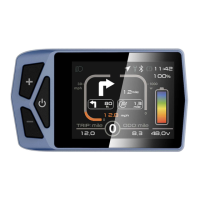

 To Next Page