Need help?
Do you have a question about the E-Bike B02NU and is the answer not in the manual?
Identifies the product as a Smart Displayer instrument.
Specifies the product model as B02NU-AKSM.
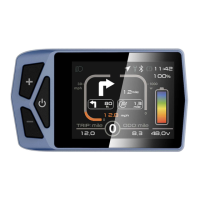
Illustrates the physical design and components of the display unit.
Details general parameters like dimensions, screen size, and operating voltage.
Explains the graphical interface and various indicators on the display screen.
Describes the function of each physical button on the display unit.
Covers basic operations such as powering on/off and gear selection.
Allows adjustment of units, auto-off timers, and display brightness.
Guides on viewing wheel size, speed limits, and battery status.
Explains how to choose from multiple supported languages for the interface.
Describes how to select different visual themes for the display interface.
Details how to set up, reset, and manage passwords for device security.
Provides steps for connecting the display to a mobile device via Bluetooth.
Outlines the procedure to restore the device to its original factory settings.
 General
| Brand | E-Bike |
|---|---|
| Model | B02NU |
| Category | Bicycle Accessories |
| Language | English |

 To Next Page