
 Need help?
Do you have a question about the E-Pill MedSmart Voice and is the answer not in the manual?
Explains how the dispenser alarms, rotates, and dispenses pills.
Details the steps to power on the device and open its lid.
Guides on setting the device's time and date, including 12/24 hour format.
Instructions for setting up medication alarms, including time and sequence.
Describes how to adjust the volume for the alarm notifications.
Explains how to remove, fill, and reinsert the medication tray using templates.
Provides instructions for locking and unlocking the pill dispenser using the key.
Details the process of dispensing medication after an alarm.
Explains how long alarms last and what happens if a dose is missed.
Information on battery life, low battery indication, and power source recommendations.
Solutions for issues where pills fail to dispense from the compartments.
Addresses problems where the alarm does not turn off after dispensing.
Explains errors related to dispenser damage, tampering, or rotation problems.
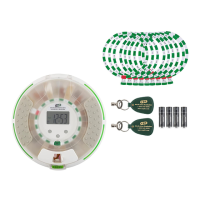
The e-pill® MedSmart® Voice Locked Automatic Pill Dispenser is a sophisticated device designed to assist individuals in adhering to their medication schedules. Its primary function is to remind and dispense pills at precise times, ensuring that the correct dose is available when needed while keeping all other medications securely locked away. This dispenser utilizes both voice alarms and blinking lights to provide clear and timely reminders, making it an invaluable tool for medication management.
The core function of the e-pill MedSmart Voice dispenser is to automate the process of medication dispensing and reminders. At a pre-set dose time, the device activates an alarm, which includes a voice reminder stating, "It's time for your medications," and blinking lights. Simultaneously, the internal medication tray rotates to make the correct dose accessible through a dispensing window. To dispense the medication and silence the alarm, the user simply turns the dispenser upside down. This action releases the pills from the available compartment, and the device confirms the action with a "Thank you" message.
The dispenser is equipped with a locking mechanism to prevent unauthorized access to medications. The lid remains locked, securing all pills until the designated dose time. Two keys are provided: one for the caregiver and one to be kept as a backup, emphasizing the importance of keeping the device locked for safety. While the device is designed to be locked, it is important to note that it is not tamperproof and should not be used for Schedule II/III drugs or pain medications where absolute tamper resistance is critical.
The device supports multiple alarm settings, allowing users to schedule up to six daily alarms. These alarms can be configured with different volume levels (Silent, Medium, Loud) to suit individual preferences and environments. The internal tray has 28 compartments, which can be filled with medications according to various dosage templates. These templates are crucial for organizing pills based on the number of doses per day and the time of day the tray is filled, ensuring accurate and consistent dispensing over a period of up to 28 days for a single daily dose.
A power-saving mode is integrated into the device, which turns off the display after several minutes of inactivity to conserve battery life. The dispenser will automatically "wake up" and sound its alarm at the scheduled dose time, ensuring that reminders are never missed due to power-saving features.
Setting up the e-pill MedSmart Voice involves a few straightforward steps. First, the device needs to be powered on by inserting four AA batteries into the battery compartment, located on the underside of the dispenser. The battery door slides open and locks into place. After inserting the batteries, the large round cover needs to be unlocked using one of the provided keys. It is crucial to turn the key only a quarter of a turn to avoid damaging the lock mechanism. Once unlocked, the dispenser can be turned right side up, and the power cord can be plugged into both the wall and the dispenser for continuous power. The "PRESS" button on the front of the lid unlatches the door, allowing access to the internal tray.
Setting the clock is a key initial step. Users can press and hold button A until the colon between hours and minutes stops blinking. Buttons B and C are then used to adjust the hours and minutes, respectively, with an AM/PM indicator for 12-hour format. The clock can also be set to a 24-hour format if preferred. Once the time is set, button A is pressed to save, and the device confirms with "Pill Dispenser Settings Updated."
Alarms are set sequentially, starting with the earliest dose. By tapping button A, a "1" appears next to the alarm clock symbol, indicating the first alarm. Buttons B and C are used to set the hour and minutes for each alarm. This process is repeated for all desired alarms, up to six. Alarms can also be deleted by navigating to the specific alarm and using button B to display "--:" for the hour. The alarm volume can be adjusted through the settings menu by tapping button C when the current time is displayed, then using button B to cycle through the volume levels (0, 1, or 2) and button A to save.
Filling the medication tray is a critical step for proper operation. The clear tray is removed from the dispenser for easier filling. Users select one of the nine dosage templates that matches their medication schedule. The template is placed into the tray's template slot. With the tray's e-pill sticker positioned at 6 o'clock, medications are filled counter-clockwise, starting with the compartment immediately to the right of the sticker. This ensures that the first dose is correctly positioned for dispensing. After filling, the tray is placed back into the dispenser, ensuring the compartment with the e-pill sticker is directly below the gray button labeled "B." The lid is then closed, and the dispenser is turned over and locked. Again, the key should only be turned a quarter of a turn to lock the device.
The dispensing process is designed to be intuitive. When an alarm sounds and lights blink, the user slides open the white dispensing door (if not already open) and turns the dispenser upside down. This action releases the medication and silences the alarm. The device will alarm for up to 60 minutes, with lights blinking every 3 seconds during this period. If a dose is not dispensed within 60 minutes, the device will issue a "Patient may have missed their medications" voice reminder every minute for up to 4 minutes. After this, the missed dose remains available until the next alarm time, when the tray rotates, moving the missed dose out of the dispensing window.
Maintenance of the e-pill MedSmart Voice primarily revolves around battery management and troubleshooting common issues. The dispenser is designed to be plugged in, with the AA batteries serving as a backup power source in case of an outage. If the dispenser is run solely on batteries, their estimated life is 6-12 months. When the battery level is low, a low battery icon will appear on the display, prompting the user to replace all four AA batteries immediately. It is crucial to use only alkaline, non-rechargeable batteries, as the dispenser does not have a charging function.
Troubleshooting is addressed for common error types. If medications do not dispense, users are advised to check all compartments for stuck pills. For gel-caps, a thin coating of standard baking flour can help prevent blockage. For tablets, splitting larger pills into smaller pieces with a pill splitter can also prevent blockages.
If the alarm does not silence after dispensing, the first step is to check and replace the batteries, as depletion can cause this issue. If new batteries do not resolve the problem, it may indicate damage to the dispenser due to misuse, which would not be covered under warranty.
An "Error Message/Rotation Issue" typically indicates that the dispenser has been shaken, dropped, transported with batteries inside, or that the tray has been tampered with. Tampering often involves a patient attempting to force the tray to rotate to access medication before the scheduled time. Such issues are considered damage due to misuse and are not covered under warranty.
Regular cleaning of the compartments can help prevent pill residue buildup that might lead to blockages. While not explicitly detailed as a maintenance step, ensuring the compartments are clean and free of debris will contribute to the smooth operation of the dispensing mechanism. The design of the removable tray facilitates this kind of preventative maintenance.
In summary, the e-pill MedSmart Voice Locked Automatic Pill Dispenser is a user-friendly and secure solution for medication management, offering voice reminders, automated dispensing, and robust security features to support adherence to complex medication schedules. Its design emphasizes ease of use, clear communication, and reliable performance, with straightforward maintenance guidelines to ensure long-term functionality.
 General
| Voice Alerts | Yes |
|---|---|
| Compartments | 28 |
| Alarm Type | Audible and visual |
| Battery Life | 6 months |
| Alarm Volume | Adjustable |
| Display | LCD |
| Type | Automated Pill Dispenser |
| Power Source | AC adapter or batteries |
| Tamper Resistance | Locking lid |
| Battery Type | AA |
| Locking Mechanism | Key lock |
| Languages Supported | English |
| Programmable Alarms | Up to 6 daily alarms |

 To Next Page
