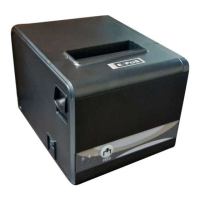
Need help?
Do you have a question about the E-Pos TEP-220M and is the answer not in the manual?
Key safety guidelines for operating and handling the thermal receipt printer to prevent hazards.
Lists various business and system types where the thermal receipt printer is utilized.
Instructions to verify all necessary accessories are included after unpacking the printer unit.
Highlights the main functional and performance features of the thermal receipt printer.
Details the technical parameters of the printer, including dimensions, speed, and power requirements.
Illustrates the available physical connection methods for the printer, such as Serial, USB, and Ethernet.
Step-by-step guide on how to properly load and install a roll of paper into the printer.
Explains how to use DIP switches to configure various printer functions like cutter mode and character set.
Identifies the physical buttons and indicator lights on the printer unit.
Describes the operational behavior and meaning of the printer's buttons and indicator lights.
Provides instructions for initializing and resetting the printer's auto-cutter mechanism.
Lists advanced features like high-speed printing, WAN connectivity, and mechanism integration.
Guides through starting the driver setup wizard and selecting the appropriate printer port.
Details driver installation via disk/CD and selecting the correct printer model.
The TEP-220M is a thermal receipt printer designed for various point-of-sale and receipt printing applications. It offers high-speed printing and a range of features to enhance user experience and operational efficiency.
The primary function of the TEP-220M is to print thermal receipts. It is suitable for a wide array of applications, including POS system receipts, EFT POS system receipts, gym, post, hospital, civil aviation system receipts, hotel, service system receipts, instrument test receipts, and tax and tab receipts. The printer supports various interfaces, including Serial, USB, Ethernet, and Parallel, allowing for flexible connectivity options. It is compatible with ESC/POS command sets, ensuring broad compatibility with existing POS systems. The printer is designed to handle different character sets and supports character enlargement, bold, underline, line spacing, and character spacing, providing flexibility in receipt formatting. It also features support for NV images download, allowing for custom logos or graphics to be included on receipts. The TEP-220M is equipped with a cash drawer kick-out function, enabling it to trigger a cash drawer to open automatically after a transaction.
The TEP-220M is designed for ease of use and reliable operation. It offers high print quality and low working noise, making it suitable for various environments. The printer supports multiple connection printing, allowing it to be integrated into complex network setups. It also supports OPOS (OLE for POS) drivers, which simplify integration with Windows-based POS applications. The printer features various character sets, including GB18030, providing support for multiple languages and character requirements. It boasts a high-speed printing mode, with a significant improvement in print speed through the serial port. The printer also includes a "Convert and print English, stop when misprinting" feature, which helps prevent errors during printing. Additionally, it has a built-in web page for easy setup and configuration directly from a web browser.
Installing the roll paper is a straightforward process: open the printer cover, install the paper roll, pull out some paper outside the printer, and then close the printer cover. Ensure the top cover is pressed to avoid error positions of the roll paper, and tear off the paper correctly. The printer's interface connections are clearly illustrated, showing how to connect the data cable and power adapter for Serial+USB+Ethernet and Parallel+USB configurations. The DIP switches on the printer allow users to set various functions, such as cutter mode, character set, speed, beeper, and print density, providing customization options to suit specific needs. The printer also has clear buttons and indicators, including a Power Switch, Error Indicator, Power Indicator, and FEED Button. The FEED button allows for manual paper feeding. The indicators provide visual feedback on the printer's status: the PAPER indicator lights up when the printer is out of paper or has paper, and dims when the paper is near its end. The POWER indicator lights up when the printer is turned on and dims when it's turned off. The ERROR indicator flashes when the printer is in an error state, such as paper out, cutter error, or print head overheat, with the flashing speed indicating the user's defined setting.
The TEP-220M includes features for easy maintenance, particularly for the cutter. To initialize and reset the cutter, users need to turn off the printer, then turn it on again. For more involved cutter maintenance, such as when the cutter is stuck, users can open the front cover, wheel the gear on the cutter to move the cutter back to its initial position, open the printer cover, and install the roll paper correctly. The printer should then work normally. A crucial caution is provided: do not open the printer cover by force, as this can damage the print head and auto cutter. The manual illustrates how to open the cover by following an arrow direction and how to turn the gear to reset the cutter, ensuring that maintenance can be performed safely and effectively. The printer also supports connecting to a WAN printing network, which can be beneficial for remote management and troubleshooting.
 General
| Print Technology | Thermal |
|---|---|
| Print Method | Direct Thermal |
| Print Speed | 220 mm/sec |
| Print Width | 72 mm |
| Resolution | 203 dpi |
| Connectivity | USB, Serial, Ethernet |
| Paper Type | Thermal Paper |

 To Next Page