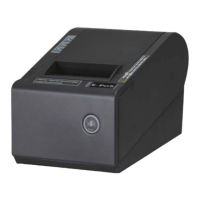
The E-POS ECO250 is a thermal receipt printer designed for various point-of-sale (POS) and receipt printing applications. It offers high-speed printing, reliable performance, and multiple connectivity options, making it suitable for a range of commercial environments.
Function Description:
The ECO250 serves as a dedicated thermal receipt printer, primarily used for generating receipts in POS systems, EFT POS systems, and other service-oriented applications. Its core function is to quickly and accurately print transactional information on thermal paper. The printer supports various barcode modes, making it versatile for different business needs. It is compatible with the ESC command set, ensuring broad compatibility with existing software solutions. The integrated mechanism and auto cutter enhance durability and streamline the printing process by automatically cutting receipts.
Important Technical Specifications:
- Printing Speed: The printer boasts a high printing speed of 250mm/sec, which is crucial for busy retail and service environments where quick transaction processing is essential.
- Print Quality: It offers high print quality, ensuring clear and legible receipts.
- Paper Roll: The printer uses paper rolls with a width of 79.5±0.5mm and supports a maximum diameter of 83mm.
- Printing Width: The effective printing width is 64/72mm.
- Dot Pitch: It features a dot pitch of 576dots/line or 512dots/line.
- Character Set: The ANK Character set includes Font A (12×24dots) and Font B (9×17dots).
- Print Command: The printer is compatible with the ESC command set.
- Interface: It offers multiple interface options, including Serial, Ethernet, and USB, providing flexibility for integration into various systems.
- Auto Cutter: Equipped with a partial auto cutter for efficient receipt separation.
- Reliability Print: The printer has a reliability print rating of 100Km, indicating its long-term durability.
- Barcode Modes: Supports a wide range of barcode modes, including UPC-A, UPC-E, JAN13 (EAN13), JAN8 (EAN8), CODE39, ITF, CODABAR, CODE93, and CODE128.
- Paper Thickness: Compatible with thermal paper with a thickness ranging from 0.06 to 0.08mm.
- Power Supply: Operates on DC 24V/2A.
- Power Adapter: Input: AC110V~220V, 50~60HZ; Output: DC 24V/2A.
- Cash Drawer: Supports a DC 24V/1A cash drawer.
- Work Temperature: Designed to operate in temperatures from 0 to 45℃ with 10-80% dampness.
- Storage Temperature: Can be stored in temperatures from -10 to 60℃ with 10-90% dampness.
- Dimensions: The physical dimensions of the printer are 151×198×151MM (W×D×H).
Usage Features:
- Unpacking and Setup: The manual outlines a clear unpacking process, instructing users to check for included accessories such as the user's manual, printer unit, data cable, and CD disk.
- Printer Connection: Detailed instructions are provided for connecting the DC cord, data cable, and cash drawer cable to their respective ports on the printer.
- Roll Paper Installation: A step-by-step guide with illustrations demonstrates how to open the printer cover, install the paper roll, feed the paper, close the cover, and tear off the paper correctly.
- DIP Switches: The printer features DIP switches for setting various printing modes, including cutter mode, character set, speed, beeper, and print density, allowing for customization based on specific requirements.
- Buttons and Indicators: The device includes a FEED Button for manual paper feeding, a Paper Indicator (lighting for paper out, dim for paper present, lighting but dim for near end), a POWER Indicator (lights when on, dims when off), and an ERROR Indicator (flashes for paper out, cutter error, or print head overheat).
- Driver Setup: Comprehensive instructions are provided for installing the printer driver, including running the setup guide, selecting the printer type and port, installing from disk, and choosing the printer model.
- Advanced Features: The ECO250 supports 250mm/sec high-speed printing and offers support for connecting to WLAN printing, enhancing its connectivity options for modern network environments.
- NV Images Download: The printer supports NV (Non-Volatile) images download, allowing users to store logos or other graphics directly on the printer for quick recall and printing.
- High Integration and Reliability: The integration of the main board and interface card contributes to high integration and reliability, reducing potential points of failure.
- USB Optimization: The optimized USB design ensures that the PC host communication port remains consistent even when replacing the printer or USB port, simplifying setup and maintenance.
Maintenance Features:
- Cutter Maintenance: The manual provides instructions for maintaining the auto cutter. This involves turning the printer off and on to initialize and reset the cutter, and if necessary, opening the front cover and manually wheeling the gear to return the cutter to its initial position.
- Safety Notices: The manual emphasizes several safety precautions, such as not touching the print head or cutter blade, avoiding excessive bending of the power cord, not using the printer when it's out of order, holding the plug (not the cord) when connecting/disconnecting, keeping desiccant away from children, using only approved accessories, avoiding disassembly or remodeling, installing on a stable surface, preventing water or foreign objects from entering the printer, and not connecting a telephone line to the peripheral drive connector. It also recommends unplugging the printer during long periods of disuse.
- Caution against Forceful Opening: A specific caution is given not to open the printer cover by force to prevent damage to the print head and auto cutter.

 Need help?

 To Next Page
 General