3
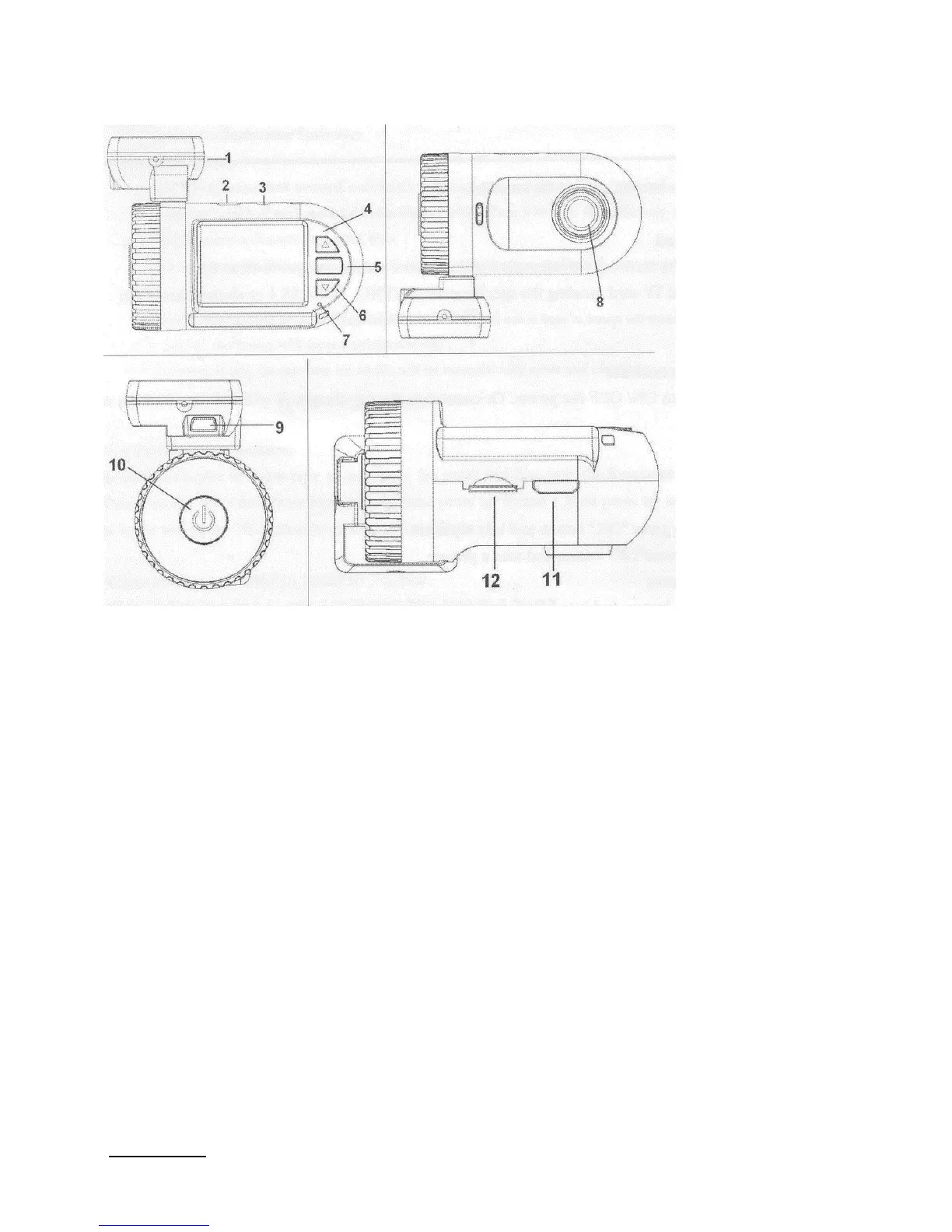
Recorder appearance and feature icons
1. GPS tracker box also bracket plus 3M sticker to stick to car front window. Note: If no GPS, it is
a bracket only.
2. USB port to a computer (USB lead also provides power to the recorder, via the computer).
3. AV port.
4. Up button/Menu/Mute and Hot button.
5. OK/Enter.
6. Down /SOS button (to lock files).
7. Light indicator: Red: Charging, Blue: Stand by, Blue flashing: Recording.
8. Lens.
9. USB This only provides power to the GPS and recorder (there is no data link to the computer).
10. Power On/Off (Long press to turn off).
11. HDM1port.
12. Memory card slot for Micro SD (TF) card.
Operation
Using a Micro SD (TF) card
Not essential if the recorder has an internal memory, but will provides more space for video and photo
storage. Use high-speed TF card meeting the specification of TFHC, Class 4 or above.
Note: A Class 10 ‘SanDisc Ultra microSDHC UHS-1’ works fine in the 0803.
Inserting card: Press until you hear a ‘click’ to lock it in, press in again to release it.


 To Next Page