Need help?
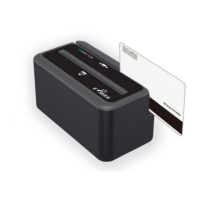
Do you have a question about the E-Seek 250 and is the answer not in the manual?
Command to restore all factory settings, overwriting current configurations with defaults.
Configures the number of data bits for serial communication, typically 7 or 8.
Sets the parity bit for error checking in serial communication.
Configures the stop bits used to signal the end of a data transmission.
Enables or disables hardware-based flow control for serial data transfer.
Sets the communication speed (baud rate) for the serial port.
Adjusts the delay between transmitted characters for serial communication.
Configures the scanner to enter a low-power idle state to conserve energy.
Enables or disables the reading of specific magnetic stripe tracks (1, 2, and 3).
Configures the messages reported by the scanner when a read operation fails.
Command to initiate software upgrades for the scanner application.
Command to initiate software upgrades for a secondary scanner application.
 General
| Model | E-Seek 250 |
|---|---|
| Interface | USB |
| Scanning Method/Technology | Laser |
| Scan Rate | 100 scans per second |
| Power Supply | USB powered |
| Light Source | 650 nm visible laser diode |
| Operating Temperature | 0°C to 50°C |
| Storage Temperature | -20°C to 60°C |
| Humidity | 5% to 95% (non-condensing) |
| Drop Specification | 1.5 m |
| Voltage | 5 V DC |


 To Next Page