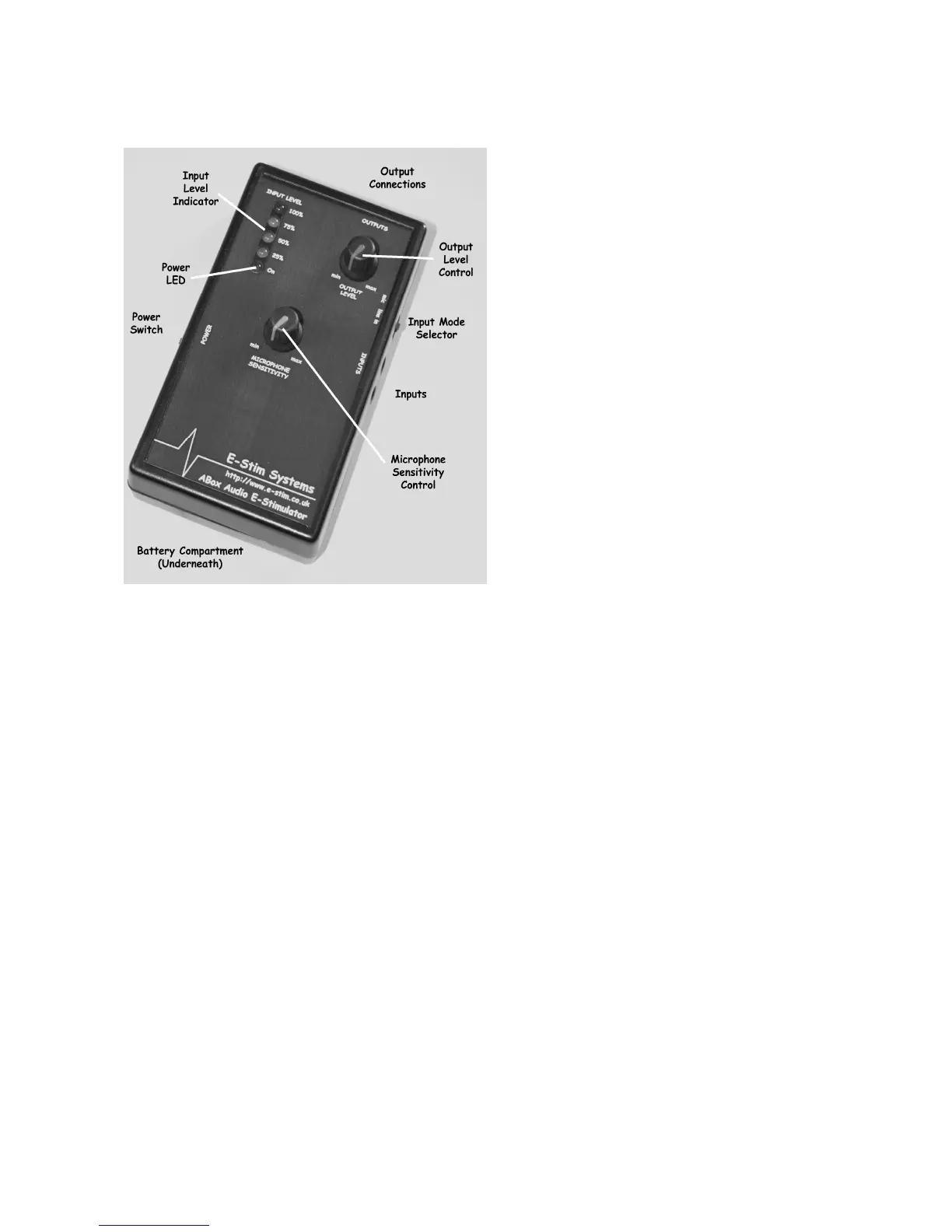
User Controls
The ABox™ unit has four user
controls. Each control allows the user
to adjust a particular aspect of the
output. It is the operation of the
controls in combination that will allow
the operation to provide an effective
electro-stimulation session.
The controls are
• Input selector switch
• Power on switch
• Output level control
• Microphone sensitivity control
As well as the 4 controls, the ABox™
features 5 display LEDs, indicating the
power status and the input level, 2
inputs fitted in parallel to allow
monitoring of the input via a
headphone, and two outputs, encompassing the dual output single channel
output system.
Power Switch
A two position slide switch is mounted on the left side of the unit. Slid towards
the top of the ABox™ the unit is switched on, slid towards the bottom of the unit
it is switched off. The power status of the unit is indicated by the position of the
switch, and the power on LED.
Input Selector Switch
A two position slide switch mounted on the right side of the unit. Slid towards
the top of the ABox™ the unit will operate from the internal microphone, slid
towards the bottom of the unit the input is switched to the external input
sockets.
Microphone sensitivity Control
The microphone sensitivity control adjusts the sensitivity of the internal
microphone.


 To Next Page