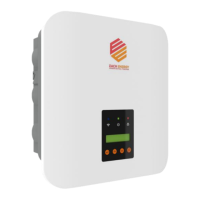
This document describes the Each Energy EES3K-M1, EES4K-M1, EES5K-M1, and EES6K-M1 single-phase on-grid inverters. These devices convert DC power from photovoltaic panel arrays into AC power, which is then fed into the utility grid. The manual covers product information, mounting, installation, operation, maintenance, troubleshooting, and specifications. It is intended for end-users and qualified personnel with knowledge of inverters or installation/maintenance skills.
Product Overview:
The inverter's front panel includes an operation panel with LED lights for Communications, Power, and Alarm, and an LCD display.
- Power LED: ON indicates power generation, OFF indicates no power generation.
- Communications LED: ON indicates connection to the Internet, OFF indicates no Internet connection.
- Alarm LED: ON indicates an alarm or fault, OFF indicates normal operation.
The scope of delivery includes the inverter, wall bracket, expansion screws, fastening screws, DC connectors (2 pairs), AC connectors (1), WiFi/GPRS stick (1), and documents (1).
Safety Instructions:
The manual uses various safety symbols:
- DANGER: High risk, may result in death or serious injury.
- WARNING: Medium risk, may result in death or serious injury.
- CAUTION: Low risk, may result in minor or moderate injury.
- NOTE: May result in device damage or property damage.
- ELECTRIC SHOCK: Danger of electric shock or high voltage.
- HOT SURFACE: Indicates hot surface, do not touch.
- WAIT (5min): Notice to wait at least 5 minutes before operation.
Key safety instructions include:
- Installation by qualified technicians in compliance with electrical standards.
- Wearing protective equipment (helmet, insulated footwear, gloves).
- Preventing unauthorized persons and children from accessing machines.
- Not opening the housing to avoid voiding warranty and damaging the machine.
- Not touching non-insulated parts or cables; disconnecting from voltage sources before working.
- Using measuring devices with a DC input voltage range of 600 V or higher.
- Waiting at least 5 minutes after disconnecting voltage sources due to high voltage in live parts.
- Avoiding touching the inverter during operation as parts may exceed 60 °C.
- Proper packing during transportation, avoiding flammable materials.
- Inverters are for single-phase circuits only, not multiple-phase combinations.
Mounting:
- Installation Location:
- Wall must support at least 4 times the inverter's weight.
- Location should be convenient for electrical connection, operation, and maintenance.
- IP66 ingress protection allows indoor and outdoor installation.
- Select safe locations as cooling fin temperature may exceed 75 °C.
- Must be well-ventilated, sheltered from direct sunlight, rain, or snow.
- LED lights and LCD display on the front panel must be visible.
- Install vertically or with a backward tilt within 15 degrees; no lateral tilt.
- Minimum 150 mm clearance between inverters and 300 mm from the ground if multiple inverters are installed.
- Install in high traffic areas where faults are likely to be seen.
- Inverter Mounting Procedure:
- Ensure bracket is horizontal, mark drill holes (for brick walls, suit expansion screws).
- Use a 10 mm drill bit for 40 mm deep holes.
- Insert expansion tubes.
- Screw expansion screws to fix the bracket.
- Lift and hang inverter securely on the bracket.
- Lock inverter to bracket with screws.
- NOTE: Wear gloves to protect hands from scratches.
Electrical Connection:
- DC Side Connection:
- DANGER ELECTRICAL SHOCK: Lethal high voltage from PV arrays under sunlight. Disconnect DC and AC breakers before connection.
- PV strings connect via special PV connectors (supplied).
- NOTE: Use only supplied IP65+ connectors for IP66 protection.
- Recommended DC cable: 4 mm². Use specialized photovoltaic cables only.
- Assemble DC cables: Strip 7mm insulation, insert wire into crimp contact, crimp. Thread cable through gland, insert into insulator, pull back to ensure firm connection, screw up gland.
- Install DC connectors: Turn OFF Grid Supply Main Switch and DC switch. Connect DC connectors (small click confirms connection), ensuring correct polarity.
- WARNING: Open circuit voltage of PV array must be within max input voltage. Do not turn off DC switch directly for reverse connection or faults; turn off only when DC current is below 0.5 A.
- AC Side Connection:
- Use 4-6 mm² outdoor cable (4 mm² for 3-4 KW, 6 mm² for 5-6 KW). AC connector supplied.
- Procedure: Strip 8-15 mm insulation. Thread cable through gland and housing. Connect wires to terminal block (yellow-green to PE, red/brown to L, blue/black to N), screw tightly. Connect gland, seal ring, housing, and terminal block. Connect AC connector to inverter.
- External Grounding Connection:
- Port is beside AC connection terminal.
- Procedure: Prepare OT terminal M4, crimp grounding cable, insert fastening screw into OT terminal, insert into grounding port, screw tightly (2 N.m.).
- WARNING: External grounding cannot replace PE terminal in AC connection. Both must be done properly.
- Earth Fault Alarm:
- Inverters have earth fault alarm. If fault occurs, inverter stops, red alarm light ON, LCD displays 'ISO Out Range' or 'PEN No Connect'. Refer to Chapter 7 or contact Each Energy.
- Over Current Protection Device (OCPD):
- Recommended to install a breaker to protect AC grid connection conductors.
- OCPD Ratings (230V):
- EES3K-M1: 13.04 A rated output, 25 A protection device.
- EES4K-M1: 17.39 A rated output, 25 A protection device.
- EES5K-M1: 21.74 A rated output, 32 A protection device.
- EES6K-M1: 26.09 A rated output, 32 A protection device.
- Communications Connection:
- WiFi/GPRS Stick Installation: Plug stick into Wifi port, rotate clockwise for secure connection. More details in corresponding manuals.
- Electrical Connection Overview: Diagram of a typical solar system.
- Meter and CT Installation (optional):
- Meter and CT (current transformer) connect to monitor electricity parameters and manage export power.
- Suggested parameters: Max input current for meter: 120A; Max measuring current for CT: 100A.
- NOTE: No need to change meter parameters, preset at factory.
- DANGER ELECTRICAL SHOCK: Turn off upstream and downstream electrical connection before meter installation.
- Residual Current Device (RCD):
- Internal RCD protects against residual current. If exceeded, inverter stops, warning light ON, LCD displays 'GFCI Device Fault' or 'GFCI Out Range'.
- If external RCD required, suggest Type-A RCD with threshold >100 mA.
- DRM (Demand Response Mode):
- Applicable to Australia and New Zealand (AS/NZS 4777.2:2020). Inverter responds to demand response modes:
- DRM 0: Operate disconnection device.
- DRM 5: Do not generate power.
- DRM 6: Do not generate >50% rated power.
- DRM 7: Do not generate >75% rated power AND absorb reactive power.
- DRM 8: Increase power generation (subject to other active DRMs).
- Connecting DRED: Assemble RJ45 connector, plug into DRM port.
- Power rate limit modes supported. DRM working mode shown in BASIC INFO.
Operation:
- Start Inverters:
- Turn ON AC breaker.
- Turn ON DC Switch.
- After 30-300 seconds delay, inverter starts, POWER light ON.
- WARNING: PV array open circuit voltage must be within max input voltage.
- DANGER ELECTRIC SHOCK: High voltage may be present, take precautions.
- Stop Inverters:
- Switch OFF AC Switch.
- Wait ~30 seconds for capacitor to dissipate energy, then turn OFF DC switch.
- Ensure all LED lights are OFF (~1 minute).
- CAUTION WAIT (5min): Wait 5 minutes before touching machine after DC switch OFF due to electrical shock risk.
- LCD Operation:
- Main Menu: Alternately displays status and power every 10 seconds. Use UP/DOWN to scroll, ENTER to access main menu.
- Sub-menus: BASIC INFO, BASIC SETUP, DETAIL INFO, TECHNICAL SET.
- Basic Info:
- Total Energy (10 S): Total energy generated.
- ThisMon/LastMon (10 S): Energy generated this/last month.
- TODAY/PRE_DAY (10 S): Energy generated today/yesterday.
- DC VOL1/CUR1 (10 S): DC voltage/current of PV input 1.
- DC VOL2/CUR2 (10 S): DC voltage/current of PV input 2.
- AC VOL/CUR (10 S): AC voltage/current of utility grid.
- GRID FREQ/POWER (10 S): Utility grid frequency/output power.
- TOTAL RUNTIME (10 S): Cumulative energy generation time.
- INVERTER SN (10 S): Inverter serial number.
- MODLE (10 S): Working mode (DRM).
- Standard (10 S): Country grid code/safety standards selected.
- Customers can view info without password, including country grid codes (cAUSAS4777_2A/2B/2C, cNZS4777_2).
- Basic Setup: Set time, RS485 address, language.
- Time Setting: Use ENT to move cursor, UP/DOWN to select digit, ESC to save.
- Address Setting: RS485 address (01-99, default 01). Use UP/DOWN to scroll, ENT to save, ESC to return without saving.
- Language Setting: Default is English.
- Detail Info - Maintenance Personnel Only: Password required (contact supplier).
- Accessing Sub-menu: Enter password, press ENT. 'Wrong Password' if incorrect.
- Sub-menus: Operation Info, Fault Info, Warning Info, SW Version, Rated Power, Rated Voltage, Daily Energy, Monthly Energy, Yearly Energy, Export Total, Export Today.
- Operation Information:
- BusVol/DCI (10 S): Bus voltage, AC direct component.
- PF/Pac Limit (10 S): Power factor ratio, output power limit.
- RCD(GFCI)/PVISOGuard (10 S): Residual current protection, insulation resistance/ground fault protection.
- AllPVParal/MPPTShadow (10 S): All PV in parallel mode, MPPT shadow mode.
- RelayCheck/DCI Prot (10 S): Self examination of AC relay, output direct component protection.
- Apparent Power (10 S): Apparent power.
- Active Power (10 S): Active power.
- Reactive Power (10 S): Reactive power.
- Export Power (10 S): Power exported to grid.
- GFCI RMS/ISO (10 S): Leakage current protection, ground fault protection/insulation resistance.
- Heatsink Temp (10 S): Heat sink temperature.
- Inv Inner Temp (10 S): Inverter inner temperature.
- Fault Info: Alarm light ON, LCD displays fault description. Refer to Chapter 7.
- Warning Info: LCD displays warning information. Inverter operates normally with warnings. Refer to Chapter 7.
- Software Version/Firmware Version: Accessible by technicians only.
- Rated Power: Inverter's rated power.
- Rated Voltage: Inverter's rated voltage.
- Daily/Monthly/Yearly Energy: Energy generated for specified periods.
- Export Total/Today: Total/today's energy exported to grid.
- Technical Set – Maintenance Personnel Only: Password required.
- ALL Set Enable: Enable all settings in Technical Set.
- Standard Set: Set safety standard/country grid code.
- VAC H/L Limit: Set high/low AC output voltage limit.
- FAC H/L Limit: Set high/low AC output frequency limit.
- Pmax Limit: Set max generation power.
- AC Inst Limit: Set AC instant voltage limit.
- Power Control: Set power control.
- Standard Func: Set increase/decrease power rate limit.
- Special Func: Set special functions.
- Set Passwords: Reset passwords.
- Factory Reset: Restore factory settings.
- Adjust Total E: Adjust total energy generated.
- Reset Total E: Clear power generation record.
- Inverter ON/OFF: Turn on/off inverters.
- Export Limit: Set export power limit.
- AC Output Voltage Limit: Set high/low AC output voltage as permitted by local grid company.
- AC Output Frequency Limit: Set high/low AC output frequency as permitted by local grid company.
- Max Generation Power Setup: Set max output power.
- Power Control: Set reactive power.
- Fixed Power Factor Mode or Reactive Power Mode: Disabled by default. Enabled if volt-var mode is disabled.
- Password Set-up: Reset password for 'Detail Info' and 'Technical Set'.
- Factory Reset: Restore factory defaults.
- Adjust Total E: Adjust total energy generated after maintenance/translocation.
- Reset Total E: Clear total energy generated record.
- Inverter On/Off: Control grid connection/disconnection.
- Export Limit: Control export limit with external devices (CT or meter). Soft limit (software controlled) and hard limit (inverter stops if limit exceeded). Use soft limit for normal operation.
Maintenance and Troubleshooting:
- General Maintenance: Inverters do not need regular maintenance; keep free of dust, foliage, dirt.
- NOTE: Use cloth moistened with clear water for cleaning; cleaning agents may damage machine.
- Disposing of Inverters: Dispose according to local regulations for electrical equipment waste.
- Storage and Transportation: Store in dry room (-25~60 °C) if not installed soon. Pack in original package, stack no more than 8 packs.
- Troubleshooting Table: Provides events, explanations, and solutions.
- DC Volt Over: High PV input voltage. Check input voltage, decrease solar panels in series.
- DC Over Current Soft/Hard: PV current exceeds software/hardware protection limit. Restart inverter, decrease solar panels in parallel.
- Bus Over Voltage Soft/Hard: Transient bus voltage exceeds software/hardware protection limit. Check input voltage, restart inverter, decrease solar panels in series.
- Transient Over Voltage: Transient over voltage in grid. Restart inverters.
- Inv Over Current Soft/Hard: Inverter software/hardware over current. Restart inverters, decrease string in parallel.
- Island Protect: Island effect protection. Check AC circuit breaker, AC cables connection.
- Low/High Temperature Inside Inverters: Check ambient temperature, ventilation, avoid direct sunlight.
- Abnormality in external flash reading and writing: Restart inverter.
- Bus Unbalance: Restart inverter.
- Low bus voltage: Check input voltage, restart inverter, increase solar panel quantity in series.
- Over Frequency: Export reduction due to over frequency. Adjust protection value limit.
- Over Temperature: Export reduction due to over temperature. Check ventilation, avoid direct sunlight.
- GFCI Device Fault: Fault in current leakage testing device. Restart inverter or contact installer.
- ACHCT Device Fault: Fault in HCT device on AC side. Restart inverter or contact installer.
- GFCI Out Range: Current leakage out of range. Check AC/DC connection, internal wire connection.
- DCI Out Range: DC component too large. Restart inverter or contact installer.
- ISO Out Range: Insulation impedance too small. Remove/reconnect DC inputs, restart inverter. Identify string causing fault, check insulation.
- No Grid... Pls Turn On AC: No utility grid. Check AC breaker, AC plug connection, inverter's L, N, PE line connection.
- Temp is Too High/Low: Check ventilation, avoid direct sunlight, check ambient temperature.
- PV Over Voltage: Over voltage in PV inputs. Check input voltage, decrease solar panel quantity in series.
- Grid Volt Over 110%: Grid overloaded. Wait for recovery, replace AC cable if too small, adjust protection value limit.
- Grid Volt Out Range: Grid voltage out of range. Replace AC cable if too small, adjust protection value limit.
- Relay Fault: Fault in grid-connection relay. Restart inverter or contact installer.
- MS Comm Fault: Communication fault between main CPU and slave CPU. Restart inverter or contact installer.
- Power to Grid beyond Limit: Power exported to Grid exceeds hardware limit. Turn on software limit, set lower software limit, turn off hardware limit if permitted.
- PEN No Connect: Grounding fault (PE and N line not connected). Check connection, contact installer.
- NOTE: If any event is displayed, turn off inverter, wait 5 minutes, then restart.
Technical Specifications (EES-M1 Series):
- Model: EES3K-M1, EES4K-M1, EES5K-M1, EES6K-M1
- DC Input:
- Recommended max. PV power: 4.5 KW (EES3K-M1) to 9 KW (EES6K-M1).
- Max. input voltage: 600 V.
- Start-up voltage/Min. input DC operation voltage: 40 V/30 V.
- MPPT voltage range: 80 V - 580 V.
- Max. input current/Max MPPT input current: 18 A/18 A.
- Max. short circuit current/Max MPPT short circuit current: 22 A/22 A.
- MPPT number: 2.
- String number per MPPT: 1/1.
- AC Output:
- Rated output power: 3 KW (EES3K-M1) to 6 KW (EES6K-M1).
- Rated/Max. apparent output power: 3 KVA/3 KVA (EES3K-M1) to 6 KVA/6 KVA (EES6K-M1).
- Max. active power: 3 KW (EES3K-M1) to 6 KW (EES6K-M1).
- Rated output current: 13.0 A (EES3K-M1) to 26.0 A (EES6K-M1).
- Max. output current: 13.0 A (EES3K-M1) to 26.0 A (EES6K-M1).
- Rated voltage/range (L/N/PE): 230 V/ 180V - 300V.
- Rated frequency: 50 Hz.
- Power Factor: >0.99, 0.8 leading ~ 0.8 lagging.
- THDI: <3%.
- Efficiency:
- Max. efficiency: 98.60%.
- EU efficiency: 98.10%.
- Protection:
- Ground fault monitoring: Yes.
- Output over voltage protection: Yes.
- Anti-islanding protection: Yes.
- Integrated AFCI: Optional.
- DC reverse-polarity protection: Yes.
- Overvoltage category: AC Class III/PV Class II.
- General Data:
- Dimension (WHD): 350340156 mm.
- Shell material: Aluminium alloy.
- Weight: 10 Kg.
- Operating ambient temperature range: -25-60 °C.
- Noise emission: 20 dB(A).
- Full load ambient temperature: 45 °C.
- Topology: Transformerless.
- Ingress protection: IP66.
- Cooling concept: Natural Convection.
- Max. operation altitude: 3000 m.
- Grid connection standard: AS 4777.2:2020, EN50549-1:2019, G98:2021, G99:2021, NC RFG, PTPIREE.
- Safety/EMC standard: ABNT NBR 16149, ABNT NBR 16150,VDE-AR-N 4105, CEIO-21, RD1699, IEC-62109-1/-2, IEC-62477-1/-2, IEC-61000-6-1/-2/-3, NB/T32004.
- Country of manufacturing: China.
- DC connection: MC4/D4.
- Communications: WiFi(2.4G), GPRS, 4G, Bluetooth, RS485.


 To Next Page
 General