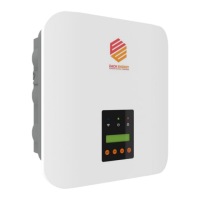
This document describes the Each Energy EES6KPro-M1, EES7K-M1, EES8K-M1, EES9K-M1, and EES10K-M1 single-phase on-grid inverters, which convert DC power from photovoltaic panel arrays into AC power for feeding into the utility grid. This manual is intended for both end-users and qualified personnel with knowledge of inverters or skills in inverter installation and maintenance. Only qualified personnel are permitted to perform installation and activities marked with safety instructions. The information in this document is subject to change without notice, and users should adhere to the actual products in case of any discrepancy. Statements, descriptions, and recommendations in this manual do not constitute a guarantee or warranty.
Function Description
The Each Energy inverters are designed to convert direct current (DC) power generated by solar panels into alternating current (AC) power, which can then be supplied to the utility grid. These inverters are suitable for single-phase circuits and should not be installed in multiple-phase combinations. They are equipped with various protection functions to ensure safe and reliable operation.
Key Functions:
- Power Conversion: Converts DC power from PV arrays to AC power for grid injection.
- Grid Interaction: Designed for on-grid applications, feeding converted AC power into the utility grid.
- Demand Response Mode (DRM): Applicable to installations in Australia and New Zealand (AS/NZS 4777.2:2020 standard). The inverter detects and responds to demand response modes, including operating the disconnection device, not generating power, limiting power generation to 50% or 75% of rated power (with reactive power absorption if capable), and increasing power generation (subject to other active DRMs).
- Export Power Management: Can be connected to a meter and Current Transformer (CT) to monitor electricity parameters (current, voltage, power) and manage export power.
- Protection Features: Includes internal residual current device (RCD) for protection against potential residual current, earth fault alarm function, overcurrent protection, DC component inspection, GFCI protection, ISO protection, and island protection.
- MPPT Shadow Mode: Supports Maximum Power Point Tracking (MPPT) in shaded conditions.
- Volt-var Response Mode: Changes the reactive power absorbed or supplied by the inverter in response to the voltage at its grid-interactive port. This mode is enabled by default.
- Volt-watt Response Mode: Varies the maximum active power output level of the inverter in response to the voltage at its grid-interactive port. This mode is enabled by default.
- Fixed Power Factor Mode / Reactive Power Mode: These modes can be enabled by the electrical distributor to meet local grid requirements if the volt-var mode is disabled.
- High Voltage Ride Through (HVRT) and Low Voltage Ride Through (LVRT): Features to enable the inverter to continue operating during temporary grid voltage fluctuations.
- Bus Mid-point Voltage Protection: Ensures the stability of the bus voltage.
- Buzzer: An audible alarm for certain events.
- Relay Check: Self-examination of the AC relay.
Usage Features
The inverters are designed for ease of operation and monitoring, with a front panel LCD display and LED indicators.
Operation Panel:
- LED Lights:
- POWER (Green): ON indicates power generation, OFF indicates no power generation.
- COMMUNICATIONS (Blue): ON indicates connection to the internet, OFF indicates no internet connection.
- ALARM (Red): ON indicates an alarm or fault, OFF indicates normal operation.
- LCD Display: Shows operation status, power output, and allows access to various menus for configuration and information.
- Navigation Buttons (ESC, Up, Down, Enter): Used to navigate through the LCD menu.
LCD Menu Structure:
- Main Menu: Accessible by pressing ENTER from the alternating status/power display.
- BASIC INFO: Displays total energy generated, monthly energy, daily energy, and DC voltage/current for each PV input.
- BASIC SETUP: Allows setting time, RS485 address, and language.
- DETAIL INFO (Maintenance Personnel Only): Requires a password to access. Provides detailed operation information, fault information, warning information, software/firmware version, rated power, rated voltage, daily energy, monthly energy, yearly energy, total export, and today's export.
- TECHNICAL SET (Maintenance Personnel Only): Requires a password to access. Allows configuration of various parameters, including:
- ALL Set Enable: Enables all setting-up functions under this menu.
- Standard Set: Selects safety standards or country grid codes.
- VAC H/L Limit: Sets high and low limits for AC output voltage.
- FAC H/L Limit: Sets high and low limits for AC output frequency.
- Pmax Limit: Sets the maximum generation power.
- AC Inst Limit: Sets the AC instant voltage limit.
- Power Control: Configures reactive power, power factor, and power rate limits (UpSlope/DownSlope).
- Special Func: Enables constant PV voltage (Set CV MPPT), multiple MPPTs parallel mode (All PV Paral), HVRT, LVRT, bus mid-point voltage protection (1/2BUS Prot), DCI Prot, GFCI Prot, ISO Prot, Island Prot, Buzzer Enabled, Relay Check, QU Curve, PF Curve, Q Curve, PU Curve, and Shadow MPPT.
- Set Passwords: Resets passwords for 'Detail Info' and 'Technical Set'.
- Factory Reset: Restores factory defaults.
- Adjust Total E: Clears or changes total energy generated data.
- Reset Total E: Clears the energy generation record.
- Inverter ON/OFF: Controls grid connection or disconnection.
- Export Limit: Configures soft and hard export limits using CT or meter mode.
Installation:
- Location: Requires a well-ventilated location, sheltered from direct sunlight, rain, or snow. The wall must support at least four times the inverter's weight. Minimum clearances (150 mm between inverters, 300 mm from the ground) are required if multiple inverters are installed.
- Mounting: Inverters should be installed vertically or with a backward tilt within 15 degrees; no lateral tilt is allowed. A mounting bracket is used, fixed to the wall with expansion screws.
- Electrical Connection:
- DC Side: PV strings connect via special PV connectors. Correct polarity is crucial. The DC switch should only be turned off when the DC current is below 0.5 A to prevent damage.
- AC Side: Connects to the utility grid using outdoor cables (4-6 mm² recommended). Includes Cable Gland, Seal Ring, Housing, and Terminal Block for secure connection.
- External Grounding: An OT terminal M4 is used to crimp a grounding cable to the grounding port on the inverter. Both external grounding and PE connection in AC are essential.
- Communications: WiFi/GPRS stick is assembled to the corresponding port for monitoring via web server or smartphone.
Start-up Procedure:
- Turn on the AC breaker.
- Turn on the DC Switch.
- After a compulsory delay (30-300 seconds), the inverter will start, and the POWER light will illuminate.
Shut-down Procedure:
- Switch off the AC Switch.
- Wait approximately 30 seconds for capacitors to dissipate energy.
- Turn the DC switch OFF.
- Ensure all LED lights are OFF (around 1 minute).
Maintenance Features
Each Energy inverters are designed for minimal maintenance, focusing on cleanliness and monitoring.
General Maintenance:
- Cleaning: The inverters do not require regular maintenance beyond ensuring they are free of dust, foliage, and other dirt. Use a cloth moistened with clear water to clean the machine; cleaning agents may damage components.
- Troubleshooting: The manual provides a comprehensive troubleshooting guide for various events, including DC Volt Over, DC Over Current Soft/Hard, Bus Over Voltage Soft/Hard, Transient Over Voltage, Inv Over Current Soft/Hard, Island Protect, Low/High Temperature Inside Inverters, Extern Flash abnormality, Bus Unbalance, Low bus voltage, Over Frequency, Over Temperature, GFCI Device Fault, ACHCT Device Fault, GFCI Out Range, DCI Out Range, ISO Out Range, and No Grid connection. Solutions range from restarting the inverter, checking connections, decreasing solar panel quantity, adjusting protection values, to contacting the installer.
Safety Precautions:
- Qualified Personnel: Installation and maintenance must be performed by qualified technicians in compliance with electrical standards.
- Protective Equipment: Wear a helmet, insulated footwear, and gloves during all work.
- Unauthorized Access: Ensure children and unauthorized persons cannot access the machines.
- Housing: Do not open the housing; unauthorized opening voids the warranty and may damage the machine.
- Live Parts: Do not touch non-insulated parts or cables. Disconnect from voltage sources and ensure no re-connection before working.
- Voltage Measurement: Use measuring devices with a DC input voltage range of 600 V or higher.
- High Voltage Warning: High voltage is present during operation. Wait at least 5 minutes after disconnecting voltage sources before touching.
- Hot Surface: Some parts may exceed 60 °C during operation; avoid touching to prevent burns.
- Transportation: Pack inverters properly and do not transport with flammable material.
Disposal:
- When disposing of inverters, follow local regulations for electrical equipment waste and choose an appropriate disposal site.

 To Next Page

 General