Eagle Healthmate
www.eaglehealthmate.com
7
Machine Features / Operation
1-50 Classes of different working speed
3 Specifically designed programs
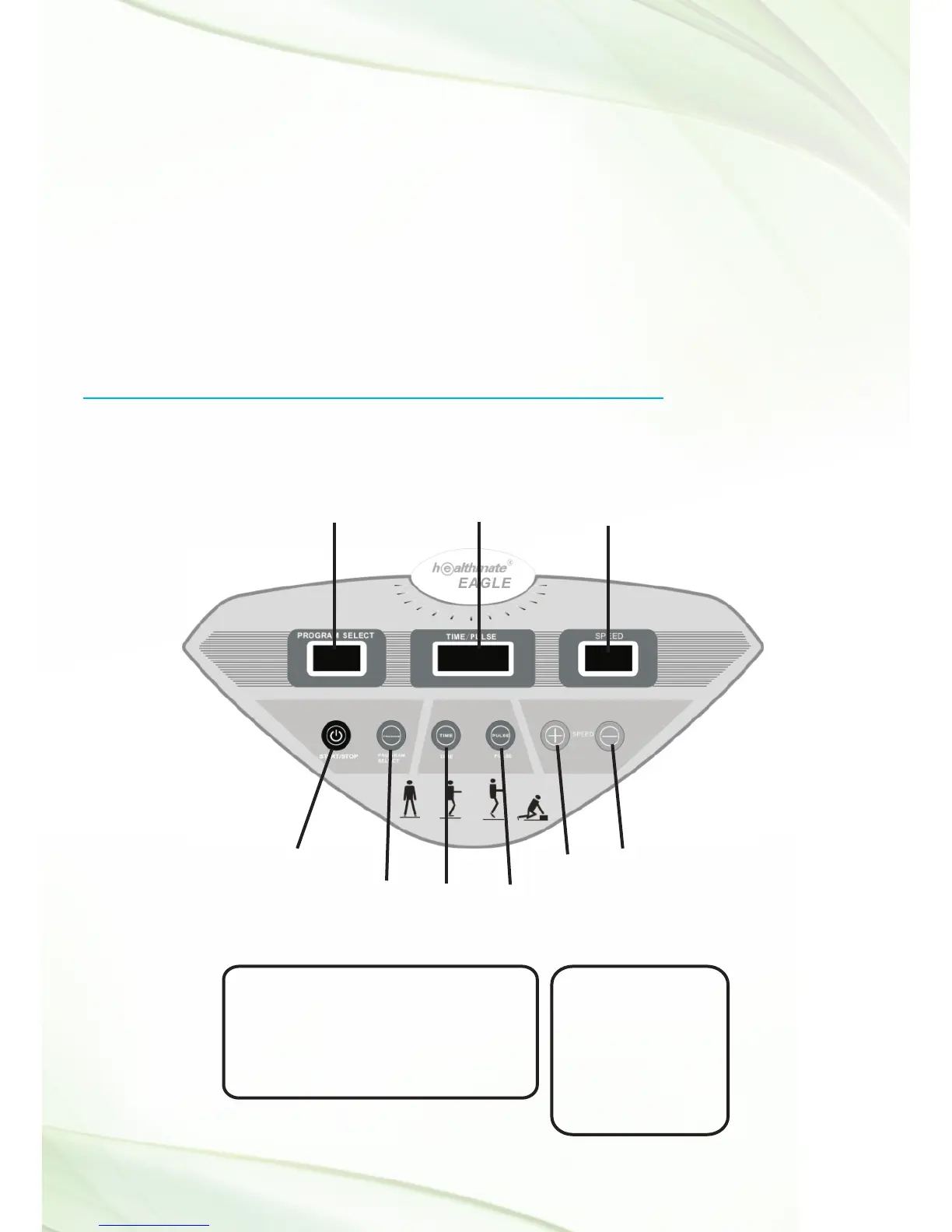
3 Digital LED screens. One indicates the program number (“Program
Selection”), the second shows time elapsed and heart pulse
(“Time/Pulse”) and the third shows the speed selected (“Speed”).
Description of Display Panel Buttons :
1. Display Window :
PROGRAM SELECT
WINDOW
TIME/PULSE
WINDOW
START/STOP
PROGRAM
SELECT
TIME
PULSE
UP
DOWN
SPEED
WINDOW
Screens :
1. PROGRAM SELECTION
2. TIME/PULSE READY
3. SPEED
Buttons :
START/STOP
PROGRAM SELECT
TIME
PULSE
UP
DOWN


 To Next Page