Appendix2:
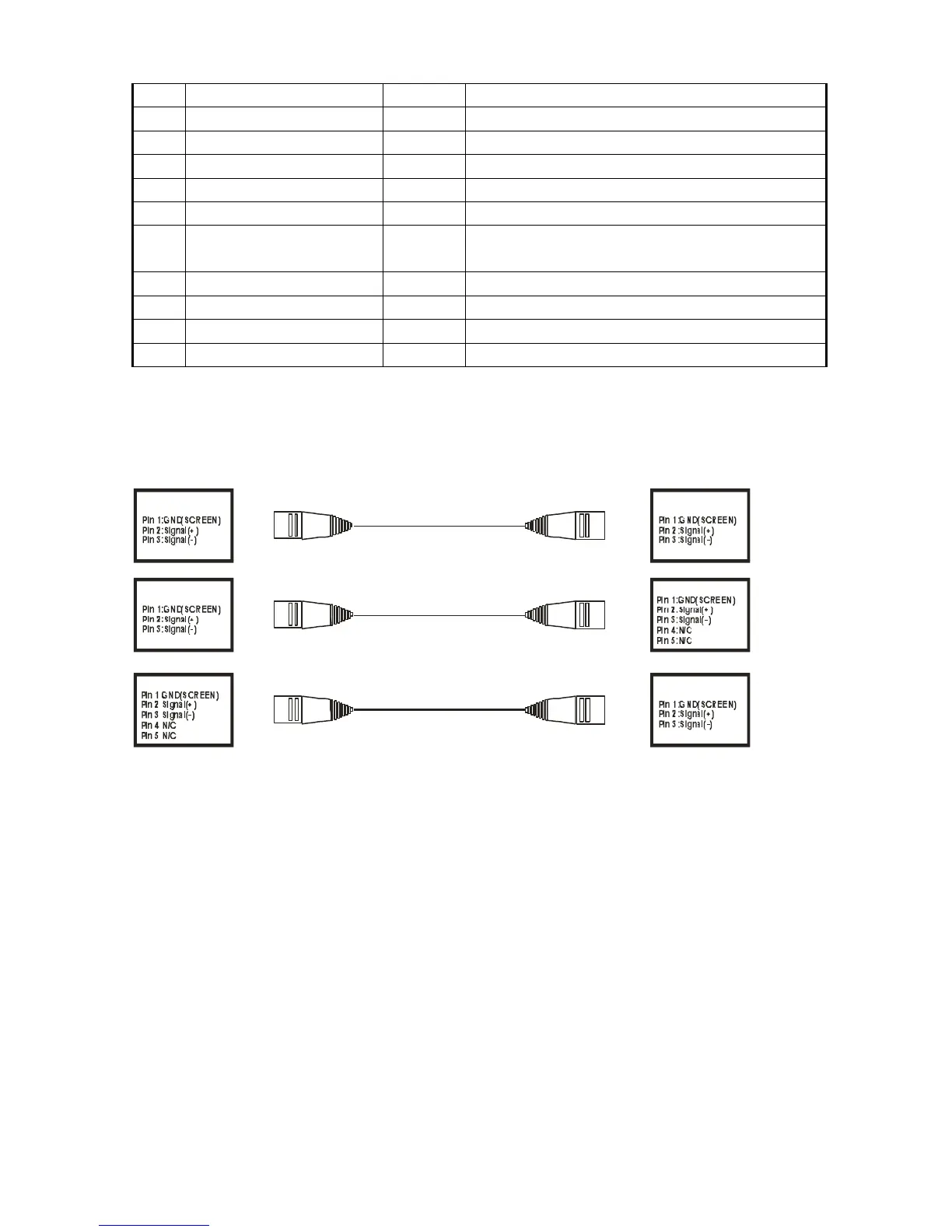
The transformation between 3 core and 5 core XLR control outlet (plug)
The following figure is the connecting method of 3 core and 5 core XLR control outlet (plug)
DMX512 signal circuit:
Pin 1 = screen Pin 2 = signal- Pin 3 = signal+
The Instruction Manual for Computer Lightings
The menu of control display boards is designed for various types of computer lights, equipped with
multiple functions of control mode, and controlled easily. For some special functions which computer
lights don’t have, the corresponding menu option set is invalid.
一、 DMX512(Address Value Setting)
This function let you to change the address value of the device.
1. Press the “ESC” button once or several time, until "A.001." appear. Then press the "up" or
"down" keys to browse other menus.
2. Press "enter" key, the letter “A” crush out; Use "up" or "down" keys to select the address value


 To Next Page