01
● No Forced Registration. Easy to Use.
● Multi-Band Equalizer, Multipoint Devices Management.
● Customizable Touch Controls, Wind Noise Cancellation.
● Relaxed White Noise, LDAC Switch, In-Ear-Detection Switch.
● Firmware Update, Find Headphones, Game mode, and More.
Note:
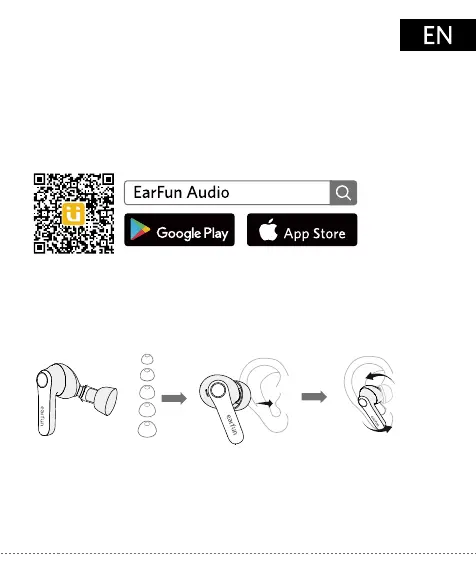
1. Please choose the suitable ear tip for the best sound and secure fit.
2. Select the left or right earbud and insert to the corresponding ear.
3. Rotate the earbud back and forth for the ear tip to create a
comfortable seal.
2. How to Fit
1. EarFun Audio App
Download the EarFun Audio app for an enhanced experience.
1. Choose the
best-sized ear tip
Download on the
Download on the
2. Insert 3.Rotate
Please update your earbuds firmware to the latest version via the
EarFun Audio App for the best user experience. If earbuds can’t connect
to the app, reinstall or update the app in the app store.
S
XS
M
L
XL


 To Next Page