03
5. LDAC
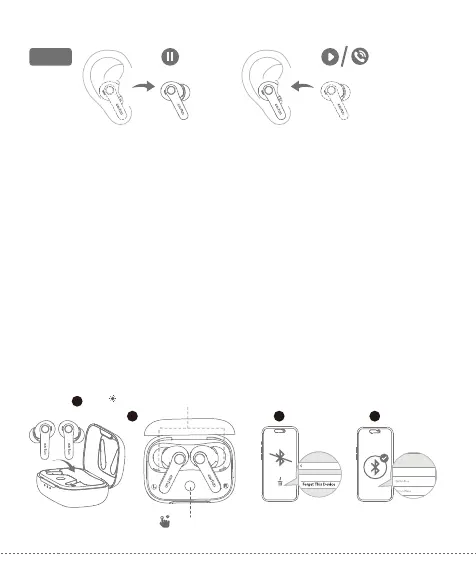
remove to pause put back on to resume or
answer a call (not for VoIP call)
L/R
*Please turn off or on In-Ear Detection in the EarFun Audio app.
How to activate and deactivate LDAC:
4. In-Ear Detection
1. Ensure your Android supports LDAC. (iOS devices do not
support LDAC.)
2. Install the EarFun Audio app and ensure the earbuds are
connected to the app.
3. Go to the "Bluetooth Audio Quality" in app settings, turn the
LDAC on or off, click "Sure" in the popup, and the earbuds will
reboot with LDAC activated or deactivated.
White LED flash triple rapidly
Press for 8s
6. Reset
Put back
in the case
Delete the
previous
Bluetooth record
EarFun Air 2
EarFun Air Pro 4
EarFun Air Pro 4
EarFun Air Pro 4
Reactivate
Bluetooth
to reconnect
1
2 3 4



 To Next Page