Option B
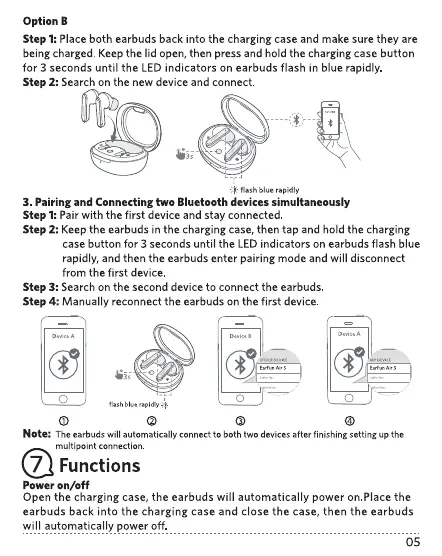
Step 1:Place both earbuds back into the charging case and make sure they are
being charged. Keep the lid open, then press and hold the charging case button
for 3 seconds until the LED indicators on earbuds flash in blue rapidly
Step 2: Search on the new device and connect
flash blue rapidly
3. Pairing and Connecting two Bluetooth devices simultaneously
Step 1:Pair with the first device and stay connected.
Step 2: Keep the earbuds in the charging case, then tap and hold the charging
case button for 3 seconds until the LED indicators on earbuds flash blue
rapidly, and then the earbuds enter pairing mode and will disconnect
from the first device
Step 3: Search on the second device to connect the earbuds
Step 4: Manually reconnect the earbuds on the first device.
flash blue rapidly
O
o
O
o
Note: Theearbudswill automatically connectto both two devicesafter finishingsetting up the
multipoint connection.
7 Functions
Power on/off
Open the charging case, the earbuds will automatically power on.Place the
earbuds back into the charging case and close the case, then the earbuds
will automatical!y power Off
05


 To Next Page