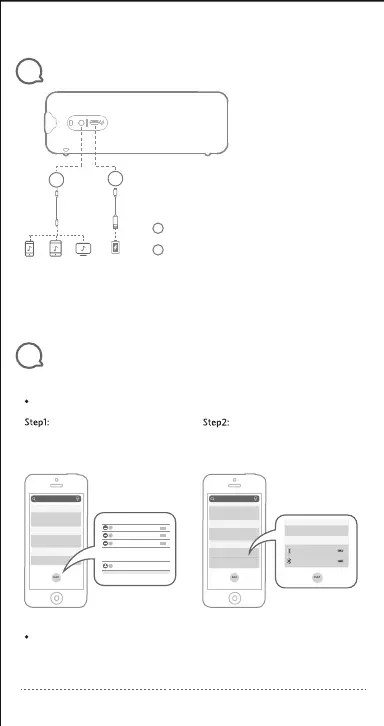
Connections
3
Battery lndicator
4
For iOS (Support iOS 9 or higher):
For Android (Support Android 8.0 or higher):
Click the ‘Edit’ and add the ‘Batteries’
widget, then click ‘Done’.
It varies from the Android device, please refer to the instruction manual of your device.
You can check the speaker battery level on the device that is paired with:
1.
2.
Note:
02
The battery level has been shown on
your device.
Plugging in an audio cable will automatically switch from Bluetooth mode to AUX
mode. When using AUX mode, control audio playback via the connected device.
To preserve battery lifespan, fully charge at least once in every 45 days.
iOS
Search
WEATHER
SCREEN TIME
UP NEKT
Up Next
Weather
Batteries
MORE WIDGETS
Amazon
iOS
Search
BATTERIES
UP NEKT
BATTERIES
UP NEKT
EarFun GO 90%
65%iphone7
(USB Type-C Port)
(3.5mm Audio input port)
1
1
2
2



 To Next Page