EasyManua.ls Logo

EarFun SP100B - User Manual

EarFun SP100B
7 pages
Print Icon
To Next Page IconTo Next Page
Loading...
Portable Bluetooth Speaker
User Manual
EarFun Go
Question and Answer IconNeed help?

Do you have a question about the EarFun SP100B and is the answer not in the manual?

Summary

Whats in the Box

EarFun Go Product Identification

Identifies the portable Bluetooth speaker model.

Included Accessories List

Lists the accessories provided with the speaker.

Buttons and Indicators Overview

Power Button Functionality

Details the operation of the power button.

Bluetooth Button Usage

Explains the function of the Bluetooth pairing button.

Multi-function Button Controls

Describes the uses of the multi-function control button.

Volume Adjustment Buttons

Covers the volume up and down button functions.

Speaker LED Indicator Status

Explains the meaning of different LED light signals.

Microphone Location and Purpose

Indicates the position and function of the built-in microphone.

Connections and Audio Input

3.5 mm Audio Input Port

Describes the analog audio connection port.

USB Type-C Connection

Details the USB Type-C port for charging and data.

AUX Mode Operation Notes

Provides usage notes when connected via audio cable.

Battery Preservation Charging

Advises on charging frequency for battery health.

Battery Level Monitoring

iOS Battery Indicator Setup

Guides on displaying speaker battery on iOS devices.

Android Battery Indicator Guide

Refers to device-specific guides for Android battery display.

Bluetooth Pairing Procedures

Automatic Connection Behavior

Explains how the speaker connects automatically.

Automatic Shutdown Timeout

Details the auto-off feature for inactivity.

Speaker LED Status Meanings

Bluetooth Pairing Mode LED

Describes the LED behavior during pairing.

Connected Device LED Status

Indicates the LED when connected to a device.

Charging Status LED

Explains the LED indication while charging.

Battery Level LED Alerts

Details LED signals for low battery.

Fully Charged LED Indication

Shows the LED state when the battery is full.

True Wireless Stereo (TWS) Setup

Initial TWS Pairing Step

Guides the first step in connecting two speakers for TWS.

Second Speaker Activation for TWS

Details powering and pairing the second speaker for TWS.

TWS Mode Confirmation

Explains how to confirm successful TWS connection.

TWS Connection Notes

Provides important tips for TWS operation.

General Functions and Controls

Music Playback Controls

Explains how to control music playback.

Speakerphone Call Handling

Describes using the speaker for calls.

Troubleshooting and Reset

Clearing Bluetooth Pairing

Instructions to reset pairing for connectivity issues.

Speaker Reboot Procedure

Guide to reboot the speaker if unresponsive.

Product Specifications

Bluetooth Version and Profiles

Details the Bluetooth version and supported profiles.

Transducer and Output Power

Specifies the speaker drivers and audio output.

Signal-to-Noise Ratio and Battery

Provides audio quality metric and battery capacity.

Play Time and Charging Details

Information on usage duration and charging time.

Physical Dimensions and Weight

Lists the speaker's size and weight.

Customer Service and Support

Limited Warranty Information

Details the warranty period for the product.

FAQs and Contact Information

Provides resources for frequently asked questions and support.

Website and Social Media Links

Offers links to the official website and Facebook page.

Overview

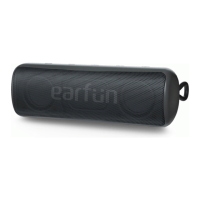
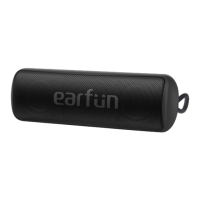
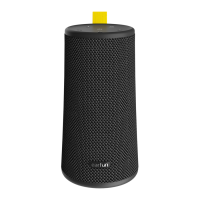
The EarFun Go is a portable Bluetooth speaker designed for wireless audio playback and hands-free calling. It features a compact, rectangular design with a perforated grille on the front, indicating the speaker drivers. The device is primarily black, with the "earfun" logo subtly integrated into the speaker grille.

Function Description:

The EarFun Go serves as a portable audio device that connects wirelessly via Bluetooth to various source devices like smartphones, tablets, and computers. It supports True Wireless Stereo (TWS) connection, allowing two EarFun Go speakers to be paired together for a more immersive stereo sound experience. The speaker also includes a built-in microphone, enabling its use as a speakerphone for calls. An AUX input port allows for wired connections to non-Bluetooth devices.

Important Technical Specifications:

  • Bluetooth Version: V5.0
  • Bluetooth Profiles: A2DP, AVRCP, HFP, HSP
  • Transducer: 2 x 40mm
  • Output Power: 2 x 6W
  • Signal-to-noise Ratio: ≥ 80dB
  • Battery: 7.4V, 2200mAh
  • Play Time: Up to 24 hours (varies by volume level and audio content)
  • Charging Time: About 4 hours
  • Input Power: 5V/2A
  • Dimensions: 58 x 171 x 62 mm
  • Weight: 430g

Usage Features:

The EarFun Go features a straightforward control panel located on the top of the speaker, consisting of several buttons and an LED indicator.

  • Buttons & Indicators:

    • Power Button (①): Used to turn the speaker on/off.
    • Bluetooth Button (②): Initiates Bluetooth pairing mode.
    • Multi-function Button (③): Likely controls playback (play/pause) and call management (answer/end calls).
    • Volume- Button (④): Decreases the volume.
    • Volume+ Button (⑤): Increases the volume.
    • Speaker LED Indicator (⑥): Provides visual feedback on the speaker's status.
    • Microphone (⑦): For hands-free calling.
  • Connections:

    • 3.5mm Audio input port (① on diagram): For wired audio connection using an AUX cable. When an audio cable is plugged in, the speaker automatically switches from Bluetooth to AUX mode. Audio playback in AUX mode is controlled via the connected device.
    • USB Type-C Port (② on diagram): Used for charging the speaker.
  • Bluetooth Pairing:

    • When powered on, the speaker automatically attempts to connect to the last paired device. If unsuccessful, it enters pairing mode.
    • To manually enter pairing mode, press the Bluetooth button. The LED indicator will flash blue.
    • The speaker will automatically shut down if not paired with any device and left idle for 30 minutes.
  • Speaker LED Indicator Statuses:

    • Flashing Blue: Bluetooth Pairing Mode.
    • Solid Blue: Connected to a device.
    • Indicator stays on red: Charging.
    • Indicator stays on red: Battery Level < 15%.
    • Indicator flashes red for 8 seconds, then speaker turns off: Battery Level < 2%.
    • Indicator stays on white: Fully Charged.
  • True Wireless Stereo (TWS) Connection:

    • Step 1: Pair and connect one EarFun Go (Go A) to your Bluetooth device.
    • Step 2: Power on a second EarFun Go (Go B) and simultaneously press the Bluetooth buttons on both Go A and Go B for 5 seconds.
    • Step 3: Both speaker indicators will turn solid blue, indicating entry into True Wireless Stereo Mode.
    • Note: Once two GOs have entered TWS mode previously, they will automatically connect to each other upon power-on. In TWS mode, either speaker's controls can manage both. The left and right channels can be swapped by quickly tapping the Bluetooth button twice.
  • Playing Music:

    • Multi-function Button (x1 tap): Play/Pause.
    • Volume- Button (x1 tap): Decrease volume.
    • Volume+ Button (x1 tap): Increase volume.
    • Volume- Button (hold for 1s): Previous track.
    • Volume+ Button (hold for 1s): Next track.
  • Speakerphone:

    • Multi-function Button (x1 tap): Answer/End call.
    • Multi-function Button (hold for 2s): Reject call.

Maintenance Features:

  • Battery Preservation: To extend battery lifespan, fully charge the speaker at least once every 45 days.
  • Battery Indicator (on paired device):
    • For iOS (iOS 9 or higher): Users can add the 'Batteries' widget to their device to view the speaker's battery level.
    • For Android (Android 8.0 or higher): Battery level display varies by device; users should refer to their device's instruction manual.
  • Reset and Reconnect: If the speaker experiences disconnection or other connection issues, simultaneously press and hold the "Volume +" and "Volume -" buttons for at least 5 seconds to clear the speaker's pairing history. Then, remove the old pairing from your Bluetooth device and pair again.
  • Reboot: If the speaker becomes unresponsive or cannot be powered off, press and hold the power button for at least 8 seconds to reboot the device.

Customer Service:

  • The product comes with an 18-month limited warranty.
  • For FAQs and more information, customers can email service@myearfun.com or visit www.myearfun.com. A QR code is provided, likely linking to the EarFun Facebook page.

EarFun SP100B Specifications

General IconGeneral
BrandEarFun
ModelSP100B
CategorySpeakers
LanguageEnglish

Related product manuals