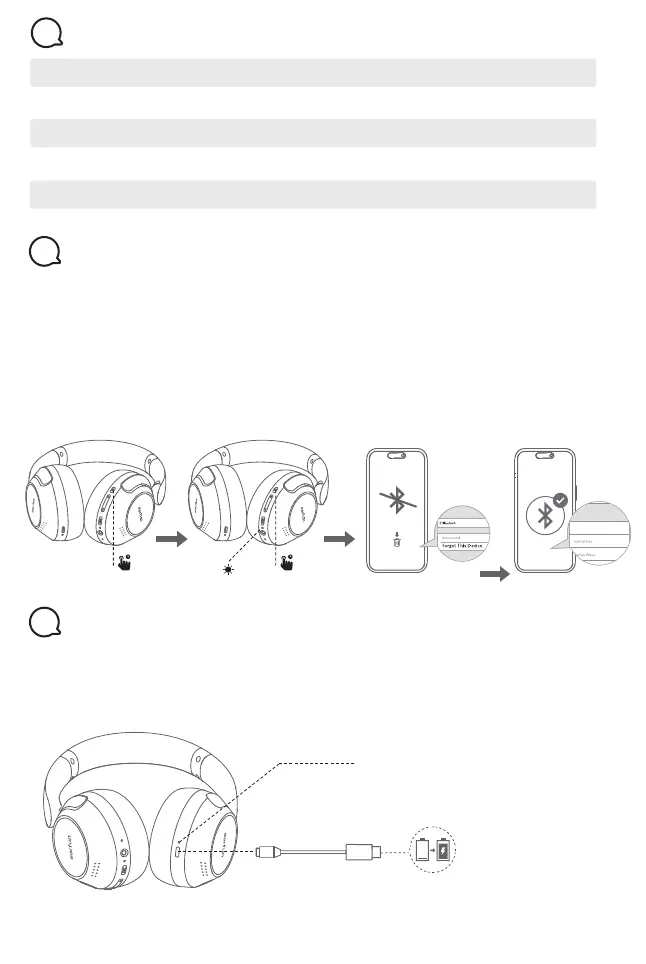
Power on White indicator turn on for 1 seconds
Power off Red indicator turn on for 1 seconds
Factory reset Indicator turn on in pink for 3 seconds
Pairing mode Indicator flashes white
Successfully connected Indicator turns off
Headphones Status LED Indicator
6
If you fail to establish a connection between the headphones and Bluetooth devices,
please try the following steps:
1. Press and hold MFB button for 5 seconds to power off headphones.
2. Press and hold the MFB button for at least 10s until headphones status LED indicate
in pink, and then release the button. The Headphones have been reset successfully.
3. Power on headphones again and then delete the previous connection from the
Bluetooth device and reactivate Bluetooth to reconnect “EarFun Wave Pro”.
Reset and Reconnecting
7
1. Please clean the USB-C charging port before charging.
2. Fully charge the headphones before first use.
3. You can check the headphones battery level from the Bluetooth device or
EarFun Audio app.
Connect USB-C cable for charging
Red – Charging
Turns off – Charging complete
Charging
8
EarFun Wave Pro
EarFun Wave Pro
EarFun Wave Pro
EarFun Wave Pro
10s
pink
5s


 To Next Page