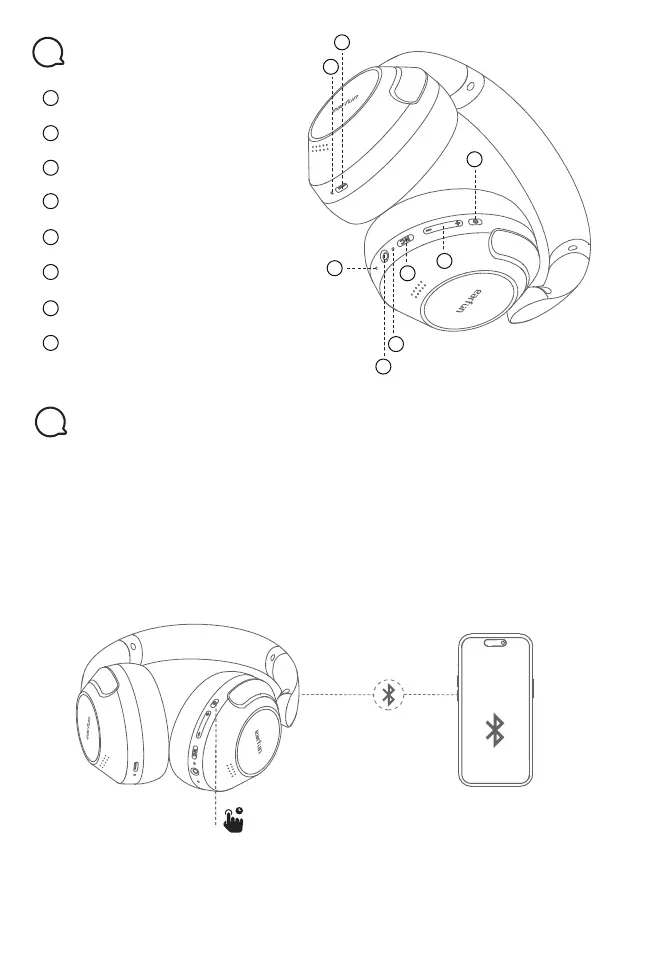
Volume +/- Button
ANC Control Button
Microphone
3.5mm AUX Audio Input Jack
MFB Button
Headphone Status LED indicator
USB-C Charging contactor
Charging LED indicator
Product Diagram
3
1
2
5
6
3
8
4
7
1.First-time Pairing with Device
Step 1. Press and hold the MFB button for 2 seconds to power on the headphones.
It will automatically enter into pairing mode.
Step 2. Activate Bluetooth on your Bluetooth-enabled device and search for other
Bluetooth devices.
Step 3. Select “EarFun Wave Pro” from the list of Bluetooth devices shown.
(if a password is needed, type ‘0000’).
Notes:
The headphones will automatically connect with the previously paired device
when power on again.
Pairing Your Headphones
4
EarFun
Wave Pro
2
5
1
3
6
7
8
4
2s


 To Next Page